
Version 1.0.20 - 2026-10-11 - More complete WhatsApp acquisition and faster gallery review
Sherlock Forensics Android Acquirer 1.0.20 makes WhatsApp acquisition more complete and speeds up gallery review at the keyboard. During Live Capture the overlap steps are now a 10% screen-height drag for Small, 25% for Medium and 35% for Large; actual scrolling remains app-dependent, so examiners should review the overlap. In the full-size preview, Space marks and unmarks an image for the report alongside the arrow keys, Ctrl-click selects individual images, Shift-click selects a range and Ctrl+A selects the shown images; the Tags menu applies tags across the selection while preserving existing tags and report marks, and report inclusion stays controlled by the checkboxes and Space. App Backups now collects the accessible WhatsApp and WhatsApp Business Media folders alongside the encrypted message backups, and the images, videos, audio and documents keep their folder paths and receive SHA-256 manifest entries, so acquisition descriptions and estimates include the media. Choosing a WhatsApp Media folder is now available in Multimedia as well as in WhatsApp conversations; linking or replacing the folder refreshes failed previews, separately supplied images are identified in the viewer and the report, exported attachment bytes are hashed and a folder link applies to the current session. Preview errors are clearer: missing or unreadable image bytes are now distinguished from decoding failures, and the viewer no longer claims that unresolved files were collected and hashed. Available on Windows, macOS and Linux.
Windows .exe, EV code-signed (Sherlock Forensics Ltd, SSL.com EV) and Authenticode-verified. SHA-256: dde6cbaec278930eb626b1db731fec159cde5fa7eab991db4f03e01f51d51c06, 77.8 MB (77,798,696 bytes).
macOS .dmg, Developer ID signed, notarized by Apple and stapled. SHA-256: 642424704a4ca62a921c3ba0392d0fc131b626637ac09bc46da93ad7bf24b9a3, 85.6 MB (85,602,206 bytes).
Linux .deb, CMS-signed with a detached .deb.sig. SHA-256: dfd21119a53588ee08a7294c7afd162f7600c6e3b32df1b2dd6b7f0f9305c2bb, 28.4 MB (28,419,652 bytes).
Version 1.0.19 - 2026-10-11 - Gallery and Live Capture refinements
Sherlock Forensics Android Acquirer 1.0.19 refines the Gallery and Live Capture. The Gallery gains compact controls, optional filters, a timeline, a resizable preview pane and image tiles up to 1000 pixels. Full-window review now offers previous and next chevrons, keyboard navigation and a filmstrip, while fit-width scrolling and zoom make long screenshots easier to read. Live Capture can run as Screenshots only, Video only or Screenshots and video, with Small, Medium and Large scroll steps to control overlap; the defaults are Small and Screenshots only. Actual scrolling depends on the app, so examiners should still review coverage. Reduced processing during capture improves responsiveness. Every saved capture remains SHA-256 hashed and review preparation follows capture. Recording sessions support up to three minutes, with more compatible recorder arguments and clearer failure diagnostics; when video fails the retained screenshots are clearly identified, and video-only sessions open directly in Recording review. For WhatsApp, the tool now associates recorded media references with attachments found in acquired or grouped evidence, and an examiner can also select a separate WhatsApp Media folder for the current session. Separately supplied attachments retain distinct provenance in reports, so they are never read as acquired evidence. Images preview and other attachments can be exported, and a manually linked WhatsApp Media folder must be reselected after the case is reopened. This release also fixes individual-message report checkboxes and Source evidence controls that did not respond to clicks, adds a dedicated Copy menu and fixes stale conversation rows when switching evidence. Available on Windows, macOS and Linux.
Windows .exe, EV code-signed (Sherlock Forensics Ltd, SSL.com EV) and Authenticode-verified. SHA-256: a48ae6061657a094edd94c5f06a63e153ccc0e5e3fdef47d19ed48e83898abb8, 77.7 MB (77,689,640 bytes).
macOS .dmg, Developer ID signed, notarized by Apple and stapled. SHA-256: cc90e51c6b9e672eb37c402082fc40c9cf31a72c9d32205f5f29a4167875041e, 85.6 MB (85,562,098 bytes).
Linux .deb, CMS-signed with a detached .deb.sig. SHA-256: f91a84f1fb6c76a4a67f99734c3bbdf39ec5a7052913dbc31bb23768a9be60f9, 28.4 MB (28,430,862 bytes).
Version 1.0.18 - 2026-10-10 - Live capture and grouped evidence review
Sherlock Forensics Android Acquirer 1.0.18 is a combined update since 1.0.15 that adds live capture and grouped evidence review. An examiner can capture the current screen, device settings or installed apps as screenshots and, where supported, as screen recordings. Each captured file is hashed and documented. Grouped acquisitions bring logical evidence and later captures into one review while separate original folders and manifests are preserved, so no evidence is moved. Examiner-created images carry LIVE CAPTURE labels and a dedicated Gallery filter, so they stay distinct from files recovered from device storage and are never presented as recovered evidence. Capture previews are larger: switch between screenshots and recordings, fit a long screenshot to the available space, zoom and hide the surrounding controls with Focus preview, while compact headers leave more room for the evidence. Reports can include screenshots, crops, video stills and time ranges with captions and provenance, and video ranges reference the original recording rather than exported trimmed clips. This release reuses unchanged analyses when a case is reopened, improves capture-failure reporting, preserves distinct screenshots and retains the recording on the phone when a transfer fails. It also corrects hashing for affected MMS filenames on Windows, recognizes Samsung bug-report packages, reports root-required diagnostic status and collects external storage on supported Sony Xperia L acquisitions. Running this tool and another Sherlock tool on the same computer no longer logs one of them out. Available on Windows, macOS and Linux.
Windows .exe, EV code-signed (Sherlock Forensics Ltd, SSL.com EV) and Authenticode-verified. SHA-256: 648b615c9e65138266bf0b27afb1178ae94cd3287fec81d43c1587f4fb5d8624, 77.5 MB (77,452,072 bytes).
macOS .dmg, Developer ID signed, notarized by Apple and stapled. SHA-256: 45cf3333d60bc8e2975abfa72e9bb38948245e618d60db8cc425d85be85dbcb7, 85.6 MB (85,618,432 bytes).
Linux .deb, CMS-signed with a detached .deb.sig. SHA-256: f5500e842f72881822b35f875004207373345684051d0a7f207e640658d07bb6, 28.4 MB (28,371,870 bytes).
Version 1.0.17 - 2026-10-10 - Live capture and grouped evidence review
Superseded the same day by 1.0.18 (the combined release above). Installer hashes for examiners who downloaded 1.0.17:
Windows .exe, EV code-signed (Sherlock Forensics Ltd, SSL.com EV) and Authenticode-verified. SHA-256: ad6f96f08db8c2f3b2496fb798691b1bf4c82a4676b7f64d0ff9cf1915e55b1d, 77.4 MB (77,443,880 bytes).
macOS .dmg, Developer ID signed, notarized by Apple and stapled. SHA-256: 49a061f1a6c7369421f674f392905a9cc2e58aab1bf827c87d971afefd7226cb, 85.6 MB (85,594,018 bytes).
Linux .deb, CMS-signed with a detached .deb.sig. SHA-256: e87f2ca6ecfa37f7de6fc010816e9e907400164a8200b7d6a6a37e29c8af118b, 28.4 MB (28,373,178 bytes).
Version 1.0.15 - 2026-10-08 - Chrome saved passwords from a full-filesystem extraction, plus every AU and NZ timezone
Sherlock Forensics Android Acquirer 1.0.15 recovers Chrome saved passwords from a full-filesystem extraction, and it reports each entry honestly by how Chrome stored it. v10-encrypted entries are recovered as plaintext. Keystore-protected entries are reported as stored and encrypted rather than decrypted. Google-synced entries show the username only. The passwords are read from the extraction, never cracked. This release also adds every Australian and New Zealand timezone, including the odd offsets and external territories. Available on Windows, macOS and Linux.
Download verification
Windows .exe, EV code-signed (Sherlock Forensics Ltd, SSL.com EV) and Authenticode-verified. SHA-256: d02602202ef89c7ff477e5dee1cc69737437fa677b2db6aa3fb6354ce4d28f67, 75.8 MB (75,802,408 bytes).
macOS .dmg, Developer ID signed, notarized by Apple and stapled. SHA-256: a9c4fa72cf5682fbe28ffc8b6ce88814a351c321985da89d4d6698eefd35fa4d, 84.8 MB (84,754,355 bytes).
Linux .deb, CMS-signed with a detached .deb.sig. SHA-256: c70c532befe52796b48149d52c6d2e824444e43a6b4bdf2a6225ae783666ca55, 28.0 MB (27,998,914 bytes).
Version 1.0.14 - 2026-10-07 - Reads encrypted WhatsApp backups with the examiner's key
Version 1.0.14 is a feature release on Windows, macOS and Linux from the same commit and forensic engine. It reads WhatsApp's encrypted message backups without leaving the case, when the acquisition collected the backups. In Conversations a Decrypt WhatsApp backup card appears with a field for the 64-digit end-to-end backup key or a recovered key file. Enter the key and the WhatsApp conversations read in place next to the handset's SMS and MMS. The key stays in memory for the session and is never written into the case folder, and the backup is opened only with the key the examiner holds, never by cracking a password. Both WhatsApp and WhatsApp Business backups are read.
This release also fixes collected backups not being read on modern handsets. On Android 11 and later WhatsApp stores its backups under scoped storage (Android/media/...), and the viewer now reads back exactly the locations the acquisition writes, so collected backups that were not being read on modern handsets now read. Recorded evidence and examiner notes are unchanged.
Download verification
Windows .exe, EV code-signed (Sherlock Forensics Ltd, SSL.com EV) and Authenticode-verified. SHA-256: e427c809702c7ab73f827ba9acbf07782d2d6b0745c038ab4adffa36fccc254e, 75.7 MB (75,709,736 bytes).
macOS .dmg, Developer ID signed, notarized by Apple and stapled. SHA-256: e1bdfbb9cec5ccde4a9fa51be297b4a3dfbdf47ddea2285c61ca1c34e45ea85d, 84.8 MB (84,766,826 bytes).
Linux .deb, CMS-signed with a detached .deb.sig. SHA-256: f42b8dcba65858daa1cd320bd7354de6dc42721c15211594873a2d706050d73f, 28.0 MB (27,975,300 bytes).
Version 1.0.13 - 2026-09-21 - Mark every search result at once
Version 1.0.13 is a feature release on Windows, macOS and Linux from the same commit and forensic engine. It answers a request from an examiner working a large case: a search on a single name returned about eighty messages, and the only way to carry them into the report was one star at a time.
Two buttons now sit above the search results. Mark all results marks every result the search found for the report in one click. Unmark all results clears the same set. Hovering either button shows an honest count of how many of the results can be marked: a few record kinds carry no case mark of their own, and those are passed over, not silently counted. Shift-click marks a range. Mark one result, then shift-click another, and everything between them takes the state of the row you shift-clicked; the first mark stays the anchor, so a second shift-click redraws the range rather than starting over. Because the search screen is shared, a logical extraction behaves exactly as a full physical image does.
Marking never alters a record. The acquisition is unchanged; marking only selects what the report reproduces. Marks made this way are ordinary case marks: they appear in Marked, carry review status and tags and are saved as they are made, not at close. Record kinds with no mark of their own are skipped by both the buttons and the range, so marking all never claims records the report cannot resolve. Nothing else in this release changes collection, parsing or report content.
Download verification
Windows .exe, EV code-signed (Sherlock Forensics Ltd, SSL.com EV) and Authenticode-verified. SHA-256: a807641c0f84ff2296eff4e3bc37be7b5b67011ea3d560da2025e81bf200cd10, 75.7 MB (75,676,456 bytes).
macOS .dmg, Developer ID signed, notarized by Apple and stapled. SHA-256: 0d0b07dd8d6f0d9e39a826e11454fb9773990943507aabb996314c79d3bad20b, 84.7 MB (84,723,722 bytes).
Linux .deb, CMS-signed with a detached .deb.sig. SHA-256: 4614925a130cf06bf9589f540abedd1ac5c1b2befe70939f11c90cd640030629, 28.0 MB (27,970,762 bytes).
Version 1.0.12 - 2026-09-20 - A new Gallery workspace
Version 1.0.12 is a feature release on Windows, macOS and Linux from the same source snapshot. It brings the Gallery into one workspace, makes finding the relevant photographs faster and makes review clearer.
A new Gallery workspace
Gallery now brings source filters, a timeline, grid or compact list and a preview pane into one workspace. Focus Gallery hides the surrounding panels, and a separate window gives photographs more room on another monitor.
Find the relevant photographs faster
Select an inclusive date range with two calendar clicks, or show photographs from all sources within 1, 3, 7 or 30 days before and after the selected image. Clear dates resets the date filter. Geotagged images appear on an offline map with drag-to-pan, Ctrl+wheel zoom and a wider city-context view.
Faster review, clearer controls
Metadata indexing starts in the background when the case becomes ready and reuses already parsed EXIF. Scrolling stays in place as results arrive. Optional similarity analysis uses faster JPEG processing and reuses existing fingerprints. Expandable burst and similarity groups organize related images without changing originals. Cards, checkboxes, filter counts, progress indicators and preview controls have consistent layouts and clearer explanations. New Gallery controls follow the selected interface language.
Selected photographs reach the report
Fixed individually marked Gallery photographs missing from the report preview, including images without corresponding media database records and extensionless image-cache files. Evidence counts and thumbnails now refresh when selections change.
Download verification
Windows .exe, EV code-signed (Sherlock Forensics Ltd, SSL.com EV) and Authenticode-verified. SHA-256: f53634e70eabe9767b0addee138ed4df55728904a2bddaabf54e9a456ed72c44, 75.8 MB (75,759,400 bytes).
macOS .dmg, Developer ID signed, notarized by Apple and stapled. SHA-256: 956959e6a5897fc3377e3837708f3a8b28ed1cd6d71b3ad28f0f8967bd1ea309, 85.4 MB (85,370,649 bytes).
Linux .deb, CMS-signed with a detached .deb.sig. SHA-256: f83494801a288e12694f973e7432c432217f7497960a57e86329a4ca7ad2b148, 28.0 MB (27,979,398 bytes).
Version 1.0.11 - 2026-09-20 - Broader collection, richer logical evidence views and a faster Gallery
Version 1.0.11 is a feature release on Windows, macOS and Linux from the same commit and forensic engine. It collects more of the accessible device, brings the advanced analysis workspaces to logically acquired data and makes reviewing a large Gallery faster.
Broader collection
The logical acquisition reaches an expanded set of accessible Android files, diagnostics and logs. Permission limits and collection gaps are explicitly recorded, so the report states what was and was not reachable.
Richer logical evidence views
Logically acquired data now opens in the advanced analysis workspaces, including threaded conversations and location evidence with source provenance. Significant Locations groups nearby observations without claiming they prove visits. These are analysis views over logically acquired data; acquisition remains logical over ADB and does not perform a full-filesystem or physical extraction.
Faster Gallery
The Gallery adds Cards and List layouts, improved large-photo previews, reliable Shift-click marking and optional tags, with undo and redo throughout. Compact collapsible controls, header search, tighter sidebars and animated loading make reviewing large acquisitions easier.
Fixes
Windows filename normalization no longer causes false MMS hash warnings.
Download verification
Windows .exe, EV code-signed (Sherlock Forensics Ltd, SSL.com EV) and Authenticode-verified. SHA-256: cdfd186355e42854f02be56847ea2405f12bf1ff97a56c3eee1488514208bbf7, 75.4 MB (75,368,744 bytes).
macOS .dmg, Developer ID signed, notarized by Apple and stapled. SHA-256: 78895a0efea2523118e0372ac3fa496cd84ac8c441bef156ea5d5ddc57b8a5d5, 83.9 MB (83,947,360 bytes).
Linux .deb, CMS-signed with a detached .deb.sig. SHA-256: a562e32c296bcdbffc0d3649ad8099a78e3fff6d1a3c4a8f0698d19a00ae8f63, 27.8 MB (27,778,946 bytes).
Version 1.0.10 - 2026-09-19 - Eleven languages, tabbed settings and CJK fixes
Version 1.0.10 is a feature release on Windows, macOS and Linux from the same commit and forensic engine. It broadens who can run the examination: the interface is now multilingual, the settings are reorganized into tabs and Chinese, Japanese and Korean text renders correctly.
Eleven languages
The interface is now available in eleven languages, including Polish, so an examiner can work in their own language.
Tabbed settings
Settings are reorganized into tabs, so the letterhead, report and acquisition options are quicker to find.
CJK font fixes
Chinese, Japanese and Korean text renders correctly across the interface and in the report.
Download verification
Windows .exe, EV code-signed (Sherlock Forensics Ltd, SSL.com EV) and Authenticode-verified. SHA-256: 8f6f77fa8d3a52a299fc43c192e73f50cabe44cadb852634f353ac5d24f2ad6f, 75.0 MB (75,019,560 bytes).
macOS .dmg, Developer ID signed, notarized by Apple and stapled. SHA-256: ea94d8e0c5bb4a0f9b855ee54e60883e17fd3fae292a78159d3c4794b338e2db, 83.8 MB (83,752,235 bytes).
Linux .deb, CMS-signed with a detached .deb.sig. SHA-256: c0a1c9c402b927a167698b29f33adadf8eb8421928c62d47fdee7de65a028cc4, 27.7 MB (27,707,350 bytes).
Version 1.0.9 - 2026-09-19 - Bulk evidence marking, and a logical overview
Version 1.0.9 is a smaller examiner-workflow release on Windows, macOS and Linux from the same commit and forensic engine. The 1.0.8 editable report remains the headline; this release speeds up how you mark evidence and how a folder acquisition opens.
Mark evidence by the hundred
In the Gallery, filter to an album, an app or a folder, then Mark all shown. Shift-click marks a range, Ctrl-click adds one and Ctrl+A marks everything shown. Photo Albums has a star per album, Documents has its own Mark all shown and Data Footprint marks an app's files as one set. Everything marked flows into the report exactly as before, whatever category it came from. Marking applies to the shown, filtered set; the examiner still chooses the filter and what to include.
A logical overview that leads with the evidence
Opening a folder acquisition now puts the device card, key findings and artifacts on screen without scrolling. The reading warnings and the tool's notes stay at the top in a few lines, and the file inventory and the SHA-256 manifest fold under one header. The case path, Open another case and Rescan sit on the title row.
Quieter chrome
The icon rail stays collapsed until you pin it, and hovering an icon names it in large letters.
Download verification
Windows .exe, EV code-signed (Sherlock Forensics Ltd, SSL.com EV) and Authenticode-verified. SHA-256: 31020abb6b4438bff3f620c477e5f9bc04ce4e35d8330632faef3cefa4ec9229, 68.4 MB (68,438,312 bytes).
macOS .dmg, Developer ID signed, notarized by Apple and stapled. SHA-256: 1ab8bb46b6c3a3fc268e0f717ce1156907036e30cd3a55245799e953305e8999, 78.1 MB (78,141,084 bytes).
Linux .deb, CMS-signed with a detached .deb.sig. SHA-256: 1750b5cbfbae520fea3da8f3aca32d29f6e8917a29587b40e0f47adf66a54ba7, 26.6 MB (26,628,528 bytes).
Version 1.0.8 - 2026-09-19 - The report is a page you edit
Version 1.0.8 is a reporting release, on Windows, macOS and Linux from the same commit and forensic engine. The report you export is now a page you edit rather than a form you fill in, and the forensic-honesty work carries into every photo, timestamp and exhibit.
The report is a page you edit
Preview and edit shows the report on white paper in its own type. The examiner clicks the title, any heading, any paragraph, the cover fields or even the fixed sentences, and types. Undo and redo are available, and sections move up and down, hide, add or duplicate. Setup is two steps and one button; everything about the report itself is chosen on the page. The examiner authors every word; the tool lays out what is written and records what it reads, it does not write your conclusions for you.
Templates, snippets and fields
Five built-in templates (Standard report, Court bundle, Client brief, Technical workspace, Cover and summary) ship alongside the examiner's own, saved by name and reusable on any case. Reusable sections (Methodology, Limitations, Chain of custody, Conclusions, Declaration) are written with fields like the device, serial, case number, examiner and date that fill in from the case at export.
Photos in the report, with their hashes
The examiner adds photographs of the handset, the seal or a screen to any section. The selection is honest: every photo, user photos only (no app caches, icons or thumbnails) or only the ones starred in the Gallery, narrowed by a date window (last 30 days, last year, since a date) and to located photos. The page shows thumbnails read from the phone, and the report carries each photo with its SHA-256 and a download link. Large photo sets go to a media folder beside the HTML automatically. Building shows progress and can be cancelled.
Times a judge can read
A report time zone in Settings accepts any IANA zone. Every timestamp prints as local time with the UTC time in brackets, and the scope notes state which zone and offsets apply. No conversion is left to the reader.
Letterhead and cleaner reading
The report's highlight colour is the firm's choice: ten swatches or any hex, applied to the page, the HTML and the PDF. Exhibit cards show only recorded values, three to a row. The sections rail gains a Gallery group and folds the per-app sources away.
Download verification
Windows .exe, EV code-signed (Sherlock Forensics Ltd, SSL.com EV) and Authenticode-verified. SHA-256: 6342fb48e0ba34ce2fcd45e25f89d665287b0a959a872eeaefbea75696c70b62, 68.4 MB (68,432,680 bytes).
macOS .dmg, Developer ID signed, notarized by Apple and stapled. SHA-256: 4ca04a3d2f34fee5e490b5a8043c7a1ec6240ff0394b35eceb15f91e2630dec1, 78.4 MB (78,405,198 bytes).
Linux .deb, CMS-signed with a detached .deb.sig. SHA-256: 193818eefb4c5ed8b6633523b7a20641f345f96661c3635130baf9ea6d448019, 26.6 MB (26,628,530 bytes).
Version 1.0.7 - 2026-09-18 - A court-ready editable report, and multi-phone bench imaging
Version 1.0.7 consolidates every change since 1.0.4, on Windows, macOS and Linux from the same commit and forensic engine. Two headline features and reliability work across acquisition and reporting.
Court-ready report, editable before export
A point-and-click builder produces a forensic PDF and a self-contained offline HTML report, no commands. The report is fully editable in a Preview step: rename, reorder, remove or add sections and rewrite the text before you export. A Settings screen holds the examiner letterhead, logo, agency, contact and a signature block, reused on every report. The HTML opens on any machine with no internet, embeds photos and media and shows full-size images.
Multi-phone bench imaging
The acquire screen is a visual planner and bench. Plug several phones into a USB hub, see a card per phone with its live screen and record counts, pick Logical or Full image per phone, and image them together in one pass. Time and size estimates are shown before you collect.
Reliability and honesty
- A phone that Windows sees but the tooling cannot reach now gets a card explaining why, with a one-click driver repair.
- Before imaging, each phone helper state is shown, and the tool warns and asks rather than silently skipping messages, calls or contacts.
- Older or unsupported phones are guided to a full filesystem image instead of a dead end.
- Saved Wi-Fi key recovery, a chain-of-custody attachment-verification fix and the SHA-256 manifest and file inventory shown up front.
- Multi-device runs no longer lose a phone data under load; single-item export gained cancel and progress.
Download verification
Windows .exe, EV code-signed (Sherlock Forensics Ltd, SSL.com EV) and Authenticode-verified. SHA-256: 23e43d89d69c322b957215caad3887657688cdb9e840f4ad02447b1332ac0fb1, 67.8 MB (67,803,432 bytes).
macOS .dmg, Developer ID signed, notarized by Apple and stapled. SHA-256: 9c89d759d41abf928100fb15664eeaaab39e765a08f500187f912afa16a62f04, 78.0 MB (78,013,963 bytes).
Linux .deb, CMS-signed with a detached .deb.sig. SHA-256: 3e9af73f4444a3f62824e12085e8f973c243a91608e0641d5d9c370ee8b071ed, 26.6 MB (26,628,526 bytes).
Version 1.0.4 - 2026-09-16 - macOS and Linux editions, and in-app updates on every platform
Version 1.0.4 brings Sherlock Forensics Android Acquirer to macOS and Linux for the first time and consolidates every change since 1.0.1. All three builds are compiled from the same commit and carry the same forensic engine. Windows has years of field use behind it. The macOS and Linux builds are new: they have had a full functional smoke test, including an end-to-end in-app update on macOS, but they are not yet field-proven.
Two new platforms
- macOS. One universal disk image covering Intel and Apple Silicon, signed with our Developer ID, notarized by Apple and stapled, so it opens on a machine that has never seen it and with no network. That matters because examiner workstations are routinely air-gapped. Requires macOS 11 Big Sur or later.
- Linux. A Debian package for Debian, Ubuntu and Kali. It declares its own dependencies, so a machine missing a library is told at install time rather than by a window that never appears.
In-app updates, on all three platforms
Previously Windows only. Every platform now checks, downloads and installs an update, and each one verifies the download before it runs. The examiner asks for the check, asks for the download and authorises the install. Nothing happens on its own.
- Windows verifies the Authenticode signature and that it names Sherlock Forensics.
- macOS verifies Apple notarization and our Team ID. Both are required, because Apple notarizes thousands of developers and notarization alone does not say a build is ours.
- Linux verifies a signature made with the same code-signing key as the Windows binaries, checked against a certificate compiled into the application, and installs through the system package manager, which asks for a root password so the package database stays correct.
Fixes, in order of how much they mattered
- An extraction the phone accepted and never delivered. On Samsung handsets an extraction could report "Helper running on device" for fifteen minutes while nothing happened. Android had put the helper to sleep in the background and was discarding the request while still reporting the send as successful. The helper is now woken before every extraction, and a request that does not reach it fails in about thirty seconds with an explanation instead of counting to fifteen minutes.
- Photographs that showed no photograph. Camera photos and screenshots drew a placeholder icon instead of their preview. The picture was in the acquisition the whole time and was read by the wrong path.
- An acquisition reported as an empty folder. After a successful acquisition the results view could report "No acquisitions in this folder" when a case had been opened earlier from somewhere else. The acquisition, its manifest and its helper output were complete on disk; the tool was looking in the previous folder.
- The IMEI on an extraction with no build properties. The IMEI lives in /efs. An extraction that captured /efs but no getprop output did not show it, because it was drawn after a check for build properties that had already stopped.
- One way to mark evidence. Marking used three different controls depending on the screen. Everything is the square case-mark checkbox now.
- Non-Latin evidence on the new platforms. Chinese, Japanese and Korean text now renders on macOS and Linux. Without this it drew as empty boxes while the text underneath was intact, which reads as damaged evidence rather than a font problem.
Limits worth stating plainly
- USB device detection is Windows-only. On macOS and Linux, when adb sees no device the tool shows the general checklist rather than naming what is on the USB bus. Acquisition itself is unaffected.
- macOS updates need the app somewhere the user can write, typically /Applications for the installing user or ~/Applications. The updater refuses rather than asking for an administrator password: a forensic tool that prompts for admin rights to overwrite itself is indistinguishable from malware doing the same.
- Linux CJK rendering needs fonts-noto-cjk, which the package recommends and apt installs by default. An install with --no-install-recommends will not have it.
- The macOS and Linux builds are smoke-tested and new, not field-proven. Windows has years of field use behind it.
The forensic engine test suite passes 2,275 of 2,275. All three builds were downloaded back from the CDN and hash-compared after publication.
Download verification
Windows .exe, EV code-signed (Sherlock Forensics Ltd, SSL.com EV) and Authenticode-verified. SHA-256: e04b7938584737738cbe9dd58b82195ad6d069cdbae47cfbdba90f5b198e00a0, 68.1 MB (68,134,184 bytes).
macOS .dmg, Developer ID signed, notarized by Apple and stapled (spctl reports source=Notarized Developer ID). SHA-256: 6e35bc3bf71e2837d59d89343889efe0c2dff5e6dc6d6a9d8712ee146d8a79bb, 78.7 MB (78,728,253 bytes).
Linux .deb, CMS-signed with the same code-signing key as the Windows binaries, with a detached .deb.sig beside it. SHA-256: b849573906f128f1f8ffcbc8d401bc876d6ad471d63a2c5a1039e8e9b857a366, 26.6 MB (26,627,894 bytes).
Version 1.0.1 - 2026-09-15 - A clearer view of the evidence, and 346 registered parsers
Version 1.0.1 is a major redesign of evidence review, and it consolidates every parser and interface change since 0.9.348. The tool now reads 346 registered parsers, not 346 apps, because several parsers read the same app from different files. ALEAPP parity is not complete. Everything below is interface, report and parsing work. Nothing in this window changes acquisition. All counts are measured on five reference handsets: Josh Hickman's Pixel 7a, the Cellebrite CTF2024 Sharon image, a Samsung Galaxy, an A53 and an S20, and are not a promise about any other device.
- It recovers pictures an app no longer admits to. On one reference handset WhatsApp holds 737 media files, 730 tied back to the conversation they belonged to with every stored SHA-256 verified against the bytes, and four received images whose message rows are gone, so the picture outlived the message. Telegram Stories are deliberately ephemeral, and 30 of 37 story copies outlived the story record. This does not recover deleted WhatsApp media: on both reference handsets carrying WhatsApp the count of rows naming a file that is gone was zero, and the tool reports exactly that. The cache-deep image set comes from a full-filesystem or rooted acquisition. Those images live in app-private storage. A logical acquisition over ADB does not reach that storage, so on that path the gallery shows the shared-storage and media-store pictures instead.
- Viber media, counted honestly. Viber's file set on one handset is 411 exchanged pictures and about 1,470 stickers, emoticons and thumbnails, and every record says which it is, so the tool does not collapse them into a single blended file count. Seventeen of the thumbnails are the only surviving copy of a picture the handset no longer holds in full.
- Task snapshots, the operating system's own capture of the last screen of an app. These reach apps whose stores this tool cannot read at all, including Signal, Telegram, WhatsApp, Snapchat, a crypto wallet and a password manager. Apps that set FLAG_SECURE are recorded as generated placeholders, not screen captures, because the operating system never kept a real image for them. On the reference set nine are placeholders for that reason, and the report labels them as such rather than calling them screen captures.
- It names correspondents inside secure messengers, by two separate routes. Some encrypted stores are read directly and decrypted, including Signal, Session, SimpleX, TeleGuard, Wire, Silent Phone and Threema. For apps whose stores it cannot read, it names the people involved from system stores those apps do not control: the System Intelligence people index, the notification history, the launcher icon cache, the recent-apps list and the shortcut service. The two are different facts, and the report keeps them apart. The boundary is published too. An encrypted-stores parser lists the app databases that are encrypted and were not read, so the report states what the tool could not reach rather than leaving a silent gap.
- Google's on-device location timeline. On one handset that is 15,245 records over six months: 386 visits, 326 trips and 14,207 GPS positions, decoded from the on-device store and cross-checked against an unrelated app's trace on the same device. A named location is where the device recorded being, which is not the same as proving a person attended. Historical events record what the device did, not what its owner did, and a missing record is not proof that something was deleted.
- A second profile earlier builds walked past. Samsung Secure Folder at /data/user/150 holds 350 packages that no previous version read. Source attribution for it is more accurate now, so device-wide build properties are no longer misread as secondary-profile contents. This profile comes from a full-filesystem or rooted acquisition.
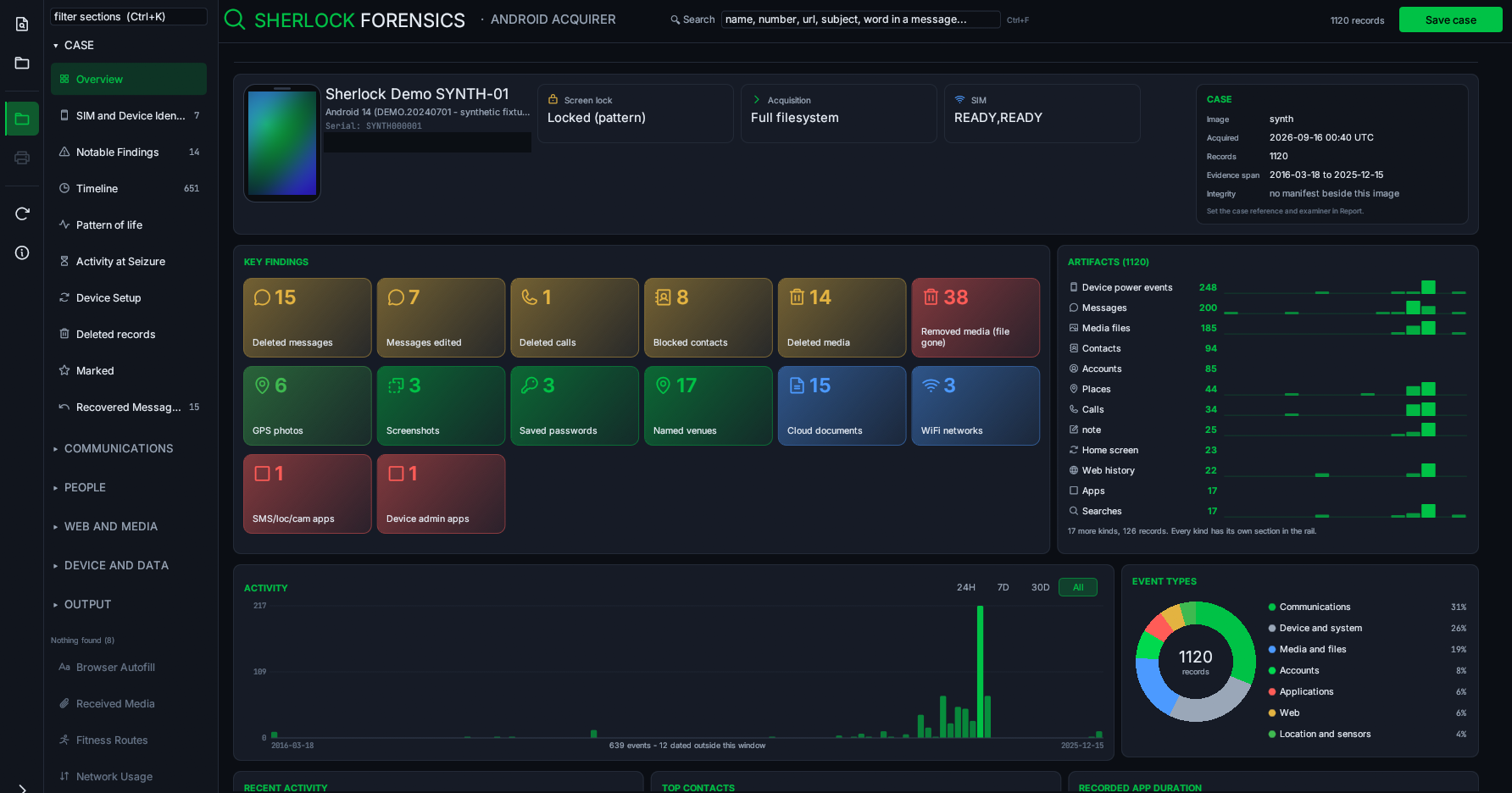
- A case overview that starts from the finding. Colour-coded findings, device context, activity charts and evidence counts sit together on one page, and a finding card opens the records that support it. Acquired contact and profile images are used on the people and account pages where the acquisition captured them, which depends on the extraction and the source, so not every contact has a photo.
- Communications, people and timelines, redesigned. Messages, calls, notifications, communication maps, deleted and recovered records, contacts, accounts and calendar views were rebuilt, with clearer event colours, filters and pattern-of-life explanations. Recorded app durations can include fitness activity and are not a claim of foreground screen time.
- Device and network detail, and consistent session counts. Wi-Fi, Bluetooth, Documents, Data Footprint and App Usage were redesigned. Recovered Wi-Fi keys are shown when they are present and readable, and encrypted or unavailable values are identified as exactly that. Bluetooth entries show the device class the record carries, which is source data and not a model-identification service. The sidebar and the page now reconstruct screen-on and screen-off from the same source, so their session counts agree.
- Evidence screenshots and a refreshed Web and Media workspace. An examiner can capture a supported review view into the case with its provenance and a hash beside the saved image. A screenshot of a review view is not an exact reproduction of the handset screen. The Web and Media workspace has readable tables, record inspectors and optional visual browsing. The saved-web view remains a mockup, not a claim that a cached page rendered exactly as the user saw it.
- Apps at a glance. A default card grid uses acquired icons where the acquisition captured them and shows captured file sizes and whether private files were available. A private file on disk is not proof that an app is currently installed, and a missing private file does not establish that an app was preinstalled or sideloaded.
- A report a nontechnical reader can follow. The report builder was redesigned with case-reference and examiner fields, selectable sections, a reader's guide, an evidence summary, numbered selected exhibits, a contents page and PDF bookmarks, in larger type. The PDF is a readable summary and a selected-exhibit report, not a verbatim export of every record. The full JSON export is still there, and no evidence is removed by these presentation changes: a dashboard can summarise a subset while the underlying records and original fields remain.
- A faster, redesigned Gallery. Thumbnail reads and image decoding now run in the background, with only the visible candidates queued, one decode in flight and a bounded thumbnail cache, so fast scrolling no longer leaves a backlog of off-screen images. This moves expensive work off the interface thread rather than promising a fixed speed multiplier, and the initial file inventory is still case-dependent work. The grid gains larger picture cards, an adjustable tile size, path search, sorting, square case-mark checkboxes and a selected-file inspector, with copyable full paths and Enter or a double-click to enlarge a selected image.
- Preview handling stays bounded and non-destructive. Preview decoding has allocation and dimension limits and a 96 MiB source-size threshold, and an enlarged preview is scaled to a maximum 2,048-pixel edge while keeping the original aspect ratio, with the original dimensions shown. Unsupported, corrupt or oversized candidates stay listed, and an unavailable preview does not establish that a file is absent. A cached picture does not establish that the user viewed or created it, and the original evidence files are not modified.
- A new home for About Sherlock. A dedicated About Sherlock Forensics page carries a License and Updates tab and a feedback tab, scrolls on smaller displays and keeps its Close control reachable, and the Contact support and Talk to our team links open https://www.sherlockforensics.com/. This changes the native Android Acquirer only and does not redesign the shared About dialog in other Sherlock products.
- Nothing the tool makes lands in the evidence. Marks, the report and message staging are written outside the acquisition folder, so the next person to parse that folder does not read a tool output back as an artifact of the device.
EV code-signed binary (Sherlock Forensics Ltd, SSL.com EV), Authenticode chain verified. setup.exe SHA-256: 7f122f178bf3dfc9069b774cfbed08ab9c6437b4b704336701b38ace27bdd307, 68.2 MB (68,176,680 bytes).
Version 0.9.348 - 2026-09-14 - A gallery of every image the acquisition holds, and faces that outlive the link
- A gallery of every image the acquisition holds. One grid of every picture in the acquisition, not just the camera roll or media store. On our Pixel 7a reference image that is 12,983 pictures, 6,071 of them pulled out of app caches that no media store catalogued, against roughly 200 media-store rows. The cache-deep set comes from a full-filesystem or rooted acquisition. Those app-cache images live in app-private storage; a logical acquisition over ADB does not reach it, so on that path the gallery shows the shared-storage and media-store pictures instead. It surfaces pictures viewed in a browser or a chat and never saved, profile photos and pictures whose originals were deleted. Android imaging libraries wrap cached bytes (a Volley cache entry starts with a serialised HTTP-request record ahead of the image), so files that used to read as "cannot decode image" open now. Each picture is labelled by what the case can establish: whose profile photo it is, or which message it arrived in and from whom, otherwise what its location means. A picture the app displayed is a different fact from a picture the owner saved, and the grid keeps that distinction. Of the 12,983, 4,365 are flagged as app-shipped resources rather than user content, so a third of the grid is dismissed at a glance. Full keyboard navigation, click or Enter for full size, Space to mark a picture into the report and the whole list exports.
- Faces on the people they belong to. A contact's profile picture now shows on their address-book entry, on the account card and beside their conversation. The URL a messenger records for a profile picture expires, often within about thirty days, so a case examined months later finds a dead link. The handset keeps its own copy that never expires, so from a full-filesystem or rooted acquisition the face is recoverable when the link is not.
- Opening an acquisition no longer pins a CPU core for the length of the parse.
- A failed parse no longer spins a core indefinitely behind a progress spinner that never finished.
EV code-signed binary (Sherlock Forensics Ltd, SSL.com EV), Authenticode chain verified. setup.exe SHA-256: 0d57daf944bfbce9f524c802f0132d969c90b6ade90f5215fa0c1ff45a7a784c, 58.1 MB (58,069,800 bytes).
Version 0.9.341 - 2026-09-14 - Kik, deleted-message detection and a case that opens instantly
- Kik conversations, contacts, groups and attachments. Kik keeps its store unencrypted inside the app sandbox, so this reads from a rooted handset or a full-filesystem extraction, not a non-rooted logical pull, and there is no shared-storage backup to fall back on the way WhatsApp has. Conversations in both directions, contacts, groups and attachments are read, along with the signed-in account's email, stated date of birth, JID and stored credential, and whether a contact was found by username search. Validated against Josh Hickman's public Android 14 reference image: all 16 messages in both directions and both exchanged pictures matched his published record.
- A deleted Kik message is detected and reported. Kik removes the message row outright rather than blanking its text, but the store records the highest message id it ever issued, so a missing id proves a message existed and was deleted. The report gives the time window between the surviving messages on either side and does not claim text it does not have.
- Pictures draw in the message viewer. Pictures sent or received in a chat now render in the message viewer and open full size on a click, instead of a line saying the bytes are not part of the record.
- Account details are a card you can work with. The signed-in account's details are now a selectable, copyable, markable card instead of a tooltip.
- A case opens instantly. Opening a case no longer reads every file on the device to catalogue it first. A 102,449-file extraction went from 255 seconds to 2.8.
- Threaded view for a single app. The threaded conversation view works when a single app is selected.
- Release a seat from the activation window. A customer moving to a new machine can free their own seat in the activation window instead of raising a ticket. The tool had been telling them to release a seat while providing no way to do it.
EV code-signed binary (Sherlock Forensics Ltd, SSL.com EV), Authenticode chain verified. setup.exe SHA-256: 41f2e67d307c40994a804bb95fd02a647c9ebac5215ab4b68c904ccca8f1a3fc, 57.9 MB (57,930,536 bytes).
Version 0.9.327 - 2026-09-08 - SIM and device identity, and it opens exports from your other tools
- Identity evidence you can corroborate. The SIM and Device Identity section now names every SIM the handset registered with its ICCID, IMSI, MSISDN, carrier, MCC/MNC, country and whether the card is physical or eSIM. Each identifier is corroborated across every file that names it rather than read from one. An identifier that belongs to a different handset is reported as exactly that. Nothing is claimed unless it passes its own check digit, because real devices write junk identifiers into their own logs. A dated SIM change history and a statement of which subscriber held the device between which dates come from the device's own network accounting.
- Opens what your other tools produced. Filesystem exports from XRY and MSAB now load as a full case rather than an empty one. Cellebrite and Magnet already did. An examiner handed an extraction from another tool can read it here.
- Nothing the tool makes lands in the evidence. Marks, the forensic report and decrypted message staging are written outside the acquisition folder, so the next person to parse that folder does not read a tool output back as an artifact of the device. That is a chain-of-custody point.
- The interface gives the evidence back its screen. Two rows of controls returned to every table. Acquiring a device and opening an existing case are now separate front-door actions, so an examiner handed an extraction is not sent to the device screen. A click anywhere on a row selects it, Ctrl+C and a right-click menu copy the row or a single value and confirm they did, two window-freeze faults are gone, long tables keep up with a held arrow key and emoji in app and contact names draw as glyphs from a font built into the tool.
EV code-signed binary (Sherlock Forensics Ltd, SSL.com EV), Authenticode chain verified. setup.exe SHA-256: 77acfded54adef6a45955f94d0a871576696f2b4bbd5b29f776522e071287261, 57.6 MB (57,616,168 bytes).
Version 0.9.321 - 2026-09-08 - A SIM is identity, not connectivity
0.9.321 adds a SIM and Device Identity section, second in the rail. It lists every SIM the handset ever registered with the identifiers an examiner quotes in a report, a dated history of when cards were swapped and which subscriber was in the device between which dates. It was asked for by an examiner who had to prove one SIM card had been used in more than one handset. A SIM used to sit inside Networks among the wifi and bluetooth. It is identity, so it now has its own section.
SIM and Device Identity
- Every SIM the handset registered, with the identifiers that go in a report: ICCID, IMSI, MSISDN, the card id, carrier with its carrier id, MCC/MNC, country and whether the card is physical or eSIM. Where a card carries a second phone number from IMS that disagrees with the provisioned one, both are shown and each says where it came from.
- A dated SIM change history. The
siminfotable is a set with no timestamps, so on its own it cannot say when a card arrived. The carrier config loader can: on the test device it records no SIM at 15:51:02, an AT&T card three seconds later then a swap to T-Mobile the next day. - Which subscriber was in the device between which dates, read from the device's own network accounting. An identity is only reported when it passes both a structural and a carrier check. A window still open when the image was taken is called a lower bound rather than being closed at the acquisition time.
- The IMEI is read from the extraction itself. An earlier build reported the device IMEI as out of reach of a
/dataimage and pointed elsewhere for it. That was wrong: on test devices the IMEI is present in the extraction in several places. The tool now reads it and shows where each copy was found rather than sending the examiner to look for it off the image.
Also in this release
- Starring a global search result now marks it instead of opening the section. The row was taking every click aimed at the star inside it. The same defect was found and fixed in the conversation list, where starring a thread opened it.
- Opening a message from search now lands on the message. Every other kind of result already did.
- The star is now drawn rather than typed. It was two different font characters that shifted and changed weight when clicked. It is now one shape painted in two states, larger, no longer dependent on the font having the glyph.
- A starred SIM now reaches the report without printing "No longer present" over a card that was in the image.
This build reads 94 artifacts, generated from the registry that does the reading rather than written by hand. New in 0.9.321: a SIM change history (carrier_config_log) and subscriber date windows (net_stats), both feeding the SIM and Device Identity section. See the full parser list.
EV code-signed binary (Sherlock Forensics Ltd, SSL.com EV), Authenticode chain verified. setup.exe SHA-256: 5020cc3fdecbc9724eaaaef81dcb5fe8a05298aa98fe1918e1b972fce7e5a9c3, 55.2 MB (55,204,136 bytes).
Version 0.9.318 - 2026-09-07 - Export the file an artefact came from, and date when a handset lost its radios
- Export an entry, get the file it came from. Exporting a single record now hands over the database that record was read out of, whole, with its write-ahead log beside it and a provenance note giving the on-device path, the SHA-256 and the byte count. Every one of the 92 parsers names its inputs now, and a build check fails if a new one forgets. See the full parser list.
- The write-ahead log travels with the database. A SQLite file copied without its -wal is not what the examiner was looking at, the newest rows sit in the log until a checkpoint folds them in. The -wal, -shm and -journal sidecars are now copied alongside, so a second tool opening the copy reports the same records this one showed.
- It dates when a seized handset lost its radios. From the connectivity and radio history the tool now names the moment a device dropped its network and radios rather than giving a window, which matters for establishing when a seized handset went dark.
- Export is fast (the source file is noted during the parse, not re-derived after) and the export status line no longer truncates mid-word.
EV code-signed binary (Sherlock Forensics Ltd, SSL.com EV), Authenticode chain verified. setup.exe SHA-256: c96037dd29133ebe84a8c5e88333da062792daba134da542f316e740ffaa76cc, 54.9 MB (54,937,384 bytes).
Version 0.9.309 - 2026-09-07 - ColorNote notes and backups, a right-click row menu, and every row opens
- ColorNote notes and backups are read. A note is where an owner writes what they mean to remember in their own words, and the ColorNote .backup file on the SD card survives the app being uninstalled and can outlive the notes in it. Sherlock reads ColorNote notes and checklists and decrypts the .backup file, verified against a real backup the app wrote rather than one this code produced.
- A password-locked note or backup is reported as locked, not decoded and not hidden. ColorNote encrypts a protected note with the owner's own password. Printing that ciphertext would put rubbish in an exhibit and dropping the row would read as "this device had no backups", so it is stated as a finding the examiner can act on. The app's own settings row is left out of the notes list, because it is configuration, not something the owner wrote.
- Right-click any row. Mark or unmark it, export just that one entry, or copy what it says. The single-entry export runs through the same exporter the marked set uses, so the file arrives with its SHA-256 and its on-device path in a CSV beside it, and the examiner's own marks are untouched.
- The overview lists every artifact this build can read. Built from the parser registry itself so it cannot go stale, it lets a reader tell "this device had no Signal" from "this tool does not read Signal", opposite conclusions about the same case.
- Clicking a row opens it, in every section. A click used to land on a content cell rather than the row beneath it, so in twenty-six sections a row never opened. The table now selects and the pane reads and copies, with a build check that fails on the next cell that breaks the rule. Every field in a reading pane copies when clicked, so a long value is legible where it is read.
EV code-signed binary (Sherlock Forensics Ltd, SSL.com EV), Authenticode chain verified. setup.exe SHA-256: 6834c0008c40807a757a5535bab9c82e34eb34f4f4ee05e8e1bf9054455950bf, 54.8 MB (54,766,888 bytes).
Version 0.9.305 - 2026-09-06 - Two viewers behave alike, an offline map and CJK text renders
- Two viewers, one set of behaviours. A logical acquisition and a full filesystem image are read through different viewers, and this cycle made them behave alike: every list reads its record in a pane beside it rather than under it, everything a case holds can be starred into the report from where it is read, and typing in a search box no longer closes the record being read.
- An offline map. Location trail, significant locations and places plot their fixes on a bundled world of coastlines, borders, built-up areas and seven thousand named towns, numbered in time order, with a day slider, a toggleable travel path and scroll-to-zoom. There is no tile server: the map is compiled into the executable, so it draws on an air-gapped workstation and nothing about where an examiner is looking leaves the machine. It plots coordinates on an outline, not streets or addresses; a named place in evidence is the address the device geocoded, and the town names the map draws are the tool's own estimate, labelled as such in the product.
- Chinese, Japanese and Korean text renders. Han characters, kana and hangul were drawing as boxes while the underlying text stayed intact and copied out correctly. They now draw. Colour emoji may still render as a box; the codepoints remain in the record, the export and the report, so this is a drawing limit, not a loss of data.
- A calendar you can read as a calendar in both viewers, with a month grid beside the table.
- Reading and per-source detail. The reading pane drags wider wherever it appears, and per-source lists show that source's own fields instead of one crushed summary line. Seventeen sentences that carried source-code indentation into the text, four of them paragraphs of the PDF report, are fixed.
EV code-signed binary (Sherlock Forensics Ltd, SSL.com EV intermediate), RFC3161 timestamped. setup.exe SHA-256: abeaabb58b138cdbe966192cf7aec19a8d6edfbfaecb8fa2df43c05d70a34841. Windows .exe this cycle; the MSI (0.8.8) and Linux (0.7.0) builds are unchanged.
Version 0.9.40 - 2026-09-05 - Activity ends at the last real event, WhatsApp deleted-message recovery and a table on every screen
- Activity ends at the last real event, not a scheduled one. A device's period of activity now ends at the last thing that actually happened on it, not at a calendar entry that was only ever scheduled. A holiday booked for a future year could previously set the end of the timeline, so a case opened long after seizure would read years of empty calendar as activity. The cut-off is now taken from the image itself, the later of the newest file the acquisition wrote and the newest record of a real event, never from the clock of the machine doing the analysis.
- What has not happened yet is shown, never counted. Every screen that states a span now says how many records fall beyond it and how far. The calendar draws a not-yet-reached entry in the accent colour and counts them at the top. Anything scheduled after the seizure is raised as a finding of its own, one click from the overview to what the owner had booked before the phone was taken.
- WhatsApp deleted-message recovery. A message the sender removed can be read back out of a later reply that quoted it, preserved in the quotation that answered it. An encrypted WhatsApp backup is opened only with the key the examiner already holds and never by cracking a password, which is the distinction that keeps the result defensible in court.
- A table with a detail pane on every screen. Every section is now a table with a detail pane and every record can be marked, from the keyboard as well.
- Reliability and speed. This build resolves a range of exhibit-handling and interface faults and includes a broad performance pass that makes large acquisitions quicker.
EV code-signed binary (Sherlock Forensics Ltd, SSL.com EV intermediate). setup.exe SHA-256: 48e73ff9f12a3e355963a3b6792442cd369c56522b3b0a46f8ebd50a2a2f7802. MSI and Linux builds to follow. TSA countersignature present.
Version 0.8.7 - 2026-09-02 - Marking across every record type, a real message table and two fixes
- A star on every record. The full-image viewer could read evidence but could not select any of it. Marking now reaches every record type: messages, calls, contacts, calendar entries, media, Wi-Fi networks, paired Bluetooth devices, accounts, saved logins, notifications, installed apps, web pages, searches, cookies, clipboard entries, saved form values, locations, screenshots, downloads, hidden photos, recovered deleted messages, received attachments, blocked contacts, app install history, fitness routes, sleep and step records, app process deaths and permission holds. Search hits are markable where they are found.
- Marking is not navigation. Starring a conversation, an app or a search hit does not open it or jump away from it. Marks save to sherlock-marks.json beside the evidence the moment they are made and are still there when the case is reopened.
- The report prints what was marked, with its content. A marked location prints its coordinates, source and time; a marked notification its text; a marked conversation its full transcript. A marked saved login shows that a password exists and never reproduces it. The marked section states plainly that it is the operator's own annotation, not a finding by the tool.
- Messages read as a sortable table. Index, timestamp, sender or ID, direction, app, status and snippet, with a viewer beside it showing the correspondents, timestamp, app, row state, message type and the full text with any attachment named. Click a column to sort, shift-click a second to break ties. Choosing one app filters the same table to it.
- Contact names instead of bare numbers where the address book has one, the number kept beside the name and a resolved name coloured so it is clear which rows the phone could name. A sender the store never recorded is shown as not recorded rather than a bare question mark.
- Status reports only what the record asserts: deleted, withdrawn by its sender, edited after sending or truncated by the device. These stores carry no delivery receipt, so nothing claims one.
- Fix: reading a case no longer shows the acquisition dialog. Opening a case for review once showed the live-acquisition dialog with a Stop button that did nothing to a case read from disk. Reading a case now has its own dialog that says what is actually happening.
- Fix: a licence server error no longer counts toward lockout. An HTTP 5xx from the licence server is now told apart from an unreachable network, named as our fault and never counted against the five-launch lockout.
EV code-signed binary (Sherlock Forensics Ltd, SSL.com EV intermediate). setup.exe SHA-256: 2710bdf9bfbe9b671fe10993e09a4ac64672dc443a8604fc14dee8005655e0ad. MSI and Linux 0.8.7 builds pending. TSA countersignature present.
Version 0.7.0 - 2026-08-13 - Rebuilt examiner interface and installer packaging
- Evidence fills the screen. Evidence views resize with the window instead of reading through a fixed box, so a conversation opens to the full height of the monitor.
- Connection strip. An always-on strip names the state of the handset and what to do about it: USB debugging off, an on-device prompt waiting, a device that answered then stopped, another program holding the phone.
- Conversations as the phone showed them. Messages render in turns with times and delivery ticks; press F to reveal the source database row (file, table, row id, exact UTC) without the thread moving. Recovered deleted messages carry a RECOVERED flag and their own colour.
- Pattern-of-life dashboard. Message volume by day with silent days kept in, an hours-by-days usage grid, ranked counterparties and a plain-language panel naming what a logical acquisition cannot reach.
- Apps ordered by access. The app list opens on the software holding the most sensitive access, with sideloaded installs flagged, rather than sorted alphabetically.
- Reporting carries the words. Mark individual messages, not only whole threads. Marked material carries its text into the PDF. An abridged report says so on page one and names what it left out.
- In-tool support. Ask for help from inside the tool; it sends only what you type along with the product, version and licence tier. No evidence, device data or file names leave the machine.
- Installer packaging. Ships as a setup.exe and an MSI for managed deployment, bringing Microsoft's WebView2 runtime when a system does not already have it.
EV code-signed binary (Sherlock Forensics Ltd, SSL.com EV intermediate). setup.exe SHA-256: 4d874209f6d02cbe46cce82ca892a777b2f311cd692d5ce6b67a48df5336694f. MSI SHA-256: 24bd7ef60511c99bcbcce4e8fd799ad37407504c6c02ba081545a9f22256a079. TSA countersignature present.
Version 0.6.0 - 2026-07-29 - Full-filesystem analysis tier, deeper messenger and location forensics
- Full-filesystem analysis tier. Loads full-filesystem extractions from Cellebrite and Magnet directly for deep analysis beyond a logical pull. Recovers a modern-Android app inventory from binary XML, account stores present even before the first unlock and the media store on the mainline module path. Builds an app-usage, screen, unlock and boot timeline, a permission-usage timeline, app shortcuts, recents and application exit reasons.
- Messenger content from a full image. Recovers WhatsApp including deleted-for-everyone, Telegram, Google Messages (RCS, SMS and MMS), Google Chat, TikTok and Lemon8 direct messages. Decrypts Session and SimpleX when the key is recovered and reads the WeChat feed without the key.
- Location depth. Adds Google on-device Timeline, Google Maps photo-location trail and last camera position, MIUI Gallery place names, video capture GPS, Health Connect workout routes, saved and airport Wi-Fi travel history and a fused Last Location view.
- Deleted-record recovery extended. Measures deleted MMS, WhatsApp and trashed media, on top of the existing deleted photo and message recovery.
- Document and secret forensics. Decrypts app secrets stored in EncryptedSharedPreferences, scans pulled PDFs for threats and reads OOXML document metadata and OpenVPN configurations.
- Reworked interface. A per-source section rail, iOS-parity views, sortable and filterable tables, a calendar month view, cleaner contacts, a usage bar chart and an FFS Matrix quick reference with a Request Your Device path.
EV code-signed binary (Sherlock Forensics Ltd, SSL.com EV intermediate). SHA-256: 131a69672c2a206ddf51e883368f1f48fb4408089b7f691ef6ec0a95936622fa. TSA countersignature present.
Version 0.5.0 - 2026-07-18 - Full-filesystem image support and deep app-database forensics
- Full-filesystem image viewer. A rooted or beyond-logical acquisition of /data opens in a dedicated full image viewer with sections for overview, timeline, messages, email, calls, contacts, web, media, places, crypto and apps. The same record types and court-ready report are produced whether the source is the logical helper output or the raw databases in a full image.
- Deep app databases parsed from the image. Chrome and Samsung Internet full forensic set (history, per-visit events, saved logins, cookies, form autofill, saved address and payment profiles, bookmarks), Samsung email and Gmail (Gmail protobuf-decoded), Skype messages and calls, contacts and call log and text messages from the Samsung call-log store, device accounts, calendar, app-usage sessions, removed-app history, the Play Store install ledger, the media store and Samsung media hub, location history and the Amazon account store. A logical pull cannot reach this app-private storage.
- Deleted-record recovery. The SQLite reader replays the write-ahead log and walks the freelist inside a full image, so deleted records that still survive in the file come back and are marked as recovered, including deleted photos with paths, times and GPS, together with deleted messages.
- Cryptocurrency evidence. Mycelium Bitcoin wallet addresses and per-transaction outputs are decoded from the wallet database and are traceable on-chain.
- Unified sortable timeline and CSV export. Every dated artifact across all sources merges into one timeline you can filter by kind and date and sort by time, type or detail and export to CSV for report exhibits.
- Older devices handled honestly. The helper-required panel now explains when a device is too old for the helper instead of dead-ending, with a button to send the device details to support directly.
EV code-signed binary (Sherlock Forensics Ltd, SSL.com EV intermediate). SHA-256: ea4944bc58d247fd78db006b29d6cf497228906ab1a86c08f22dfa825bf73284. TSA countersignature present.
Version 0.4.0 - 2026-07-17 - Findings surfaced, photo locations read, a fuller exhibit
- Findings up front. A "worth a look" panel on the overview and a "Findings of note" report section gather what the tool noticed while reading an acquisition, most serious first: a device not in its factory state; a clock not set from the network, so its timestamps may not track real time; an app installed from an APK file that can also read the screen or every notification, which is the shape stalkerware takes; a SIM that has left the phone since it carried a message; messaging accounts whose conversations a logical acquisition cannot reach; files whose contents do not match their name; photos carrying their own GPS coordinates; devices the handset was paired with before. Each is stated as a fact about the material collected, not a conclusion by the tool.
- Photo geolocation. The tool reads GPS coordinates and capture time from each pulled photo's own EXIF. The device media index cannot report this because Android redacts those columns for an app without special permission. The file copied off the phone still carries it. Coordinates show on the files tab and travel into a marked photo's report entry.
- A fuller exhibit. The PDF report identifies the handset from its own build properties (make, model, Android version, security patch, build fingerprint and bootloader state) rather than an operator-typed label alone. It names the apps granted powerful access (accessibility, keyboard, notification-listener role), flags any installed from outside a store and summarises every collected category including user accounts and SIM or telephony.
- More collected and parsed. The on-device helper reads each calendar event's calendar name and attendees, where each app was installed from (a store or a sideloaded APK) and the permissions each app holds. Bluetooth device kind, per-app battery residency and notification-listener holders are read out of the raw dumps.
- Marking and navigation. Conversations, calendar events, saved Wi-Fi networks and paired Bluetooth devices are markable for the report. Apps, contacts and call lists are searchable by name or number. The section tabs moved from a top strip that clipped on an unmaximised window into a scrollable left sidebar shown when a case is open.
- Fixes a customer would hit: the GET DATA button is always clickable and opens the acquire screen when no device is connected; the section tabs no longer run off the right edge on an unmaximised window; the media tab no longer asks you to read a photo's location by hand; and the paired-device list no longer vanishes when there are no saved Wi-Fi networks.
EV code-signed binary (Sherlock Forensics Ltd, SSL.com EV intermediate). SHA-256: 87ecaeb4ae3ee3f5942c5aecbe67a03330b9bf90fb2b4bd617ee300a41c7d96f. TSA countersignature present.
Version 0.3.0 - 2026-07-16 - Built-in results viewer and two-party integrity verification
- RESULTS viewer with fourteen tabs reads an acquisition back inside the tool: overview, device, conversations, calls, contacts, apps, contact map, usage, notifications, battery, files, networks, integrity and marked items. Version 0.2.0 collected to a folder with no way to review it in the application.
- Two-party integrity verification. The on-device helper hashes each file on the phone and the workstation hashes what arrives, so agreement means two independent parties hashed the same bytes. Folder verification re-hashes every file against the manifest to confirm nothing changed since acquisition. The manifest is unsigned, so this evidences that data was not disturbed, not that it is authentic.
- New collections. Call log, app usage history, SIM and telephony, settings provider, paired and nearby Bluetooth, saved Wi-Fi networks, notification access, per-app battery stats and connectivity history.
- Media and data files now pull actual bytes. Prior versions returned MediaStore metadata only, so a run could report success while collecting no photos. Fixed and verified.
- Mark for report. Star items and add notes; they appear as their own PDF section, labelled as the operator's selection rather than a finding by the tool.
- Fixes a customer would hit: manifest now records device artifacts with their folder so the report's own re-hash instruction is followable; the report no longer claims the helper was removed when it was not; SMS and MMS threading and MMS recipients corrected; PDF text wraps instead of running off the page; the extract button no longer hides below the fold on an unmaximized window.
EV code-signed binary (Sherlock Forensics Ltd, SSL.com EV intermediate). SHA-256: ae4c6e451f6c7df928f3d2da03e9daf69740aa3b5f612215c27e271a3b088914. TSA countersignature present.
Version 0.2.0 - 2026-07-16 - Self-contained binary and provenance-hardened helper lifecycle
- Bundled adb, fastboot and signed helper APK unpack on first run. No external Android SDK, Platform Tools or JDK install required. Runs on a clean Windows 10 or 11 workstation with no developer tooling.
- Helper install recorded in the acquisition manifest with UTC timestamp and APK SHA-256. Chain of custody captured at deployment, not reconstructed after the fact.
- Staged copies swept off the device with removal verified. Belt-and-suspenders cleanup so nothing lingers on the phone after acquisition.
- One-click helper removal returns the device to its pre-acquisition state. Auditable and reversible.
- Fixed installation gap where prior versions expected adb beside the exe. Reported by a customer who tried to acquire without an existing Android developer environment. Fresh Windows 10 VM regression test added to release gate.
EV code-signed binary (Sherlock Forensics Ltd, SSL.com EV intermediate). SHA-256: 47b6aad63aa5ac3df450b54b19948ecc7602e9d69608008daec7963ca20982c2. TSA countersignature present.