
Why PDFs Are Dangerous
PDFs look harmless. They are not. The PDF specification supports JavaScript execution, embedded executable files, auto-launch actions and form fields that connect to external servers. A weaponized PDF can install malware the moment you open it.
Most PDF viewers execute active content by default. Adobe Acrobat Reader runs JavaScript automatically. Browser-based viewers disable some features but still render the document. If you receive a PDF from an unknown sender, opening it in a standard viewer is a risk. For a deeper look at PDF threats, read why every PDF is a security risk.
Method 1: Use a Sandboxed PDF Viewer (Recommended)
Sherlock Forensics PDF Viewer + Editor is a free Windows application that opens PDFs in a sandboxed environment. It uses a pure Rust parser (lopdf) that does not execute JavaScript, auto-launch actions or embedded executables. The rendering engine runs in an isolated process.
What gets blocked automatically:
- JavaScript execution
- Embedded executable files (.exe, .bat, .ps1)
- Auto-launch and auto-open actions
- External URL connections from form fields
- Malicious annotation actions
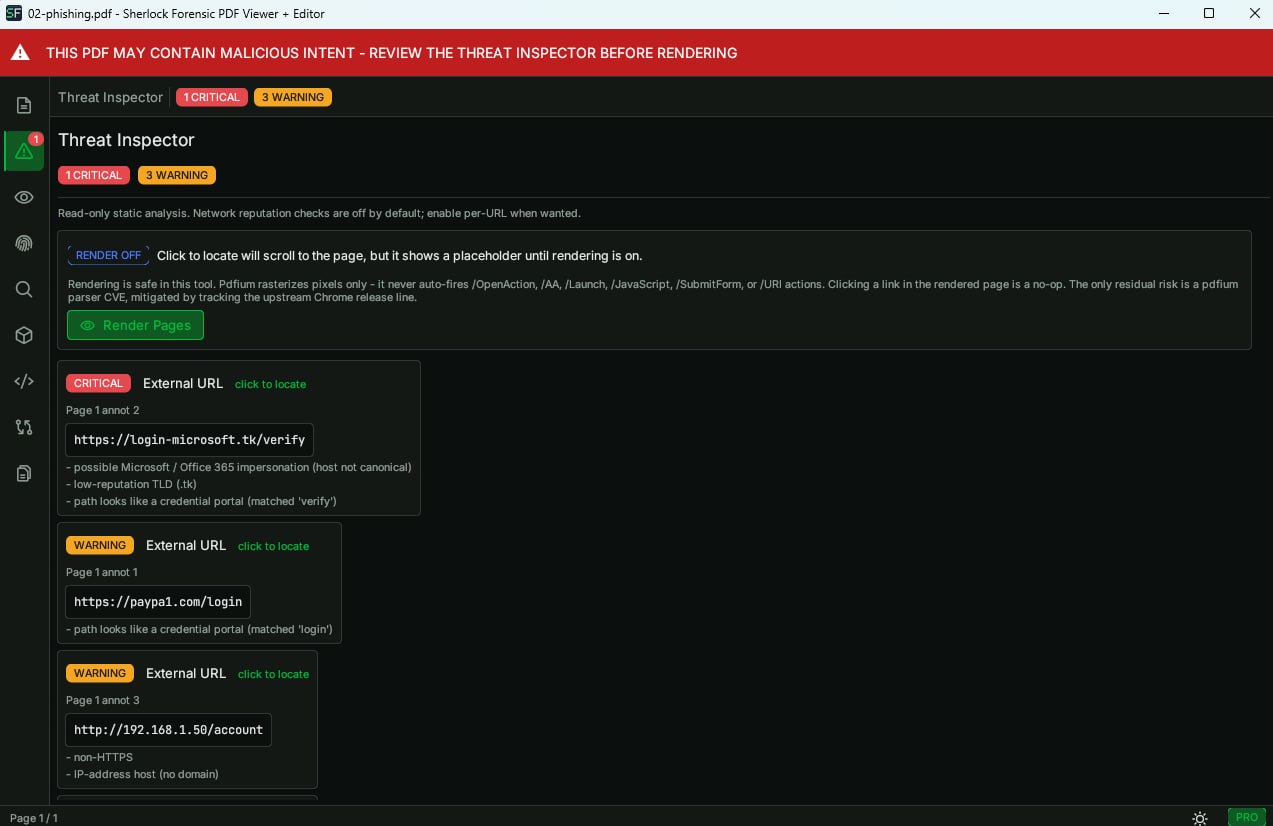
Threat inspector flagging suspicious elements in a PDF - click to enlarge
If you need to verify digital signatures or redact sensitive content, the Pro Edition is $29/year. See also our full review of safe PDF viewers for Windows.
Method 2: Disable JavaScript in Adobe Reader
If you already have Adobe Acrobat Reader installed, you can reduce the risk by disabling JavaScript:
- Open Adobe Reader and go to Edit > Preferences.
- Select JavaScript from the left panel.
- Uncheck Enable Acrobat JavaScript.
- Click OK.
This blocks JavaScript-based attacks but does not stop embedded executables, auto-launch actions or malicious form fields. It also does not survive Adobe Reader updates, which sometimes re-enable JavaScript. Most users forget to check this setting after updates.
Method 3: Use Your Browser's Built-in Viewer
Chrome, Edge and Firefox all have built-in PDF rendering. These viewers are generally safer than Adobe Reader because they disable most JavaScript execution and run in the browser's sandbox.
Limitations: browser viewers cannot handle all PDF features (forms, annotations, digital signatures). They also do not give you visibility into what the PDF contains under the surface. You see the rendered output but not the threats hiding in the document structure.
What to Look for in a Suspicious PDF
Before opening any PDF from an unknown source, check for these red flags:
- Unexpected sender. Did you expect this document? Is the email address legitimate?
- Urgency language. "Invoice overdue", "legal notice", "account suspended" are common social engineering tactics.
- Unusual file size. A one-page invoice that is 5MB may contain embedded payloads. A 200-byte PDF is likely malformed.
- Requests to enable content. Any PDF that asks you to "enable editing", "allow permissions" or "click to view" is suspicious.
Need to read email archives securely? See how to open PST files without Outlook. Securing endpoints? Learn how to block USB drives on Windows.
Frequently Asked Questions
Can a PDF give you a virus?
Yes. PDFs can contain JavaScript that executes when the file opens, embedded executable files that auto-launch and malicious form actions that connect to external servers. Most PDF viewers execute these by default. A sandboxed viewer like Sherlock Forensics PDF Viewer + Editor blocks all active content automatically.
Is it safe to open PDFs in Chrome?
Chrome's built-in PDF viewer is safer than Adobe Reader because it disables most JavaScript execution. However it is not a full sandbox. It still renders the PDF and may process certain embedded elements. For unknown or suspicious PDFs, a dedicated sandboxed viewer provides stronger protection.
What is the safest PDF viewer?
A viewer that blocks all active content by default: JavaScript, embedded executables, auto-launch actions and external connections. Sherlock Forensics PDF Viewer + Editor uses a pure Rust parser that does not execute any active content. The rendering engine runs in an isolated process with no network access.