Sherlock Forensics iPhone and iPad Analyzer · New Release

Sherlock Forensics iPhone and iPad Analyzer
iOS forensic software for Windows

Sherlock Forensics iPhone Analyzer acquires and analyzes iPhone or iPad logical MobileBackup2 backups on Windows and analyzes Cellebrite UFED full-filesystem extractions. Read-only, court-defensible, fully offline. 130+ artifact views across communications, media, web, location, personal, apps and system. HEIC and HEVC decode built in. Encrypted-backup offline decryption via RFC 3394 keybag unwrap and AES. Installer, application executable and bundled ffmpeg are all EV signed (SSL.com), so Windows SmartScreen shows no warning.

Free tier: preview 25 percent of artifacts (capped at 100 rows per view). Forensic Edition ($599 one-time): unlimited data, global search, CSV and JSON export, court-ready HTML report, raw SQLite browser, file extraction and screen capture.
Before you buy - device requirements. Sherlock Forensics iPhone Analyzer uses Apple's official MobileBackup2 logical acquisition path. To use it on a device, you must have: (1) the device passcode or PIN, (2) the ability to physically connect the device to your Windows forensic workstation via USB and (3) the ability to unlock the device and tap "Trust" on the "Trust This Computer" prompt. Sherlock Forensics iPhone Analyzer does NOT bypass lock codes. It does not jailbreak the device or exploit iOS security. Locked devices without a passcode and untrusted devices are not supported by this tool or by any logical acquisition method.

SSL.com EV signed · SHA-256 verifiable · No SmartScreen warning

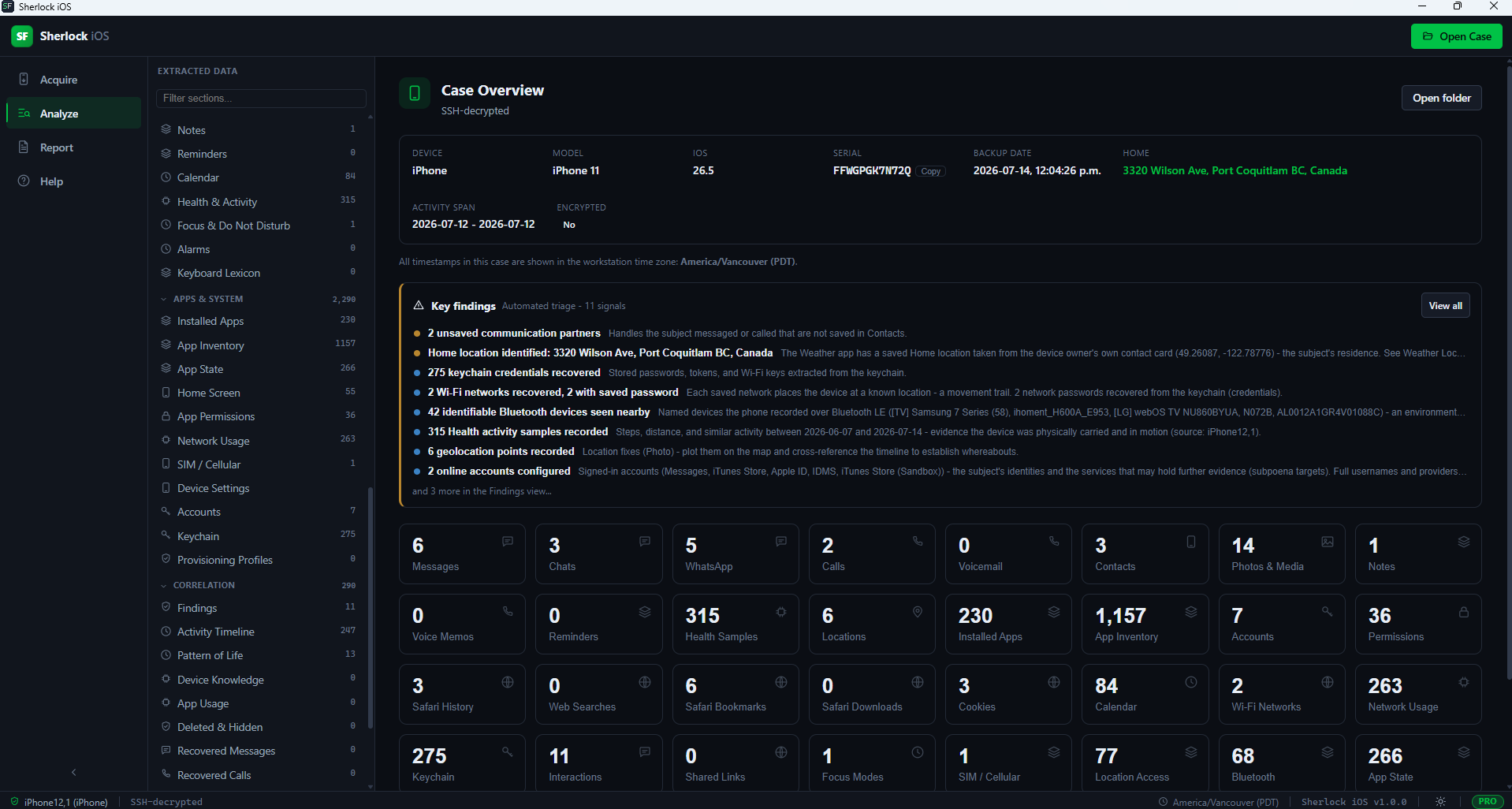
Sherlock Forensics iPhone Analyzer dashboard overview showing case summary, device attribution, artifact counts and investigative highlights at a glance
Dashboard overview · every dated event, every artifact, every finding in one investigative surface

Overview

What Sherlock Forensics iPhone Analyzer Actually Is

Sherlock Forensics iPhone Analyzer is a Windows forensic workstation that acquires and analyzes iPhone or iPad evidence from a logical MobileBackup2 backup and, as of version 1.2.0, analyzes a Cellebrite UFED full-filesystem extraction. Read-only, court-defensible, fully offline. Sherlock delivers the same user-experience shape as Magnet AXIOM and Cellebrite Physical Analyzer in the logical-acquisition scope. The honest credibility floor is EnCase-grade rigor for iOS logical evidence.

Every artifact view in the tool ships as its own dedicated, searchable, exportable interface. The Forensic Edition unlocks the full data set and court-ready reporting; the Free Edition previews 25 percent of every artifact so an evaluator can see the exact tool depth before purchase.

Acquisition

Logical Backup Over MobileBackup2

Sherlock Forensics iPhone Analyzer uses the MobileBackup2 logical acquisition path. This is the universal method: it works on any iPhone or iPad you can unlock, no jailbreak, no exploit. iOS decrypts the data on-device as it is copied out so the result is already plaintext.

Encrypted-backup mode: Sherlock sets the backup password itself before acquisition then decrypts the backup offline using RFC 3394 keybag unwrap and AES. Operators do not configure a password; the tool handles the encryption flip end-to-end. Encrypted backups actually contain more data than unencrypted backups (keychain, Health, Wi-Fi passwords) which is why the tool automates the flip.

The acquisition channel is read-only. A destination free-space pre-flight prevents partial-capture failures.

New in 1.2.0

Full-Filesystem Extraction Analysis: Bring Your Cellebrite UFED Extraction

Sherlock Forensics iPhone and iPad Analyzer 1.2.0 analyzes a Cellebrite UFED full-filesystem extraction. It detects the extraction, resolves every artifact at its real on-device path and runs the full parser suite against it. Sherlock does not acquire the extraction; it analyzes the one your acquisition tool produced.

Point Sherlock at an extracted Cellebrite UFED full-filesystem tree and it opens it the same way it opens a backup. A full-filesystem extraction is a much deeper evidence source than a logical backup: it contains the behavioral logs, on-device intelligence caches and third-party app storage that a logical backup never copies out. Sherlock resolves every artifact at its real on-device path and runs the whole parser suite against the tree.

An extraction-provenance view parses and merges the UFED .ufd, .ufdx and DeviceInfo.txt descriptors into one record: device model, iOS build, examiner machine, acquisition tool and version, start and end times and the per-dump SHA-256 and HMAC the acquisition tool recorded. The full descriptor is carried verbatim so nothing is hidden from the examiner or the court.

The scope is worth stating plainly. Sherlock Forensics iPhone Analyzer does not itself acquire a full-filesystem extraction; that requires Cellebrite, GrayKey or comparable acquisition tooling. Sherlock's own acquisition remains the logical MobileBackup2 path with the device requirements above. What 1.2.0 changes is the economics of the analysis seat: the extraction your organization already paid enterprise money to capture now analyzes in Sherlock at $599 one-time instead of on a second enterprise analysis license.

Analysis

130+ Artifact Views From Logical Backups and Full-Filesystem Extractions

Every item below is a dedicated, searchable, exportable view. The Free Edition previews the first 25 percent of each view (capped at 100 rows). The Forensic Edition unlocks the complete data set.

Communications

Messages (SMS and iMessage), Conversations (threaded), Chats and Groups, WhatsApp messages, WhatsApp Groups (members, admin, JIDs), Message Attachments, Call History, Voicemail, Contacts.

Media

Photos and videos with capture GPS. HEIC decodes and HEVC video plays in-app. Favorites, Hidden, Recently-Deleted, Geotagged, Photos and Videos filters. Media Library, Voice Memos.

Web and Location

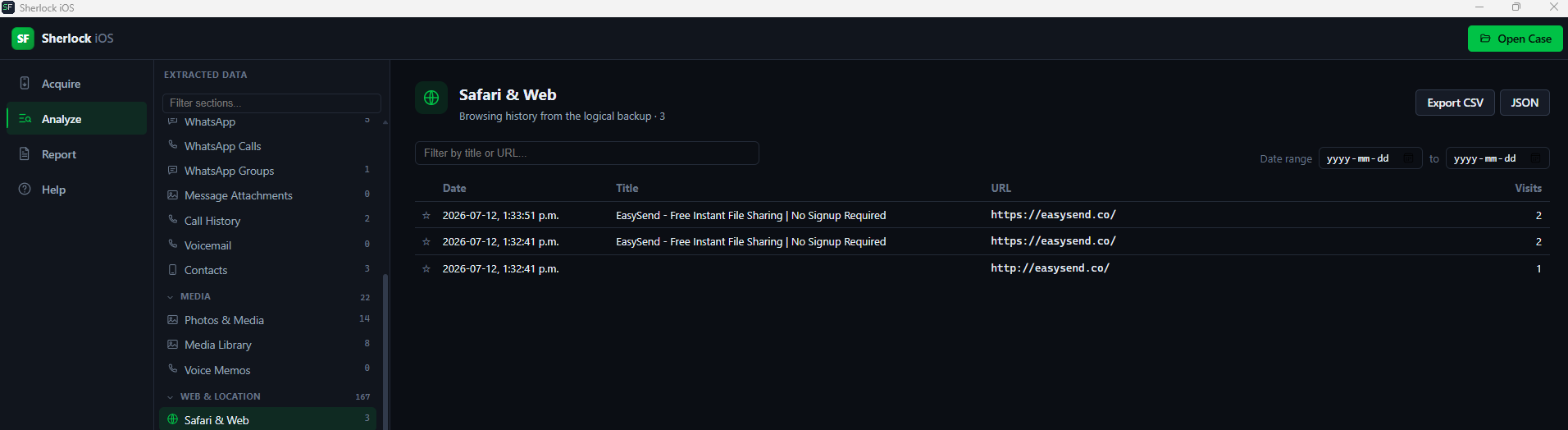
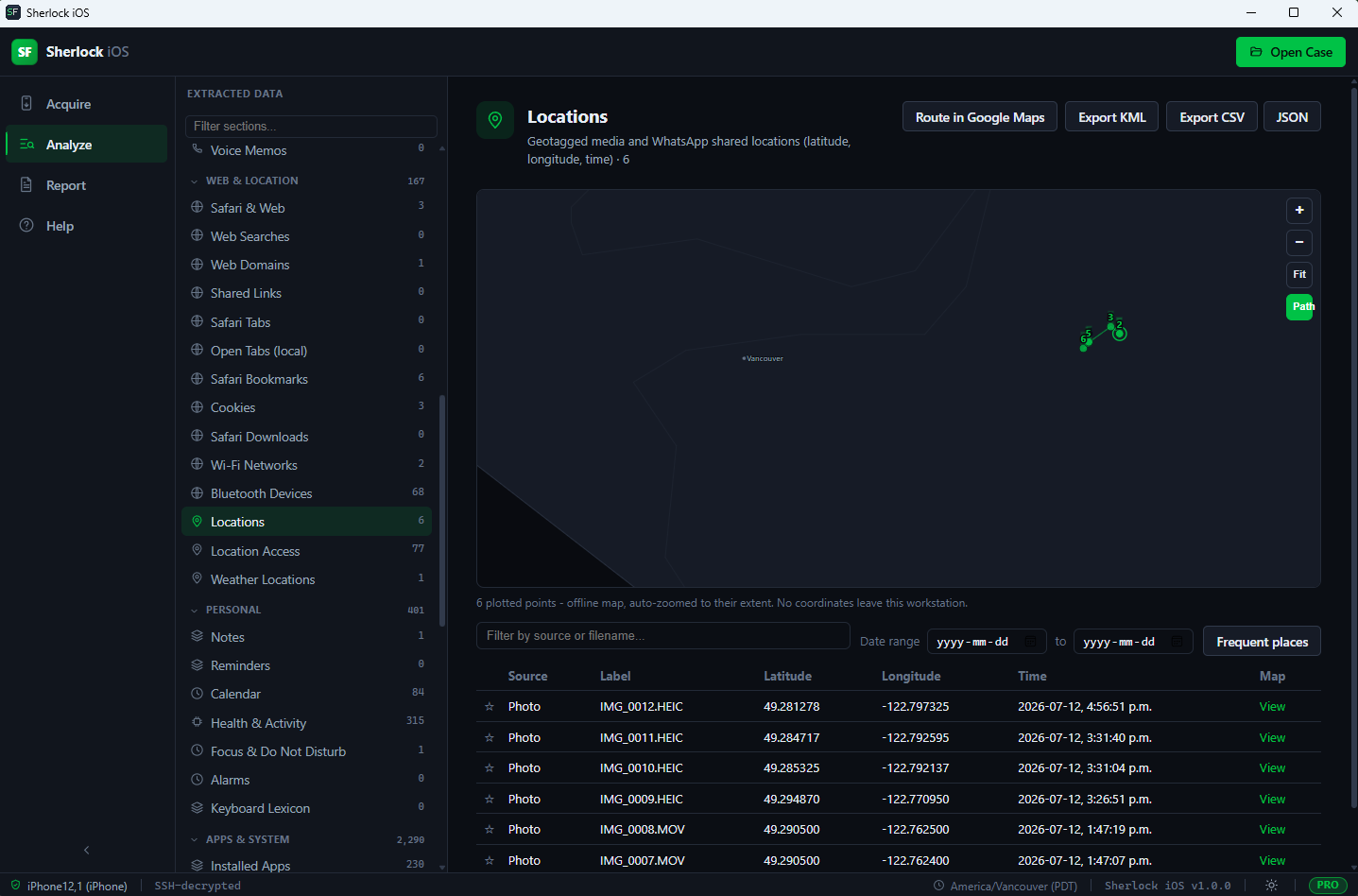
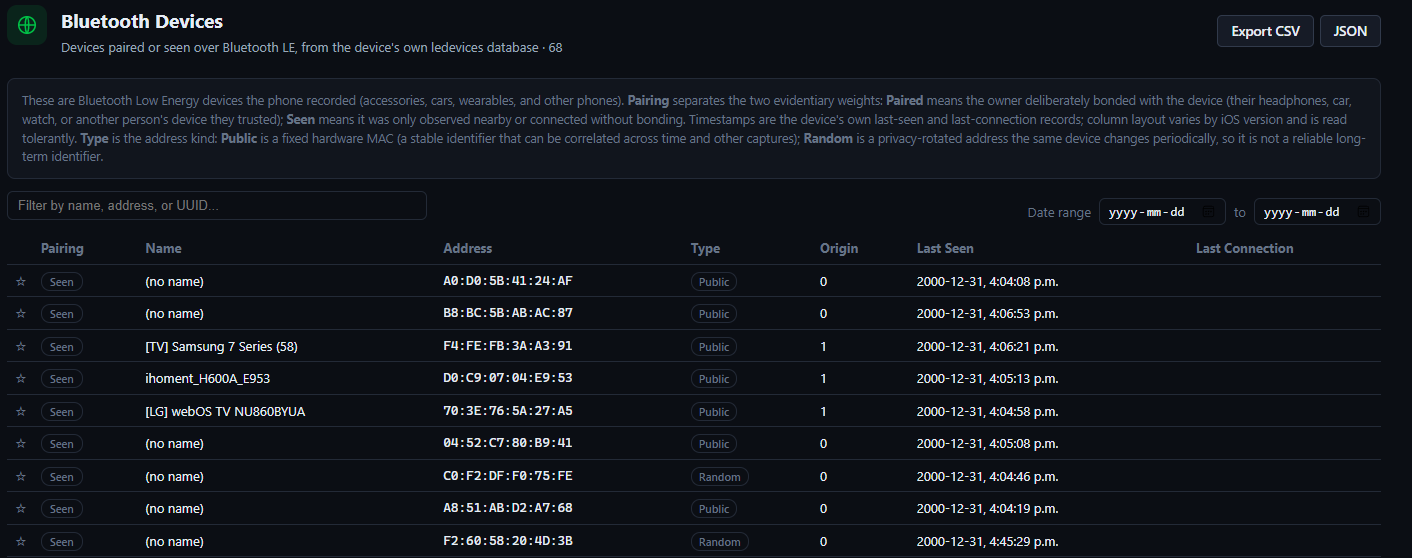
Safari history, Web Searches, Web Domains, Shared Links, Safari Tabs, open local tabs, Safari Bookmarks, Cookies, Safari Downloads, Wi-Fi networks (with saved passwords from keychain), Bluetooth devices (paired vs merely seen, with public and random address trackability), Locations (geotagged media and shared pins on an offline map), Location Access (locationd clients), Weather saved locations including the device owner HOME address.

Personal

Notes (with password-protected flagging), Reminders, Calendar, Health and Activity, Focus and Do Not Disturb modes, Alarms, Keyboard Lexicon.

Apps and System

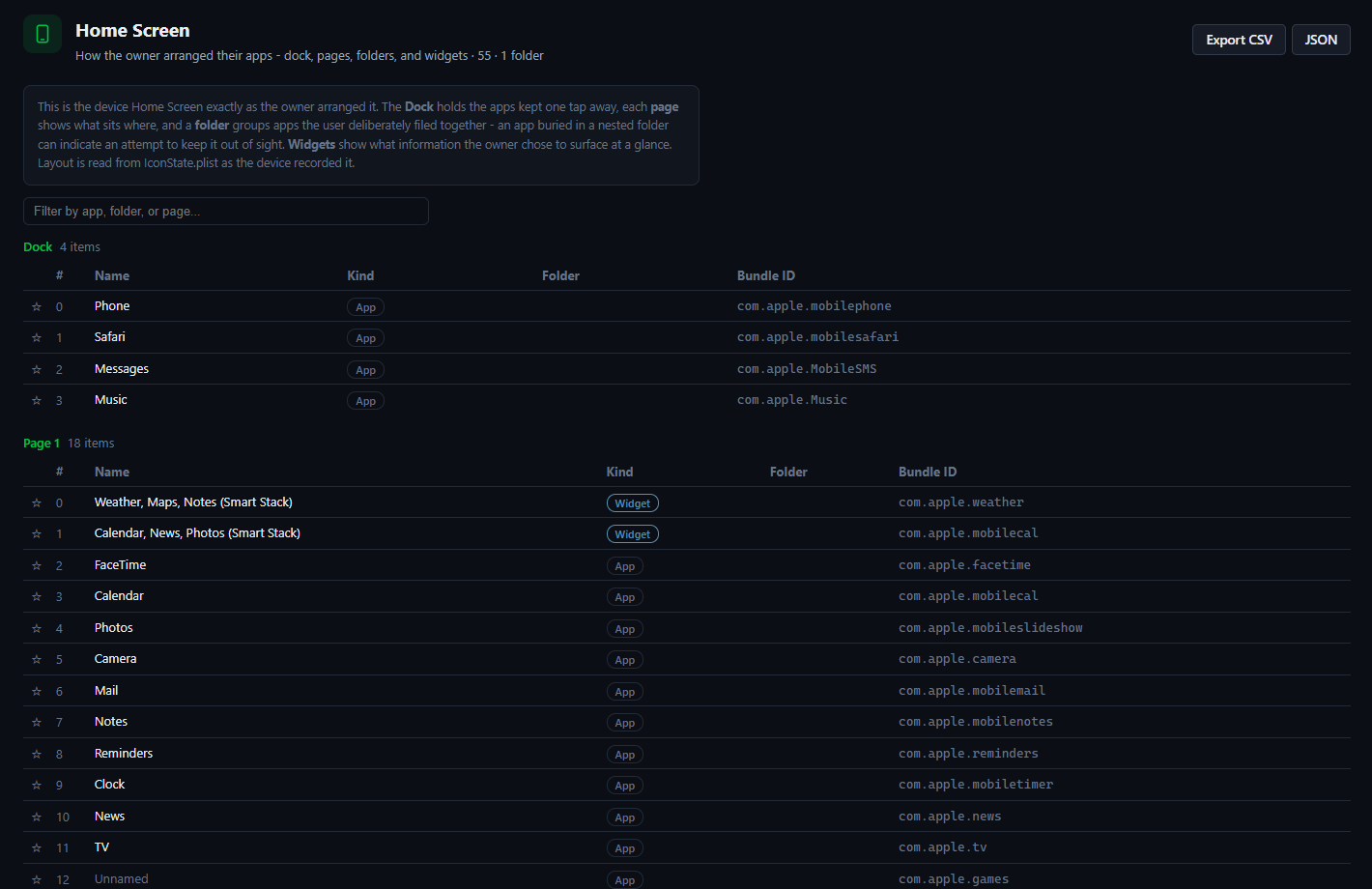
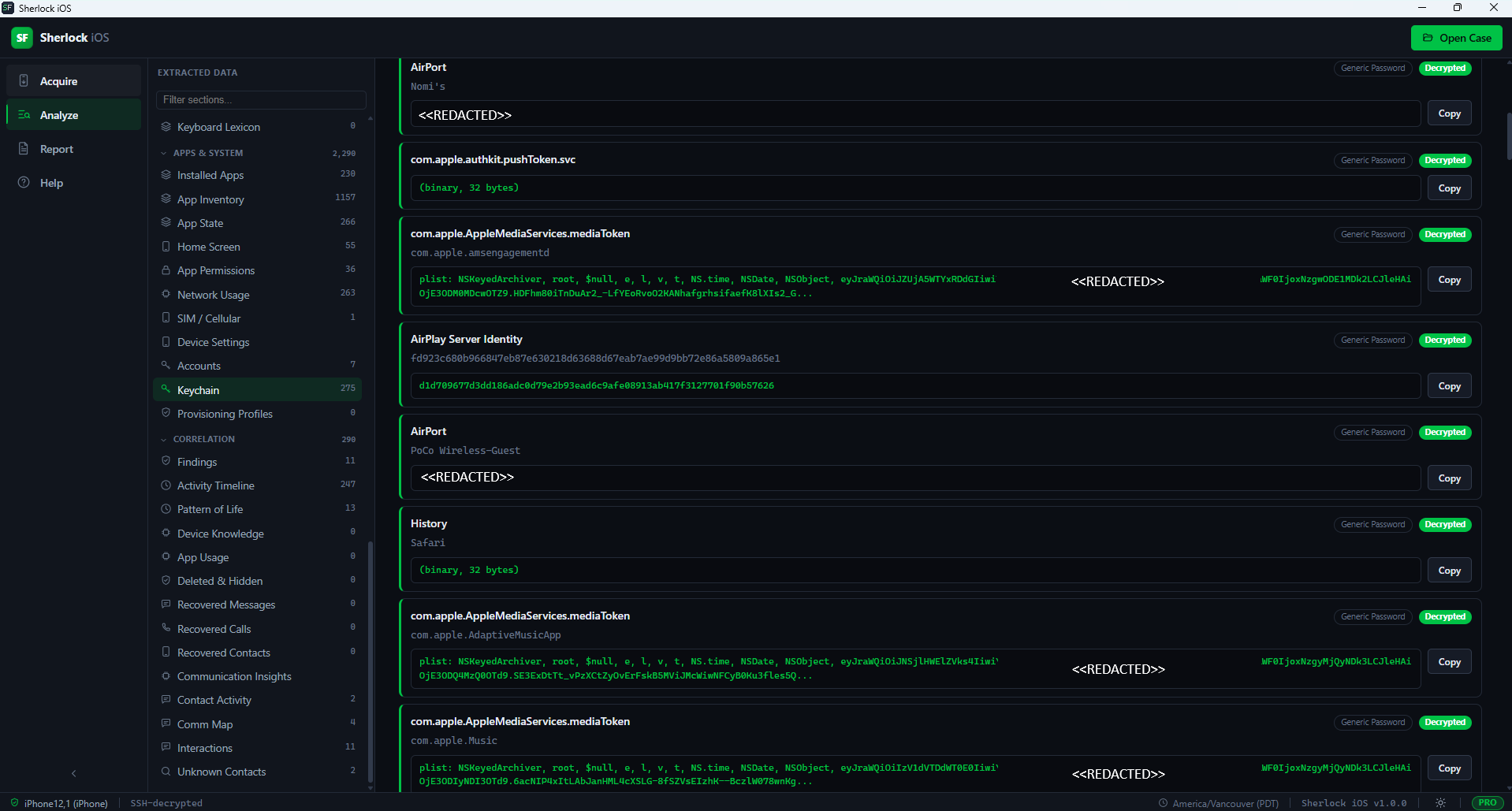
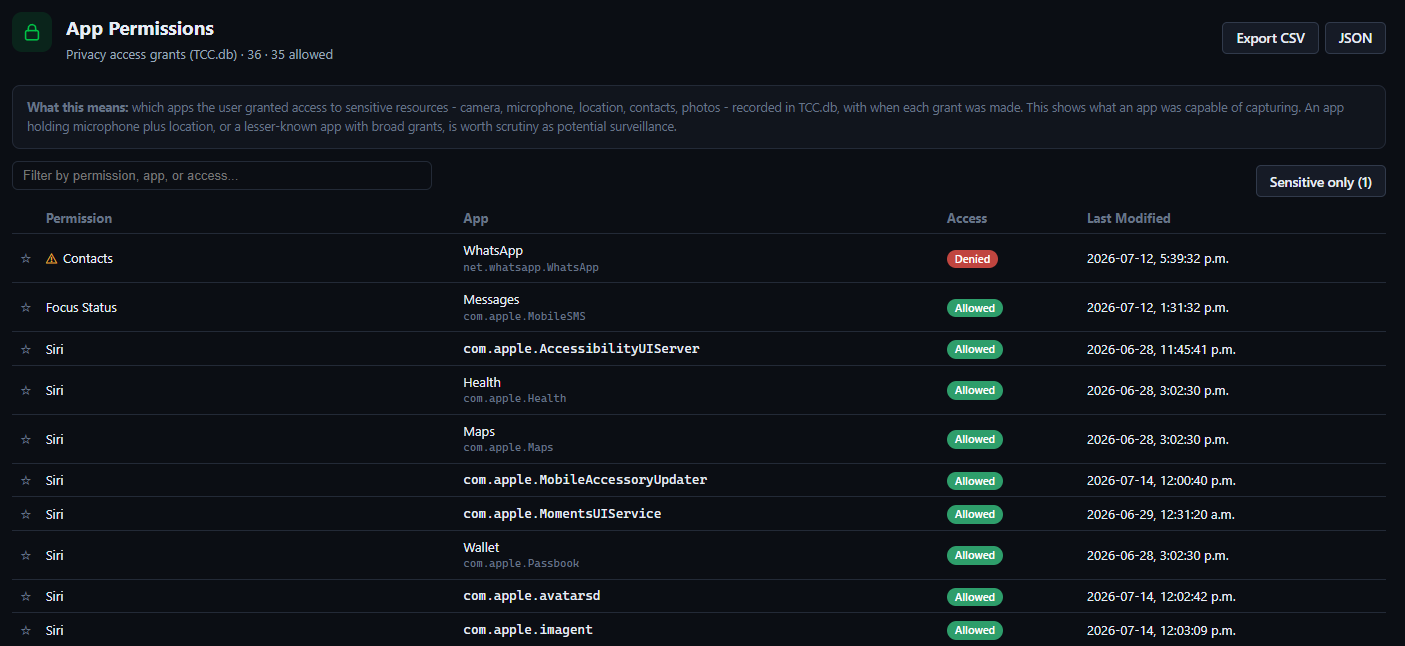
Installed Apps, App Inventory, App State (recently-used and badged), App Permissions (TCC covering camera, microphone and location access), Network Usage, SIM and Cellular identity (phone number, ICCID, IMEI or MEID, carrier), Home Screen layout (dock, pages, folders, widgets - reveals apps hidden in folders), Device Settings (locale, languages, keyboards), Accounts, Keychain (passwords, tokens, Wi-Fi keys), Provisioning Profiles (enterprise, developer, MDM sideload provenance).

Acquisition and Integrity

Overview dashboard, Device Summary, Backup Info, Provenance, Acquisition Integrity, File Manifest (every backup file with size, hashes, metadata, on-demand content preview and SQLite table browser in Forensic Edition). Version 1.2.0 adds an Extraction Provenance view for ingested full-filesystem extractions that merges the UFED .ufd, .ufdx and DeviceInfo.txt descriptors into one record.

New in 1.2.0: Full-Filesystem Depth

The groups below ship in version 1.2.0 and draw on the depth of a full-filesystem extraction: the behavioral logs, on-device intelligence caches and third-party app storage that a logical backup never copies out. Open a Cellebrite UFED full-filesystem extraction in Sherlock to reach them.

Messaging Recovery: Web Caches and Notification Previews

Skype, Facebook Messenger, Google Chat, LINE, imo, MeWe, Gettr, MEGA Chat, Instagram direct messages, TikTok direct messages, Discord and Reddit chat recovered from on-device web caches. A delivered-notifications view recovers per-app banner content (title, subtitle, body, time) that survives in-app deletion. These messages are recovered from web caches and notification previews for apps whose message stores are not directly readable; this is not a full extraction of those apps' message databases.

Whereabouts and Location

Apple Maps history, Find My (the owner's devices, AirTags and accessories and family location-sharing members), significant locations with dwell times, location enter and exit transitions, location permission requests, Waze destinations and named place-visit life events.

Pattern of Life and Device Behavior

Screen Time app usage and daily totals, powerlog app usage, app install and uninstall history with versions, the launch-by-launch app sequence, app intents and Siri actions, Siri analytics, the Focus and Do Not Disturb timeline, Handoff and user-activity events, App Store activity and text-input, audio-route and read-receipt signals from the on-device intelligence streams.

Expanded Media

Hidden and deleted photos, screenshots, photo albums, per-photo camera make and model, edited photos, Apple Podcasts, the music and media library and Now Playing history.

Health and Fitness

Health workouts with GPS routes, heart-rate history and Fitbit GPS tracks and heart rate.

Contacts and Intelligence

Contact frequency, significant contacts, ID-status contact lookups and the entities and message activity learned by the on-device intelligence platform.

Apps, Accessories and Web

Bluetooth and Bluetooth LE device history, Snapchat memories, the Stocks watchlist, AirDrop and sharing history, the Clock app (world clock, timers, stopwatch and alarms) and a cross-app cached-web-request view that surfaces in-app web and API activity from nearly every installed app.

See It At Work

Screenshots from Sherlock Forensics iPhone and iPad Analyzer showing the acquisition workflow, investigation dashboard, communications reconstruction, web and location intelligence and system-artifact extraction. The visual coverage spans all six manifest artifact groups. Click any image for full-size view.

Acquisition Workflow

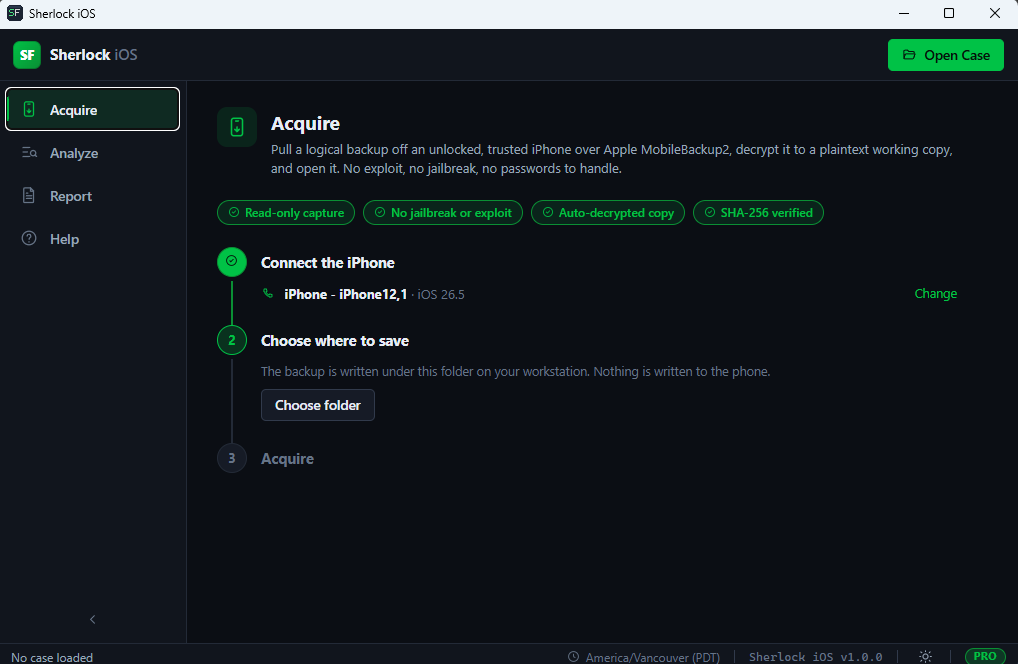
Sherlock Forensics iPhone Analyzer acquisition workflow step 1 - device selection screen showing detected iPhone and iPad devices connected for logical MobileBackup2 acquisition
Step 1: Device Selection
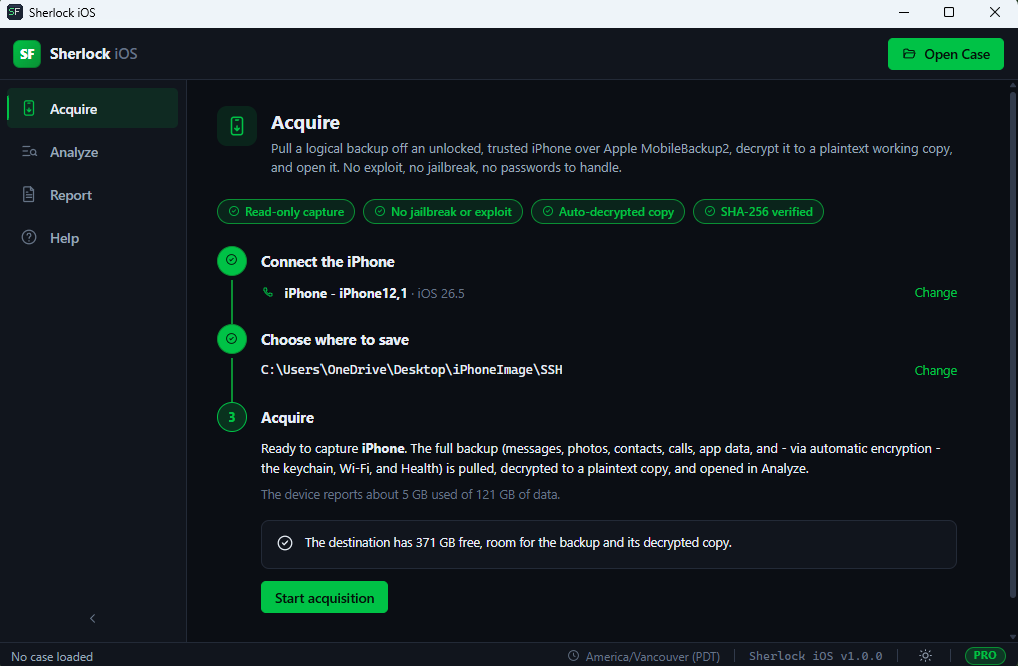
Sherlock Forensics iPhone Analyzer acquisition workflow step 2 - backup configuration screen for encrypted-backup password automation and output destination
Step 2: Backup Configuration
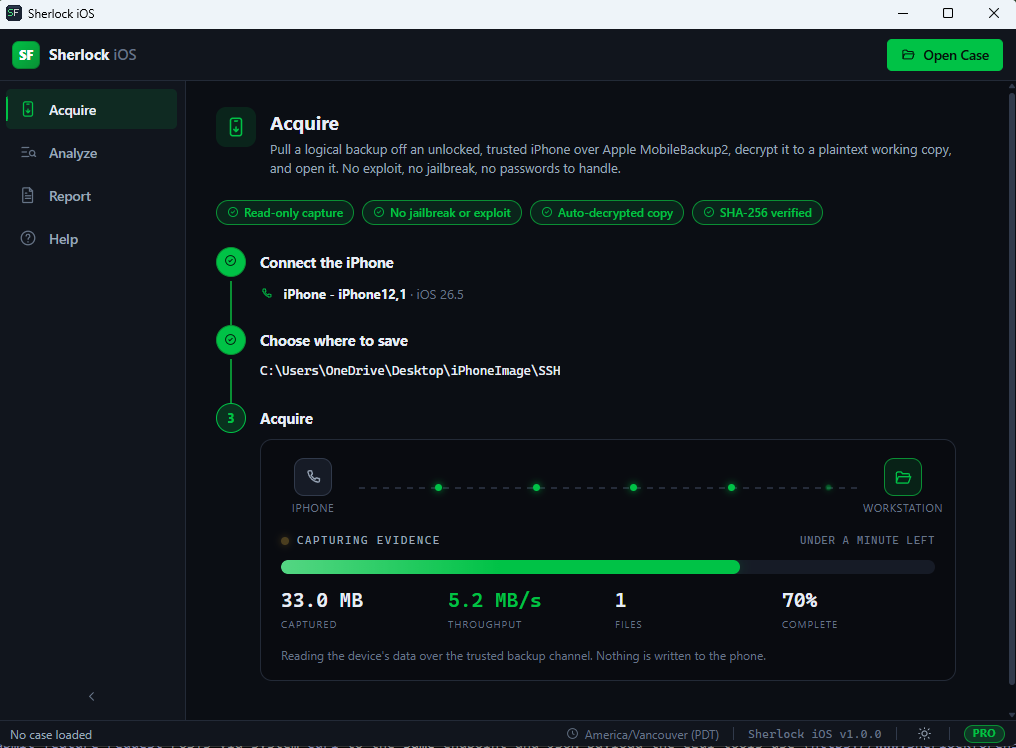
Sherlock Forensics iPhone Analyzer acquisition workflow step 3 - live acquisition progress with byte counter and estimated completion
Step 3: Acquire Data

Investigation Dashboard

Sherlock Forensics iPhone Analyzer dashboard overview showing device summary and artifact counts and acquisition integrity indicators
Dashboard Overview
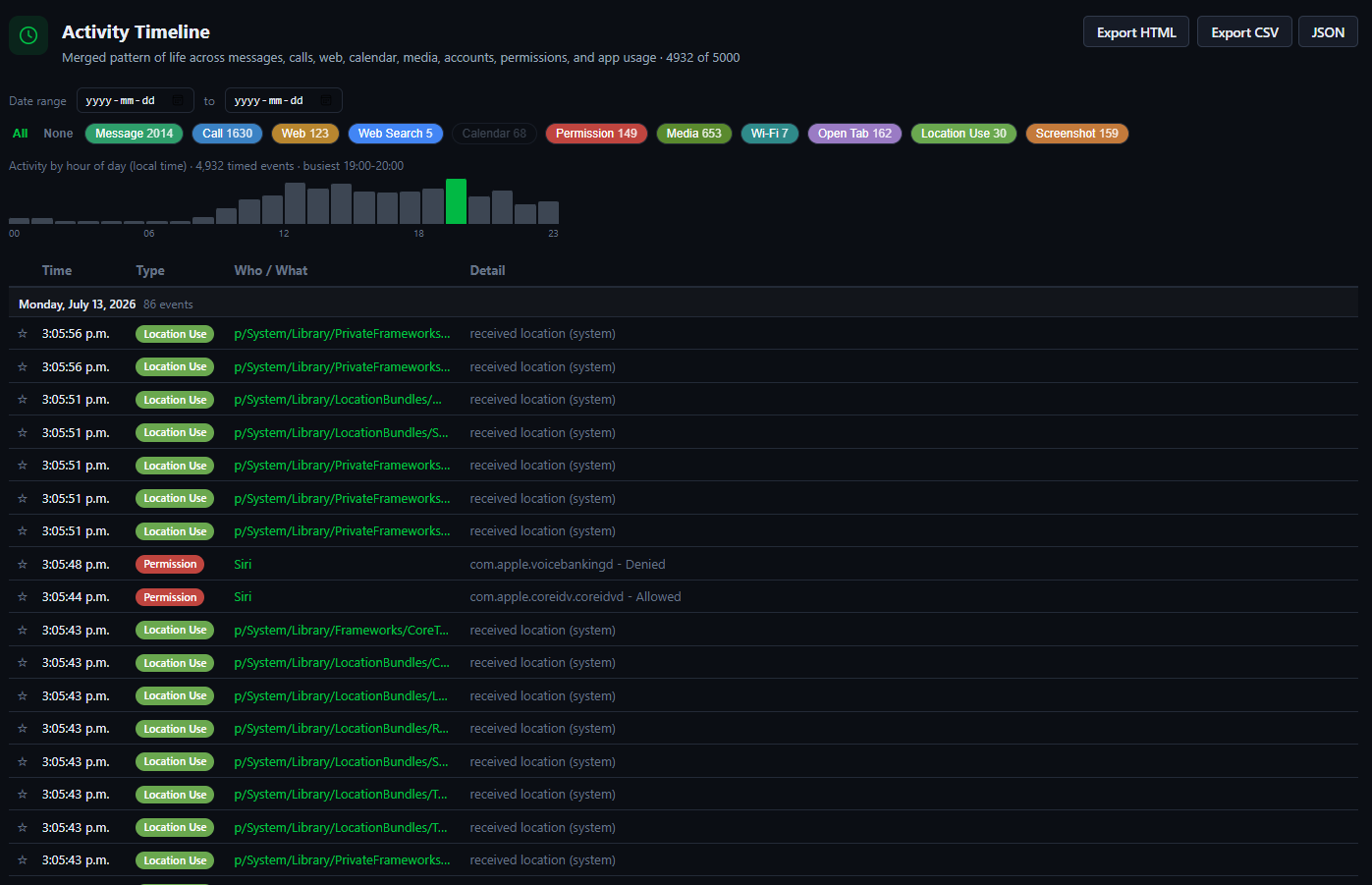
Sherlock Forensics iPhone Analyzer activity timeline showing chronological event correlation across communications, media and web activity
Activity Timeline (chronological event correlation)
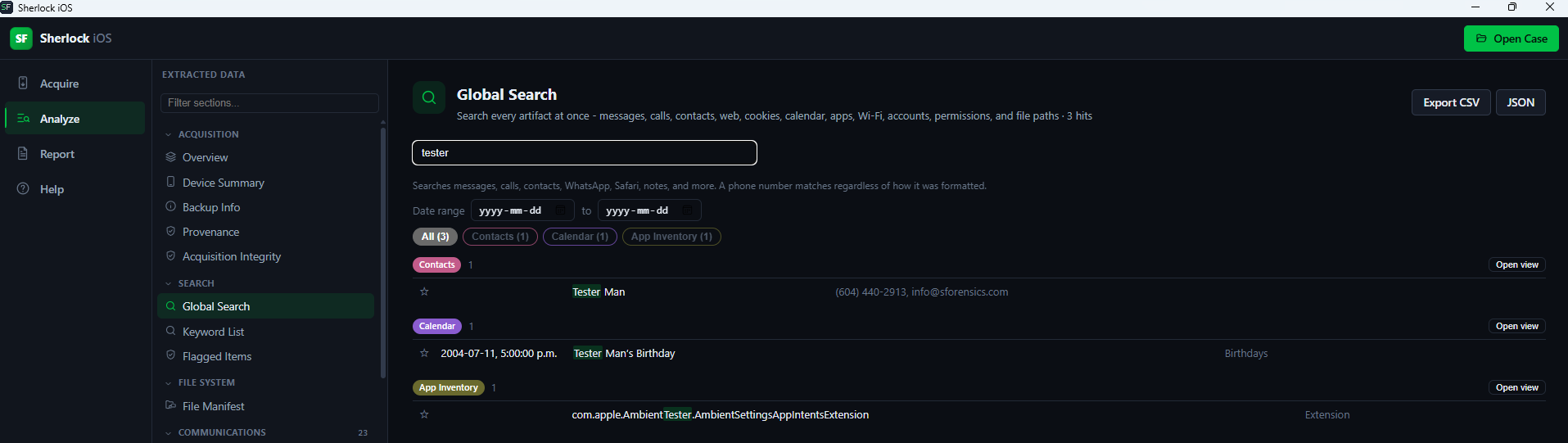
Sherlock Forensics iPhone Analyzer global search interface showing keyword query across every artifact view
Global Search Across All Artifacts
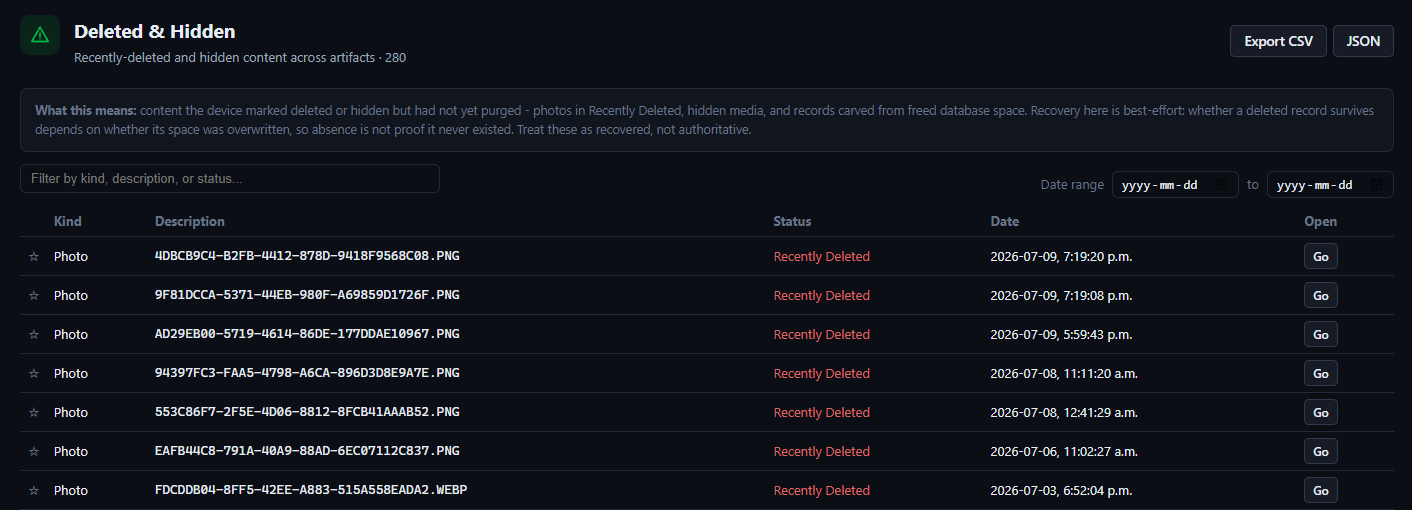
Sherlock Forensics iPhone Analyzer deleted content recovery view surfacing carved SQLite messages and hidden media and deleted contacts
Deleted Content Recovery + Hidden Media

Communications

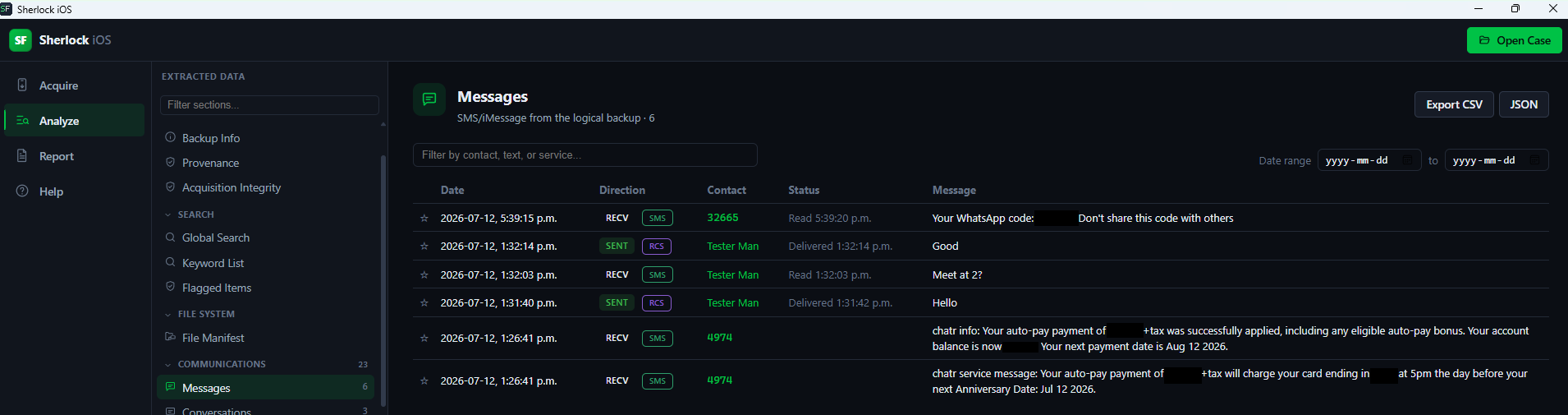
Sherlock Forensics iPhone Analyzer iMessage and SMS messages view with threaded conversation reconstruction and attachment previews
iMessage + SMS View
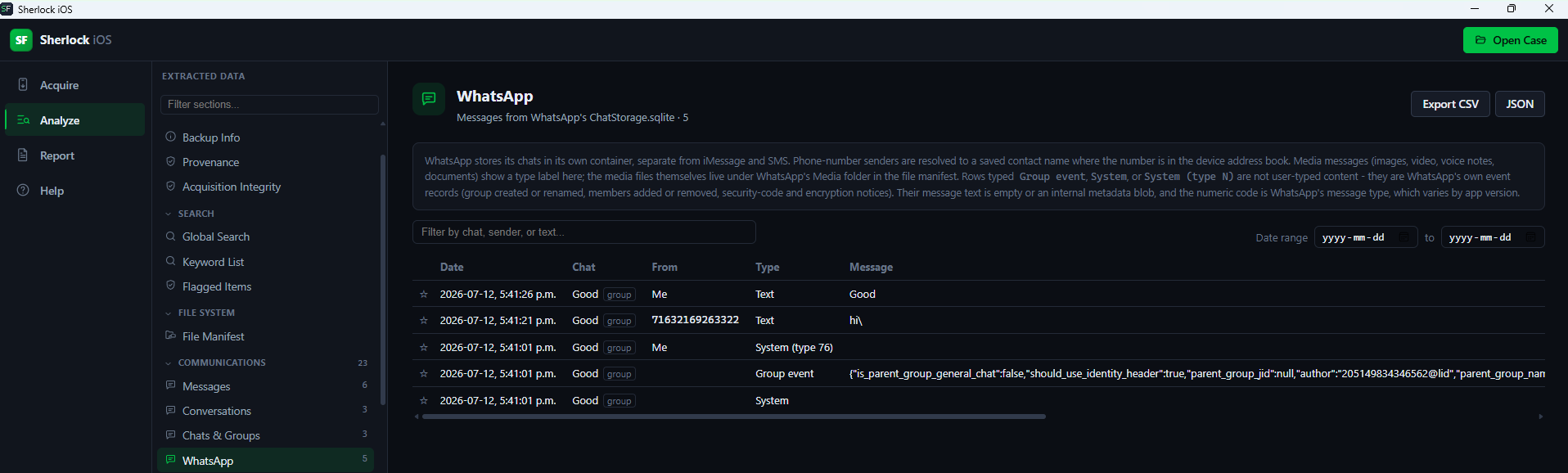
Sherlock Forensics iPhone Analyzer WhatsApp messages and groups view with member, admin and JID reconstruction
WhatsApp Messages + Groups
Sherlock Forensics iPhone Analyzer call history view showing incoming, outgoing and missed calls with contact attribution and duration
Call History with Attribution

Web + Location Intelligence

Sherlock Forensics iPhone Analyzer Safari history, bookmarks and cookies view for iOS web activity reconstruction
Safari History + Bookmarks + Cookies
Sherlock Forensics iPhone Analyzer location intelligence view showing geotagged media pins and Weather saved HOME address on offline map
Location Intelligence (Weather HOME + Geotagged Media)
Sherlock Forensics iPhone Analyzer Bluetooth devices view distinguishing paired versus merely seen devices with trackability metadata
Bluetooth Devices (Paired vs Seen + Trackability)

System Artifacts

Sherlock Forensics iPhone Analyzer Home Screen layout view revealing dock, pages, folder structure and apps hidden in folders
Home Screen Layout (Reveals Apps Hidden in Folders)
Sherlock Forensics iPhone Analyzer keychain extraction view surfacing Wi-Fi passwords, tokens and credentials from decrypted encrypted backup
Keychain Extraction (Wi-Fi Passwords + Tokens + Credentials)
Sherlock Forensics iPhone Analyzer app permissions view showing TCC grants for camera, microphone, location and contacts access
App Permissions (TCC - Camera / Microphone / Location)

Correlation

Correlation and Findings - Automated First-Look Triage

Activity Timeline: every dated event merged chronologically, filterable across every artifact source.

Findings (Investigative Highlights): automated first-look triage surfaces emergency calls, deleted content recovered, privacy-sensitive permission grants, hidden-vault apps, blocked callers, home location, online accounts (subpoena targets) and device attribution (phone number, Apple IDs).

Pattern of Life, Communication Map, Communication Insights (top contacts, callers and domains), Contact Activity, Unknown Contacts (handles messaged that are not saved).

Deleted and recovered: Deleted and Hidden media and Messages, Calls and Contacts carved from freed SQLite database pages. Content the subject deleted on-device but the SQLite freelist has not overwritten is recoverable through standard freed-page carving methodology applied across the iOS artifact set.

Global search and keyword-watchlist search across every artifact at once. Per-view filter, sort, date-range and item flagging (flagged items roll into the report).

Anti-forensic app detection: hidden-vault, encrypted-messaging and anonymity or VPN apps are flagged inline everywhere apps appear (Installed Apps, App Inventory, App State, Home Screen, App Permissions) and surfaced in Findings.

Reporting

Reporting and Export - Forensic Edition

Court-ready HTML report (print to PDF from any browser): case and evidence numbers, agency, examiner, selectable sections grouped by topic, Investigative Highlights, optional evidence-integrity SHA-256 manifest and communication summary, UTC or local time.

CSV or JSON export of any individual artifact view. Export all data as JSON in one action.

Court-Defensibility

Forensic Guarantees

  • 100 percent read-only. The evidence file is never modified.
  • Per-file SHA-256 and a provenance and acquisition manifest (chain of custody).
  • Timezone is explicitly disclosed (all times shown in the examiner workstation zone; iOS does not record the device zone in a logical backup). Tool version is stamped in the manifest.
  • Tolerant parsing that surfaces warnings and never silently hides data. Every view has an error boundary so a data surprise does not blank-screen the tool.

Honest Scope

What Sherlock Forensics iPhone Analyzer Does Not Do

Honest scope disclosure matters more than marketing polish. Sherlock Forensics iPhone Analyzer does not do full-filesystem (FFS) acquisition of any device; the Secure Enclave blocks that path on A12 and newer hardware and FFS acquisition remains the territory of Cellebrite and GrayKey class tooling. What version 1.2.0 adds is analysis: Sherlock reads a full-filesystem extraction that such a tool produced. From a logical backup alone, FFS-only artifacts (knowledgeC pattern-of-life, Significant Locations, deep app-container internals) are not available and show honest empty states rather than fabricating data.

Sherlock Forensics iPhone Analyzer is not a raw disk imager. That is a separate Sherlock tool (Sherlock Disk Imager).

Version 1.2.0 is Windows x64 only. macOS and Linux builds are not currently available.

Compare

Free vs Forensic Edition

FeatureFreeForensic Edition ($599)
Data access per artifact25 percent preview (100-row cap)Unlimited
Screen capture (export screens)-Yes
Open MobileBackup2 backupYesYes
Encrypted-backup decryptionYesYes
All 130+ artifact viewsPreview onlyFull
Deleted-content carvingPreview onlyFull
Anti-forensic app detectionYesYes
Global and keyword-watchlist search-Yes
CSV and JSON export-Yes
Court-ready HTML report-Yes
Raw SQLite table and SQL browser-Yes
File extraction from backup-Yes
Chain of custody manifestYesYes

Requirements

System Requirements

  • Windows 10 version 2004 or later and Windows 11, 64-bit.
  • Microsoft Edge WebView2 runtime (installer auto-installs if missing).
  • All dependencies bundled: HEIC and HEVC decode and ffmpeg. Photos, HEIC and video all work out of the box with no extra installation.

Download

Download and Integrity Verification

File: Sherlock-iOS-1.2.0-x64-setup.exe (NSIS installer, Windows x64, 52.39 MB).

SHA-256: b82a3741b0aa370e5dd99b61b5a4053059b16d59e213639a6d9d43b659178705 (also in the accompanying .sha256 sidecar - verify before installing).

Signed with the SSL.com EV Code Signing certificate (Sherlock Forensics Ltd, Burnaby BC), RFC3161-timestamped. Installer, application executable and bundled ffmpeg are all signed so Windows SmartScreen shows no warning on download or first launch.

b82a3741b0aa370e5dd99b61b5a4053059b16d59e213639a6d9d43b659178705

How to verify:
1. Open PowerShell (right-click Start menu, click Terminal)
2. Run: Get-FileHash .\sherlock-ios-analyzer.exe
3. Compare the output with the hash above. If they match, the file has not been tampered with.

Cellebrite Alternative

iPhone Forensics Without Cellebrite or GrayKey: The $599 Logical Alternative

The enterprise iOS forensic platforms price a solo examiner or a mid-market firm out of the room. Cellebrite, GrayKey, Magnet AXIOM, Elcomsoft iOS Forensic Toolkit and MSAB XRY all bundle physical and full-filesystem acquisition behind annual subscriptions that run from four to five figures a year. For the majority of civil litigation, family law, workplace and defense matters, the evidence that decides the case lives in the logical backup: iMessage and SMS threads, WhatsApp, call history, Safari, photos with capture GPS, locations and the keychain. Sherlock Forensics iPhone and iPad Analyzer reads all of it from an encrypted MobileBackup2 backup at $599 one-time, no subscription.

Sherlock is honest about the trade. It does not bypass a locked device and it does not do full-filesystem imaging of a Secure Enclave device. It needs the passcode and a Trust prompt, the same as Apple's own backup path. What it gives back is enterprise-grade analysis depth on the logical evidence, on a Windows workstation, at a price a single case can justify. Version 1.2.0 adds the other half of the full-filesystem economics: when a case did justify a Cellebrite UFED full-filesystem extraction, that extraction now analyzes in Sherlock at $599 one-time instead of on a second enterprise analysis seat.

CapabilitySherlock iPhone and iPad AnalyzerCellebriteGrayKeyMagnet AXIOMElcomsoft
Price$599 one-time$10,000+ per year$15,000+ per year$4,000+ per year$1,500+ per year
License modelOne-time, ownedAnnual subscriptionAnnual subscriptionAnnual subscriptionAnnual subscription
Runs on WindowsYesYesApplianceYesYes
iOS logical acquisitionYesYesYesYesYes
Encrypted backup decryptionYes, automatedYesYesYesYes
Deleted content carvingYesYesYesYesPartial
Keychain extractionYesYesYesYesYes
Full-filesystem or physical acquisitionNoYesYesYesYes
Passcode or lock bypassNoYesYesNoSome models
Court-ready report with SHA-256YesYesYesYesYes

The read is simple. If your case needs a passcode broken or the raw filesystem carved off a locked handset, you need Cellebrite or GrayKey and their annual contract. If you have a device you can unlock and the logical backup holds the evidence, which is the common case, Sherlock delivers the analysis at a fraction of the lifetime cost.

How To

How to Acquire and Analyze an iPhone or iPad Backup

The whole workflow runs on one Windows workstation, offline, read-only, from connect to court report.

  1. Connect and trust the device. Plug the unlocked iPhone or iPad into the workstation over USB. Unlock it and tap Trust on the Trust This Computer prompt, then enter the passcode. The tool cannot pair with a locked or untrusted device. It does not attempt to bypass either.
  2. Acquire the logical backup. Sherlock drives Apple's MobileBackup2 path. It sets the backup password itself, captures an encrypted backup and streams it to your chosen destination on a read-only channel with a free-space pre-flight that prevents partial-capture failures.
  3. Decrypt offline. The tool unwraps the backup keybag with RFC 3394 and AES on the workstation. No password to configure, no cloud round-trip. The encrypted backup is where the keychain, Health data and Wi-Fi passwords live, which is why the tool always captures one.
  4. Analyze the artifacts. Review the acquisition across 130+ dedicated views: messages, calls, WhatsApp, Safari, photos with GPS, locations, keychain, app permissions and the rest. Carve deleted messages, calls and contacts from freed SQLite pages. Run global and keyword-watchlist search and read the automated Findings.
  5. Export the court-ready report. Produce an HTML report with case and evidence numbers, examiner details, selected sections, an optional SHA-256 evidence-integrity manifest and a chain-of-custody provenance record. Print to PDF from any browser. Export any view to CSV or JSON.

Who Uses It

Who Uses Sherlock iPhone and iPad Analyzer

Civil litigation

Counsel and litigation-support teams pull iMessage threads, call logs, Safari history and geotagged photos from a party's own device under a preservation order or consent, at a cost that fits a case budget rather than an annual platform contract.

Family law

Custody, marital-misconduct and harassment matters turn on messages, locations and contacts. Sherlock reconstructs threaded conversations and maps geotagged media, with a court-ready report and per-artifact SHA-256 for the file.

Workplace and insider investigations

HR and corporate investigators acquire a company-owned or consented iPhone during a policy, harassment or data-exfiltration inquiry. App inventory, permissions, WhatsApp and anti-forensic app detection surface the shape of the activity without a five-figure tool spend.

Criminal defense

Defense examiners review the same logical evidence the prosecution relies on, verify deleted-content recovery against the SQLite freelist and document the acquisition methodology for a Daubert challenge, all from a one-time-licensed tool.

Law enforcement

Investigators with a warrant and a device they can unlock get a defensible logical acquisition and a full analysis surface on a standard Windows workstation, with the honest-scope disclosure that full-filesystem artifacts blocked by the Secure Enclave show empty rather than fabricated.

Court-Ready

Chain of Custody and Court-Ready iPhone Evidence

Sherlock iPhone and iPad Analyzer is built by CISSP, ISSAP and ISSMP certified forensic examiners with 20 years of court-defensible digital forensics. Every acquisition is read-only and the evidence file is never modified. Each backup file carries a per-file SHA-256 in a provenance and acquisition manifest that documents chain of custody from the device forward.

The report format states its own scope. Times are shown in the examiner workstation timezone and that fact is disclosed on the face of the report, because iOS does not record the device timezone in a logical backup. The tool version is stamped in the manifest. Parsing is tolerant and surfaces warnings rather than silently dropping data, so an examiner can testify to exactly what the tool did and did not read. Admissibility depends on jurisdiction and on the examiner following proper evidence-handling procedure. The report documents what courts typically require for mobile evidence.

Acquisition Types

Logical vs Physical iPhone Acquisition: What Each One Reaches

Buyers researching iPhone forensics run into three acquisition types. The difference decides which tool a case needs. Understanding them is the difference between buying the right tool and overpaying for capability a matter never uses.

Logical acquisition copies the data Apple exposes through the MobileBackup2 backup path: messages, call history, contacts, Safari, photos, app data from an encrypted backup and the keychain. It needs a device you can unlock and a Trust prompt. It does not modify the device and it produces court-defensible evidence for the overwhelming majority of civil, family, workplace and defense matters. This is what Sherlock Forensics iPhone and iPad Analyzer does. It is what most cases actually turn on.

Full-filesystem acquisition reaches deeper into the operating system: knowledgeC pattern-of-life, Significant Locations, app-container internals and system databases that never enter a backup. On A12 and newer iPhones the Secure Enclave blocks this path unless the passcode is known and a supported exploit chain is available. Cellebrite, GrayKey, Magnet AXIOM and Elcomsoft compete here. Sherlock does not compete in FFS acquisition. What version 1.2.0 adds is the analysis half: Sherlock opens a full-filesystem extraction one of those tools produced and runs its full parser suite against it. From a logical backup alone, those FFS-only artifacts show as honest empty states rather than fabricated data.

Physical acquisition images the raw storage and is largely historical on modern encrypted iPhones because the flash is encrypted at rest. It survives mostly on legacy hardware.

The practical takeaway is that logical acquisition answers most questions a case asks of an iPhone, at a fraction of the cost of the platforms built for the harder physical and full-filesystem paths. A firm that handles the occasional locked-device case can send that one out to a lab and keep the routine logical work in-house on a one-time-licensed tool. Sherlock is built for exactly that in-house logical workload, with the honesty to tell you when a case has crossed into territory it does not cover.

Evidence Scope

What an Encrypted iPhone Backup Actually Contains

The single most important fact for iPhone evidence is that an encrypted iOS backup contains substantially more than an unencrypted one. This is Apple's design, not a tool trick. When a backup is encrypted, iOS includes the keychain, Health and Activity data, Wi-Fi passwords, saved website credentials and call history that it deliberately omits from an unencrypted backup. Sherlock always captures an encrypted backup for this reason, sets the password itself and decrypts it offline, so an examiner gets the fuller evidence set without configuring anything.

Inside that encrypted backup, the evidence that decides cases is genuinely present. iMessage and SMS reconstruct as threaded conversations with attachments. WhatsApp messages and group metadata are there, which is a real difference from a non-rooted Android device where the WhatsApp database sits locked in app-private storage. Safari history, cookies, bookmarks and open tabs reconstruct the subject's web activity. Photos carry their capture GPS and EXIF. The keychain surfaces Wi-Fi passwords and stored tokens. Locations map from geotagged media, shared pins and the Weather app's saved home address.

The honest boundary is worth stating as plainly as the capability. Everything above depends on a successful backup of a device you can unlock and have authority to acquire. Data the subject never backed up is not in the backup. Content deleted long enough ago that iOS has purged it or that the SQLite freelist has overwritten is gone rather than recoverable. iCloud-only data that never synced to the device is out of scope and requires credentials or legal process through a different method. Sherlock reads what the acquired backup carries accurately. Its report states the scope of what it read so an examiner can testify to it without overreaching.

Deleted Data

Deleted iPhone Data: What Survives and What Does Not

The most common question in an iPhone case is whether deleted data can be recovered. The honest answer is that some can and some cannot. A credible tool tells you which rather than promising everything. Sherlock Forensics iPhone and iPad Analyzer applies standard freed-page carving to the SQLite databases inside a logical backup. When a subject deletes a message, a call or a contact, iOS marks that record's database page as free rather than immediately erasing it. Until the database writes new data over that freed page, the deleted record is still physically present and Sherlock carves it back out for review.

What survives therefore depends on how heavily the device was used after the deletion. A message deleted an hour before acquisition on a lightly used phone is very likely recoverable. The same message deleted months ago on a busy phone has probably been overwritten and is gone. This is physics, not a tool limitation. It applies equally to Cellebrite, Magnet AXIOM and every other forensic tool that carves the same freed pages. What separates a defensible tool is that it recovers what is actually there and reports honestly on the rest, rather than fabricating records to look thorough.

Sherlock carves deleted messages, calls and contacts across the iOS artifact set, surfaces Recently Deleted and Hidden media that remains in the backup and recovers deleted Safari history from freed pages where it survives. Recovered items are flagged as recovered in the interface and in the court report, so an examiner can distinguish live records from carved ones on the stand. That distinction matters more to a case outcome than a bigger recovery number would.

Questions

iPhone and iPad Analyzer FAQ

Does Sherlock Forensics iPhone and iPad Analyzer require a jailbreak?
No. The tool uses the MobileBackup2 logical acquisition path, which works on any iPhone or iPad you can unlock. No jailbreak, no exploit, no elevated device access. iOS decrypts the data on-device as it is copied out, so the result is already plaintext.
Can Sherlock iPhone and iPad Analyzer decrypt an encrypted backup?
Yes. The tool sets the backup password itself before acquisition, then decrypts offline using RFC 3394 keybag unwrap and AES. Operators do not configure a password. Encrypted backups contain more data than unencrypted ones, including the keychain, Health data and Wi-Fi passwords, which is why the tool automates the encryption flip.
What does the free tier include?
The free tier opens a case and previews every artifact: the first 25 percent, capped at 100 rows per view, with file metadata and hashes. It does not include export, global search, the court report, the raw SQLite browser or file extraction. Those unlock in the Forensic Edition.
How do I extract iMessages from an iPhone forensically?
Acquire an encrypted MobileBackup2 backup from a device you can unlock, then open it in Sherlock. The Messages view reconstructs iMessage and SMS as threaded conversations with attachments. Deleted messages are carved from freed SQLite pages where the freelist has not overwritten them. Message content depends on a successful backup of the device you have consent or authority to acquire.
How do I decrypt an encrypted iPhone backup?
Sherlock handles it end to end. It sets the backup password during acquisition, then unwraps the backup keybag with RFC 3394 and AES on the workstation, fully offline. You do not supply or configure a password. If a device already has a backup password you do not know, the tool sets its own on a fresh acquisition rather than attempting to crack the existing one.
Can I recover deleted iPhone messages, calls or contacts?
Sometimes. Sherlock carves deleted messages, calls and contacts from freed SQLite database pages. Records the subject deleted on-device that the SQLite freelist has not yet overwritten are recoverable. Records already overwritten are gone. This is standard freed-page carving applied across the iOS artifact set, not a guarantee of universal deleted-data recovery.
How do I extract WhatsApp from an iPhone?
WhatsApp message data is included in an encrypted iOS backup, so Sherlock reconstructs WhatsApp messages and groups, including members, admins and JIDs, from the acquired backup. This is a genuine difference from non-rooted Android, where the WhatsApp database sits in app-private storage. On iOS the encrypted backup carries it, provided WhatsApp was included in the backup.
Can Sherlock extract the iPhone keychain?
Yes, from an encrypted backup. The keychain, including Wi-Fi passwords, tokens and stored credentials, is only present when the backup is encrypted, which is why the tool always captures an encrypted backup. Sherlock decrypts the keychain offline and presents it as a searchable, exportable view.
Can Sherlock extract iCloud data from an iPhone?
No. Sherlock reads a local MobileBackup2 backup captured over USB from a device you can unlock. It does not reach into iCloud. iCloud acquisition requires the account credentials or legal process and a different acquisition method. Sherlock does not imply otherwise. What it analyzes is the local backup on your workstation.
Is Sherlock a Cellebrite alternative for iPhone forensics?
For logical iOS evidence, yes. Sherlock delivers comparable analysis depth on an encrypted MobileBackup2 backup at $599 one-time versus Cellebrite's multi-thousand-dollar annual subscription. The honest limit is that Cellebrite also does full-filesystem and passcode-bypass acquisition that Sherlock does not. If your case needs the logical backup analyzed, Sherlock covers it at a fraction of the lifetime cost. New in 1.2.0: Sherlock also analyzes the full-filesystem extraction Cellebrite UFED produces, so the deep analysis runs in Sherlock at $599 one-time instead of on a second enterprise analysis seat.
Is Sherlock a GrayKey alternative?
Partly. GrayKey's value is brute-forcing a locked passcode and pulling a full filesystem, which Sherlock does not do. Sherlock needs a device you can unlock. Once you have that, Sherlock analyzes the logical backup at $599 one-time rather than GrayKey's five-figure annual contract. They solve different halves of the problem: GrayKey gets into a locked phone, Sherlock analyzes an unlockable one.
Can Sherlock open a Cellebrite UFED full-filesystem extraction?
Yes, new in 1.2.0. Point Sherlock at an extracted Cellebrite UFED full-filesystem tree and it opens it the same way it opens a backup: it detects the extraction, resolves every artifact at its real on-device path and runs the full parser suite. An extraction-provenance view merges the UFED .ufd, .ufdx and DeviceInfo.txt descriptors into one record with the full descriptor carried verbatim. Sherlock does not itself acquire a full-filesystem extraction; it analyzes the one your acquisition tool produced.
Can Sherlock extract iPhone location history?
Yes, within the logical backup's scope. Sherlock maps geotagged media, shared pins, the Weather app's saved locations including the device owner home address and locationd client access on an offline map. Full Significant Locations lives in the full filesystem behind the Secure Enclave, so a logical backup shows an honest empty state rather than fabricated data. Open a Cellebrite UFED full-filesystem extraction in Sherlock 1.2.0 and significant locations parse with dwell times, alongside Apple Maps history, Find My and Waze destinations.
What iOS versions are supported?
The MobileBackup2 logical path is universal across modern iPhone and iPad hardware and iOS versions. Full-filesystem acquisition is blocked by the Secure Enclave on A12 and newer devices, so FFS-only artifacts show honest empty states from a logical backup. Sherlock 1.2.0 analyzes a full-filesystem extraction produced by Cellebrite UFED class tooling, which populates those views. Logical acquisition and the full analysis surface work regardless of the iOS version, as long as you can unlock the device and tap Trust.
What is the difference between an encrypted and an unencrypted backup?
An encrypted backup contains more evidence: the keychain, Health data, Wi-Fi passwords and saved credentials that Apple omits from an unencrypted backup. Sherlock always captures an encrypted backup for this reason, setting the password itself and decrypting offline, so you get the fuller data set without configuring anything.
Does Sherlock support iPad?
Yes. Sherlock Forensics iPhone and iPad Analyzer treats iPad the same as iPhone. Any iPad you can unlock and trust supports the MobileBackup2 logical acquisition and the full analysis surface, including messages, Safari, photos with capture GPS, app inventory and the keychain from an encrypted backup.
Can Sherlock recover deleted photos from an iPhone?
It surfaces Recently Deleted media that is still present in the backup and flags Hidden media. Photos the subject deleted that iOS has already purged from the backup are not recoverable by a logical acquisition. Media that remains, including geotagged photos with capture GPS and EXIF, is fully reviewable and exportable.
Can Sherlock extract Safari history and cookies?
Yes. Sherlock reconstructs Safari history, web searches, visited domains, shared links, open tabs, bookmarks, cookies and downloads from the logical backup. Deleted Safari history that survives in freed SQLite pages is carved where the freelist has not overwritten it.
Can it recover deleted messages, calls or contacts?
Yes, subject to survival. Sherlock carves deleted messages, calls and contacts from freed SQLite database pages. Content the subject deleted on-device that the freelist has not overwritten is surfaced for review through standard freed-page carving methodology applied across the iOS artifact set.
Does it work on A12, A13 or newer devices?
Yes for logical acquisition, which is universal across iPhone and iPad hardware. Full-filesystem acquisition is blocked by the Secure Enclave on A12 and newer, so FFS-only artifacts such as knowledgeC pattern-of-life and Significant Locations and deep app-container internals show honest empty states from a logical backup rather than fabricated data. Sherlock does not acquire a full filesystem from any device; as of 1.2.0 it analyzes a full-filesystem extraction that Cellebrite UFED class tooling produced.
Is the installer signed?
Yes. The installer, the application executable and the bundled ffmpeg are all signed with the SSL.com EV Code Signing certificate (Sherlock Forensics Ltd, Burnaby BC), RFC3161-timestamped. Windows SmartScreen shows no warning on download or first launch because all three components carry the EV chain.
Can it detect hidden vault apps?
Yes. Anti-forensic app detection flags hidden-vault apps, encrypted-messaging apps and anonymity or VPN apps inline everywhere apps appear, across Installed Apps, App Inventory, App State, Home Screen and App Permissions. It surfaces them in the Findings view.
Is the $599 price a subscription?
No. The $599 USD Forensic Edition license is a one-time payment. No subscriptions and no recurring charges. You own the license permanently with free updates included. One-time pricing is a genuine differentiator versus Cellebrite, GrayKey and Magnet AXIOM, which charge annual subscriptions in the four to five figure range.
What operating systems does Sherlock iPhone and iPad Analyzer support?
Windows 10 version 2004 or later and Windows 11, 64-bit. The Microsoft Edge WebView2 runtime is required and the installer auto-installs it if missing. HEIC decoders and ffmpeg are bundled so photos, HEIC images and video work out of the box. macOS and Linux are not currently supported.
Is iPhone evidence from Sherlock court-admissible?
Sherlock produces court-ready HTML reports with per-artifact SHA-256, chain-of-custody provenance, examiner identification and disclosed acquisition methodology, built by CISSP, ISSAP and ISSMP certified examiners with 20 years of courtroom experience. Admissibility depends on jurisdiction and on the examiner following proper evidence handling. The report documents what courts typically require for mobile evidence.
Can I analyze an existing iTunes or Finder backup without the device?
Yes. Sherlock opens any MobileBackup2 backup folder, so an existing local backup made by iTunes or Finder analyzes without the device present. If that backup is encrypted you need its backup password. An unencrypted backup opens directly, though it omits the keychain and Health data that only an encrypted backup carries.

New in 1.1.0

New in Version 1.1.0

Photo Moments as Whereabouts Evidence

The Photos app builds its own titled clusters of place and time. Sherlock now surfaces them as a whereabouts summary on an offline map, searchable and sortable, exportable to CSV, KML and GeoJSON so a moment plots in Google Earth or GIS. Each cluster feeds the activity timeline, global search, the Overview dashboard and the court report, so a photo cluster reads as a dated whereabouts event everywhere it appears.

Known-File Search

Match an external hash set against the evidence to find which files are present and where. Sherlock accepts a SHA-256 or SHA-1 list, including NSRL, Project VIC or a plain sha256sum file. It reports malformed entries rather than silently dropping them, so a hash-matching pass is auditable end to end.

Duplicate Files

Detect byte-identical files across the backup, grouped by content, with reclaimable-space totals. This surfaces cross-app data flow, planted copies and review-reduction opportunities in one view.

Preservation and Subpoena Targets

A deduplicated, priority-ranked list of the off-device data holders an examiner should serve preservation letters on, iCloud, online accounts and AI providers among them, one recipient per provider. It turns the artifacts into an action list for the next step of the case.

Antivirus Helper for Evidence Integrity

Windows Defender scans every file the analyzer opens before the read returns. That serializes file access and slows indexing. It can also lock, quarantine or alter an evidence file mid-view, even though Sherlock only ever reads evidence and never executes it. The Overview now offers a one-click helper that excludes the case folder from Defender real-time scanning, with your approval. It is Windows-only, runs elevated, is fully reversible the same way and carries the case path inside an encoded command rather than on a command line. The result is faster review and an evidence file that Defender cannot touch mid-examination.

Sharper Message Accuracy

Tapback reactions are now distinguished from typed messages in the timeline, the thread views and the message counts, so a reaction is never read as an original communication. Group-membership events such as participant and group-name changes are labeled rather than rendered blank. Roughly ninety sidebar nodes carry an item-count badge for at-a-glance triage. A blank badge means the node is not a counted list and a zero means counted and empty, so a count is never a fabricated zero.

Changelog

Release History

v1.2.0 (2026-07-21) - Full-filesystem extraction analysis and 50+ new artifact views

  • Cellebrite UFED full-filesystem extraction analysis. Point Sherlock at an extracted UFED full-filesystem tree and it opens it the same way it opens a backup: it detects the extraction, resolves every artifact at its real on-device path and runs the full parser suite. Sherlock analyzes the extraction; acquiring it remains the acquisition tool's job.
  • Extraction provenance. The UFED .ufd, .ufdx and DeviceInfo.txt descriptors merge into one record: device model, iOS build, examiner machine, acquisition tool and version, start and end times and the per-dump SHA-256 and HMAC the acquisition tool recorded, with the full descriptor carried verbatim.
  • More than fifty new artifact views. Messaging recovered from web caches and delivered-notification previews (Skype, Facebook Messenger, Instagram and TikTok direct messages, Discord and others), whereabouts views including significant locations with dwell times and Find My and Apple Maps history, pattern-of-life views from Screen Time and powerlog and app install and launch history, hidden and deleted photos, health workouts with GPS routes, contact frequency intelligence, Bluetooth device history, Snapchat memories, AirDrop history and a cross-app cached-web-request view.
  • Validation. Parser output validated against the Josh Hickman iOS 17.3 public reference image, the standard DFIR test image.

EV code-signed binary (Sherlock Forensics Ltd, SSL.com EV Code Signing, RFC3161-timestamped). SHA-256: b82a3741b0aa370e5dd99b61b5a4053059b16d59e213639a6d9d43b659178705.

v1.1.2 (2026-07-20) - Acquisition safety and usability

  • Show and confirm the backup password. The Acquire screen now shows the backup password Sherlock will set on the device and requires the operator to confirm they have recorded it before the capture can start. That password is the only key to the encrypted evidence and any later backup, so recording it up front means a lost key store can never strand a device.
  • Synced-destination guard. A pre-flight check detects a destination inside a cloud-sync folder such as OneDrive, Dropbox, Google Drive or iCloud Drive and blocks Start until a local folder is chosen, with an override for a false positive. Cloud sync grabs each backup file as it is written and fails the capture, so this heads it off before it starts.
  • Accurate media-folder sizing. A loose media folder reports the size of its media files, consistent with the media count, rather than the whole tree, so there are no more larger-than-the-device numbers, with leftover non-media data surfaced as a warning.

EV code-signed binary (Sherlock Forensics Ltd, SSL.com EV Code Signing, RFC3161-timestamped). SHA-256: 6881c2b3ce4eea61a7985ed5b51170032de8ea19e04f99d7e6fcd532d5ecef49.

v1.1.1 (2026-07-20) - Acquisition-safety hardening

  • Encrypted-acquisition password safety. The auto-generated backup password is now saved to Sherlock's key store and confirmed on disk before it is ever set on the device. If it cannot be saved the acquisition aborts and the device is left untouched, so a run can never leave a device behind a password the tool did not record.
  • Clearer Error 104 guidance. The message now leads with the most common cause, a destination that is rejecting writes such as OneDrive or another cloud sync, real-time antivirus or a flaky destination or USB drive. It detects a re-write storm and recommends a local non-synced folder, with device lock kept as a secondary possibility.
  • Accurate partial sizing. A failed backup's preserved partial is now sized from what actually landed on disk, so the reported size never exceeds what the device holds.

EV code-signed binary (Sherlock Forensics Ltd, SSL.com EV Code Signing, RFC3161-timestamped). SHA-256: 30e39926302d4f3ee148673bac9b1d7ee36006b4f4f39b0a2206013fcd930ace.

v1.1.0 (2026-07-18) - New parsers, cross-surface correlation, evidence-integrity audit

  • Photo Moments. The Photos app titled place-and-time clusters surface as a whereabouts summary on an offline map, with search, sort and CSV, KML and GeoJSON export, feeding the timeline, global search, Overview and court report.
  • Known-File Search. Match a SHA-256 or SHA-1 hash set (NSRL, Project VIC or a sha256sum list) against the evidence to find which files are present and where, with malformed entries reported rather than silently dropped.
  • Duplicate Files. Byte-identical files grouped by content with reclaimable-space totals.
  • Preservation and Subpoena Targets. A deduplicated, priority-ranked list of off-device data holders (iCloud, online accounts, AI providers) to serve preservation letters on.
  • Roughly 130 artifact views across communications, media, web and location, personal, apps and system, acquisition and integrity.
  • Message accuracy. Tapback reactions are distinguished from typed messages everywhere and excluded from counts, group-membership events are labeled and roughly ninety sidebar nodes carry item-count badges where a blank badge is not-a-list and zero is counted-and-empty.
  • Exports and reporting. KML and GeoJSON for Photo Moments, iCal for calendar and vCard for contacts, per-view CSV for every tabular view and the Preservation Targets, Duplicate Files and Photo Moments sections added to the court report.
  • Antivirus helper. A one-click, reversible, approval-gated Windows Defender exclusion for the case folder that stops on-access scans from serializing reads or locking, quarantining or altering evidence the tool only ever reads.
  • Evidence-integrity audit. Every core parser was cross-validated against real device data and locked with regression tests, the provenance manifest uses a stable externally reproducible SHA-256 line and the URL-scheme allowlist, CSV formula-injection guard and JSON-injection escaping are locked with tests.

EV code-signed binary (Sherlock Forensics Ltd, SSL.com EV Code Signing, RFC3161-timestamped). SHA-256: 0d4739d3051b241f6caf29663870efbadb5e9b875e78cd574f95c485de609c5b.

v1.0.0 (2026-07-14) - Initial Release

  • Windows forensic workstation for iPhone and iPad evidence.
  • MobileBackup2 logical acquisition with encrypted-backup offline decryption.
  • 130+ artifact views across six manifest groups: Communications; Media; Web and Location; Personal; Apps and System; Acquisition and Integrity.
  • Findings automated first-look triage and Activity Timeline and Pattern of Life and Communication Map and anti-forensic app detection.
  • Deleted-content carving from freed SQLite database pages (Messages and Calls and Contacts).
  • Court-ready HTML report and CSV and JSON export and raw SQLite browser (Forensic Edition).
  • Read-only acquisition and per-file SHA-256 and provenance manifest.
  • SSL.com EV Code Signing on installer and application executable and bundled ffmpeg. No SmartScreen warning.

Checkout - iPhone Analyzer Forensic Edition ($599)

$599.00 USD. One-time payment. License key delivered to your email.

Secure via Stripe One-time purchase No subscription

Download

Your email is optional. If you provide it, we send 3 product introduction emails over the next 2 weeks. No long-term marketing. No data sharing. Skip the field and download directly.