Sherlock iOS Analyzer 1.0.0 · New Release

Windows Forensic Workstation for iPhone and iPad Evidence

Sherlock Forensics iOS Analyzer acquires plus analyzes iPhone or iPad logical MobileBackup2 backups on Windows. Read-only, court-defensible, fully offline. 70+ artifact views across communications, media, web, location, personal, apps plus system. HEIC plus HEVC decode built in. Encrypted-backup offline decryption via RFC 3394 keybag unwrap plus AES. Installer, application executable plus bundled ffmpeg are all EV signed (SSL.com), so Windows SmartScreen shows no warning.

Free tier: preview 25 percent of artifacts (capped at 100 rows per view). Forensic Edition ($599 one-time): unlimited data plus global search plus CSV plus JSON export plus court-ready HTML report plus raw SQLite browser plus file extraction plus screen capture.
Before you buy - device requirements. Sherlock iOS Analyzer uses Apple's official MobileBackup2 logical acquisition path. To use it on a device, you must have (1) the device passcode or PIN, (2) the ability to physically connect the device to your Windows forensic workstation via USB, plus (3) the ability to unlock the device and tap "Trust" on the "Trust This Computer" prompt. Sherlock iOS Analyzer does NOT bypass lock codes plus does not jailbreak the device plus does not exploit iOS security. Locked devices without a passcode plus untrusted devices are not supported by this tool or by any logical acquisition method.

SSL.com EV signed · SHA-256 verifiable · No SmartScreen warning

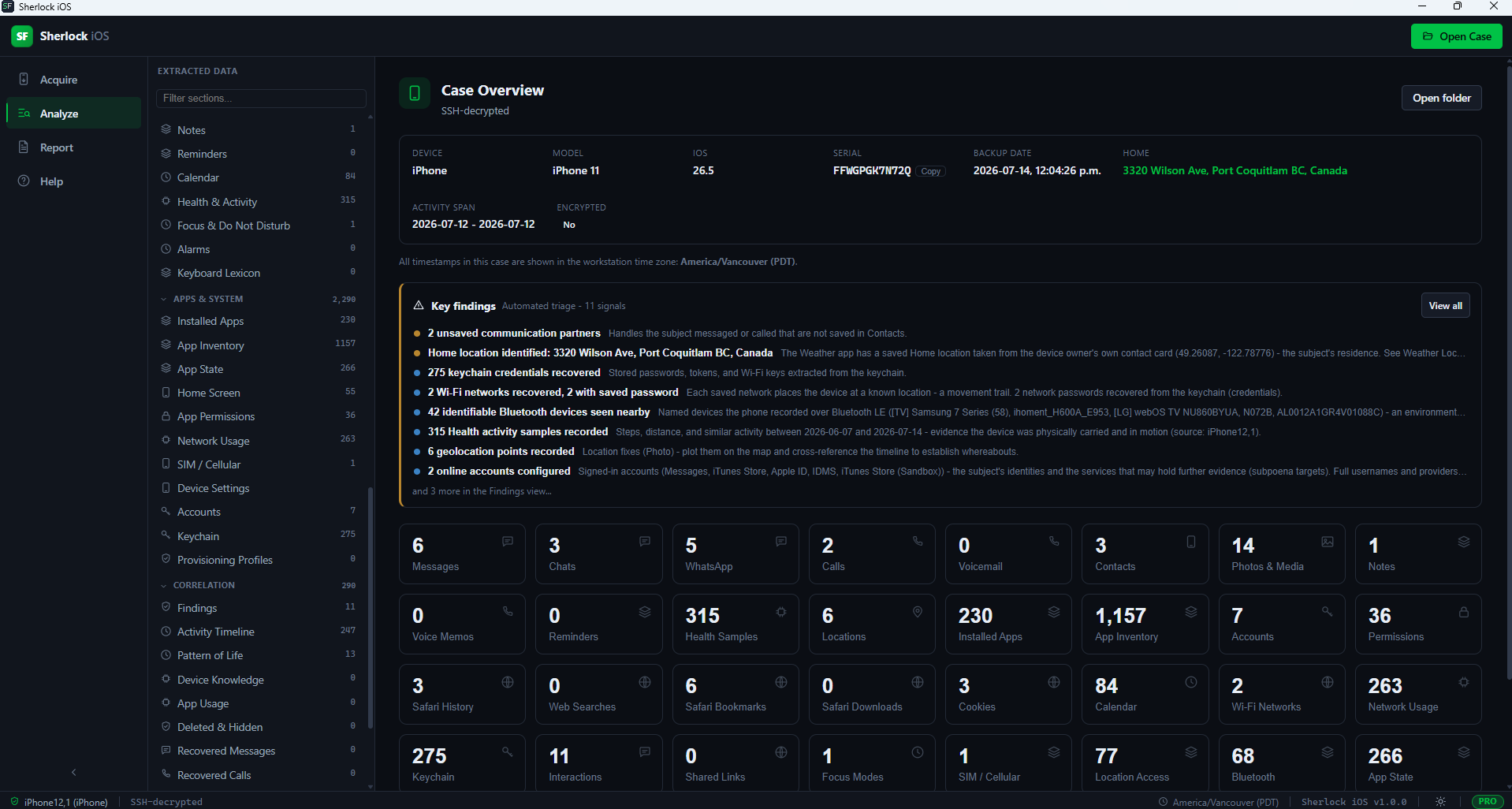
Sherlock Forensics iOS Analyzer dashboard overview showing case summary, device attribution, artifact counts plus investigative highlights at a glance
Dashboard overview · every dated event, every artifact, every finding in one investigative surface

Overview

What Sherlock iOS Analyzer Actually Is

Sherlock Forensics iOS Analyzer is a Windows forensic workstation that acquires plus analyzes iPhone or iPad evidence from a logical MobileBackup2 backup. Read-only, court-defensible, fully offline. The closest user-experience analogs are Magnet AXIOM plus Cellebrite Physical Analyzer. The honest credibility floor is EnCase-grade rigor for iOS logical evidence.

Every artifact view in the tool ships as its own dedicated, searchable, exportable interface. The Forensic Edition unlocks the full data set plus court-ready reporting; the Free Edition previews 25 percent of every artifact so an evaluator can see the exact tool depth before purchase.

Acquisition

Logical Backup Over MobileBackup2

Sherlock iOS Analyzer uses the MobileBackup2 logical acquisition path. This is the universal method: it works on any iPhone or iPad you can unlock, no jailbreak, no exploit. iOS decrypts the data on-device as it is copied out so the result is already plaintext.

Encrypted-backup mode: Sherlock sets the backup password itself before acquisition then decrypts the backup offline using RFC 3394 keybag unwrap plus AES. Operators do not configure a password; the tool handles the encryption flip end-to-end. Encrypted backups actually contain more data than unencrypted backups (keychain, Health, Wi-Fi passwords) which is why the tool automates the flip.

The acquisition channel is read-only. Destination free-space pre-flight prevents partial-capture failures. Acquisition is resume-safe if the transfer is interrupted mid-run.

Analysis

70+ Artifact Views Across Six Groups

Every item below is a dedicated, searchable, exportable view. The Free Edition previews the first 25 percent of each view (capped at 100 rows). The Forensic Edition unlocks the complete data set.

Communications

Messages (SMS plus iMessage), Conversations (threaded), Chats plus Groups, WhatsApp messages, WhatsApp Groups (members, admin, JIDs), Message Attachments, Call History, Voicemail, Contacts.

Media

Photos plus videos with capture GPS. HEIC decodes plus HEVC video plays in-app. Favorites, Hidden, Recently-Deleted, Geotagged, Photos plus Videos filters. Media Library, Voice Memos.

Web and Location

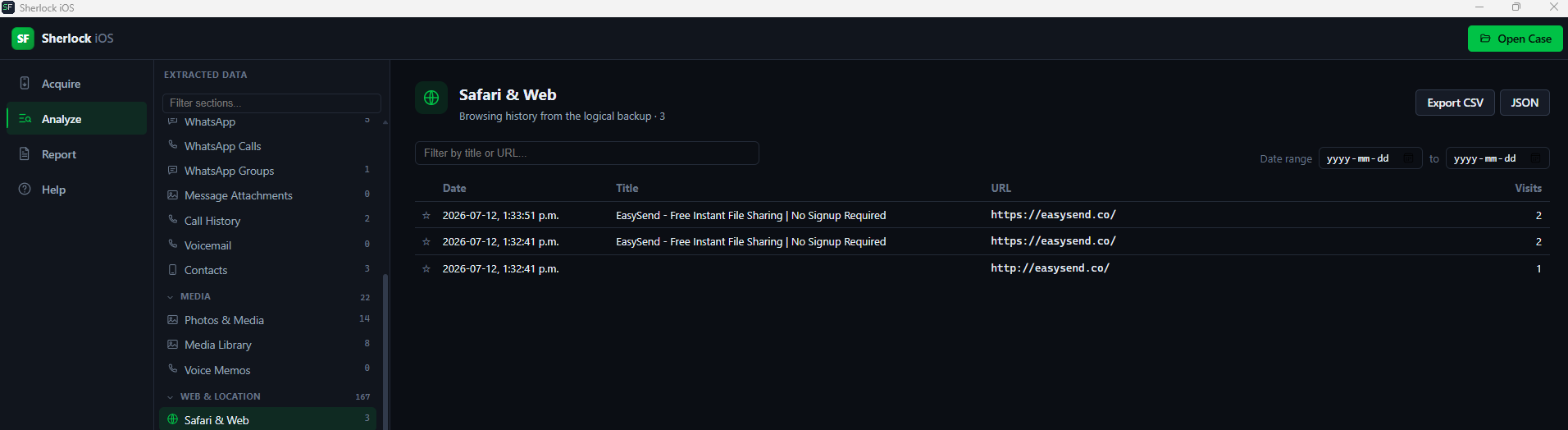
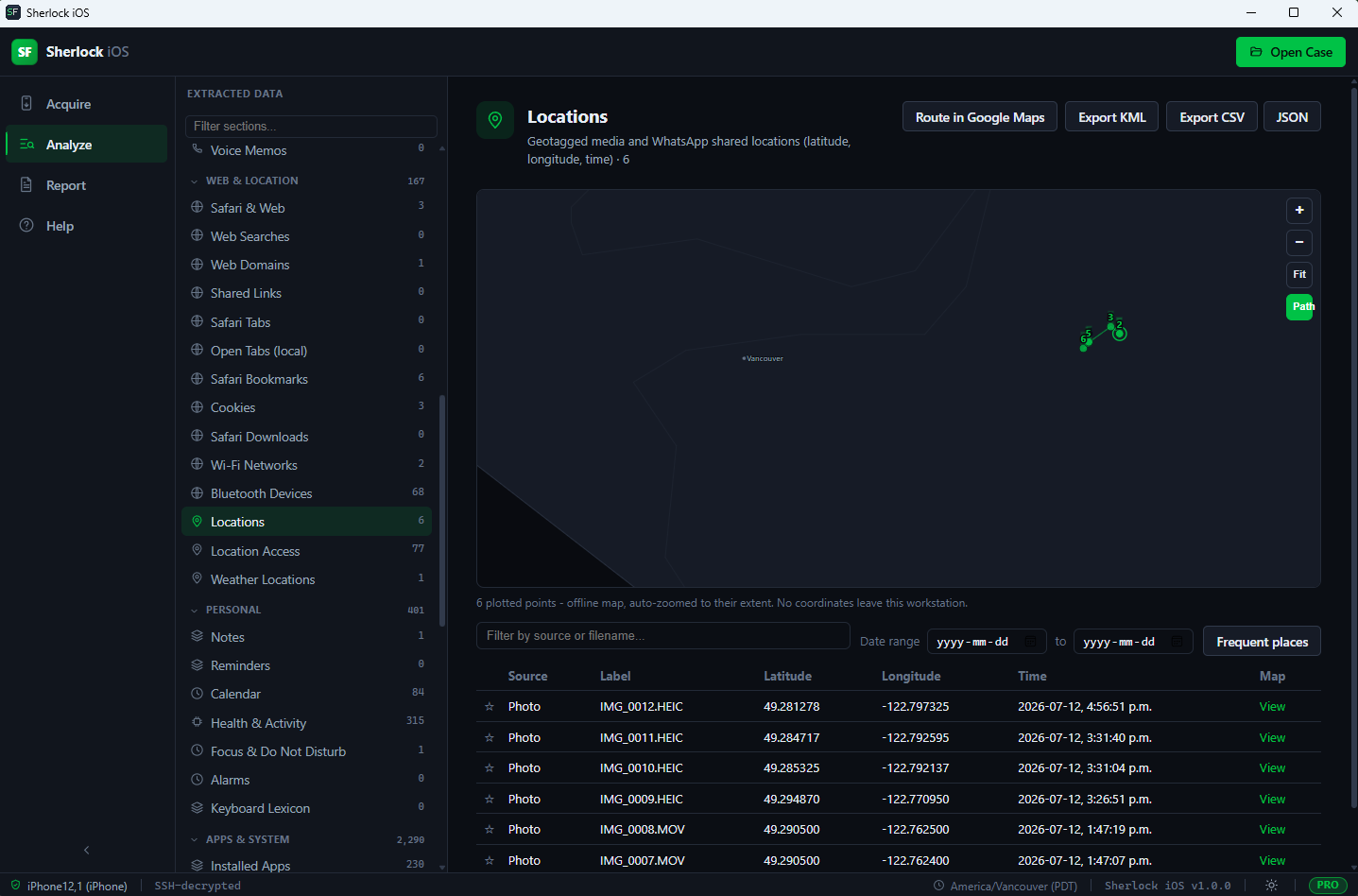
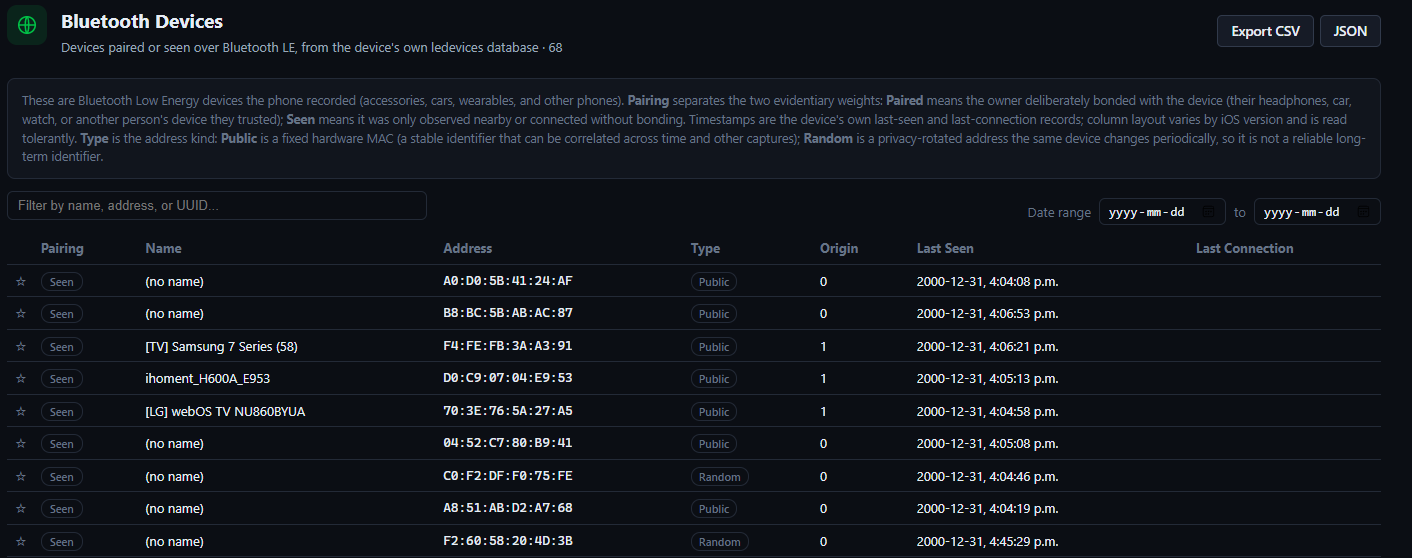
Safari history, Web Searches, Web Domains, Shared Links, Safari Tabs, open local tabs, Safari Bookmarks, Cookies, Safari Downloads, Wi-Fi networks (with saved passwords from keychain), Bluetooth devices (paired vs merely seen, with public plus random address trackability), Locations (geotagged media plus shared pins on an offline map), Location Access (locationd clients), Weather saved locations including the device owner HOME address.

Personal

Notes (with password-protected flagging), Reminders, Calendar, Health plus Activity, Focus plus Do Not Disturb modes, Alarms, Keyboard Lexicon.

Apps and System

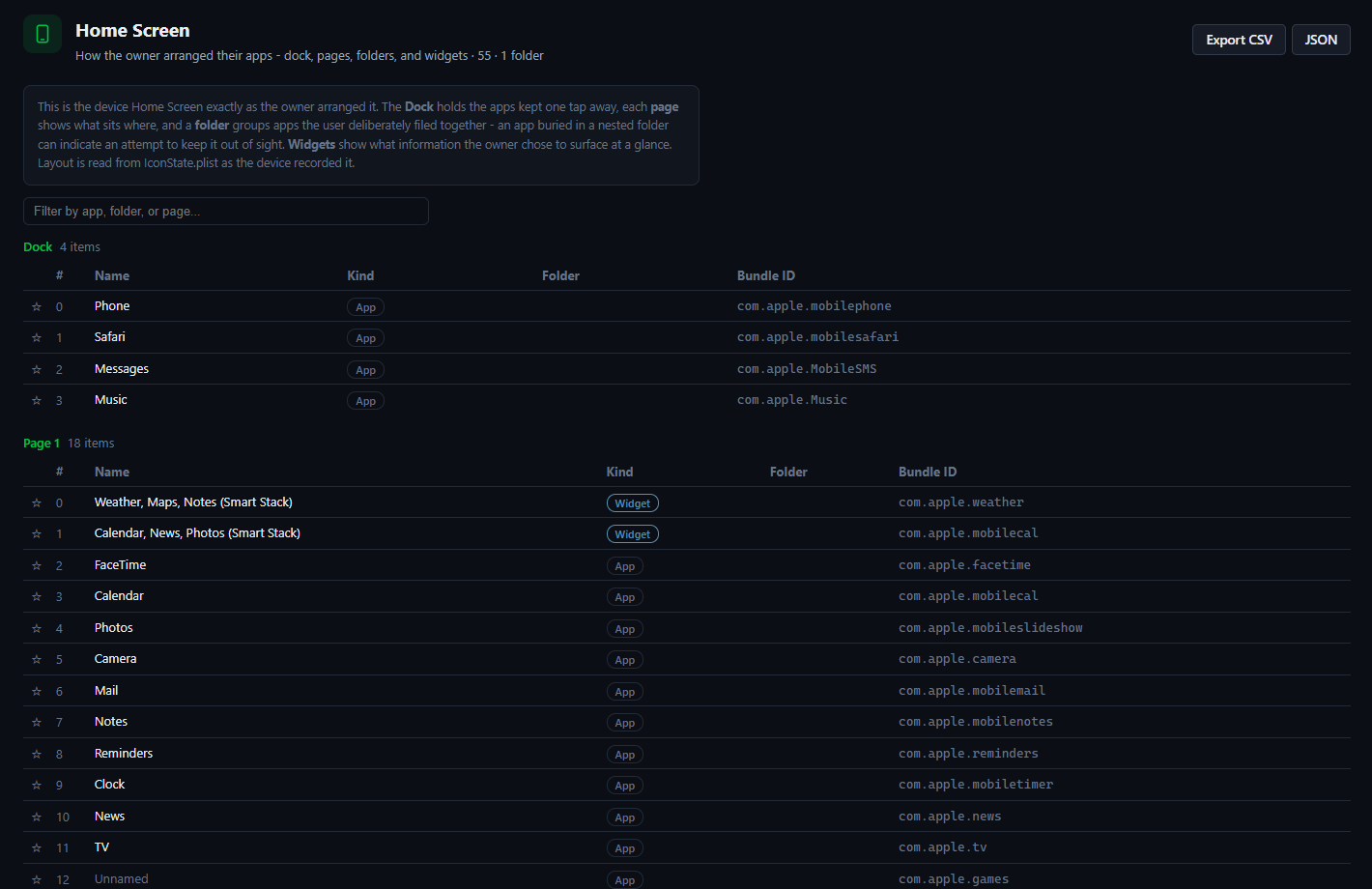
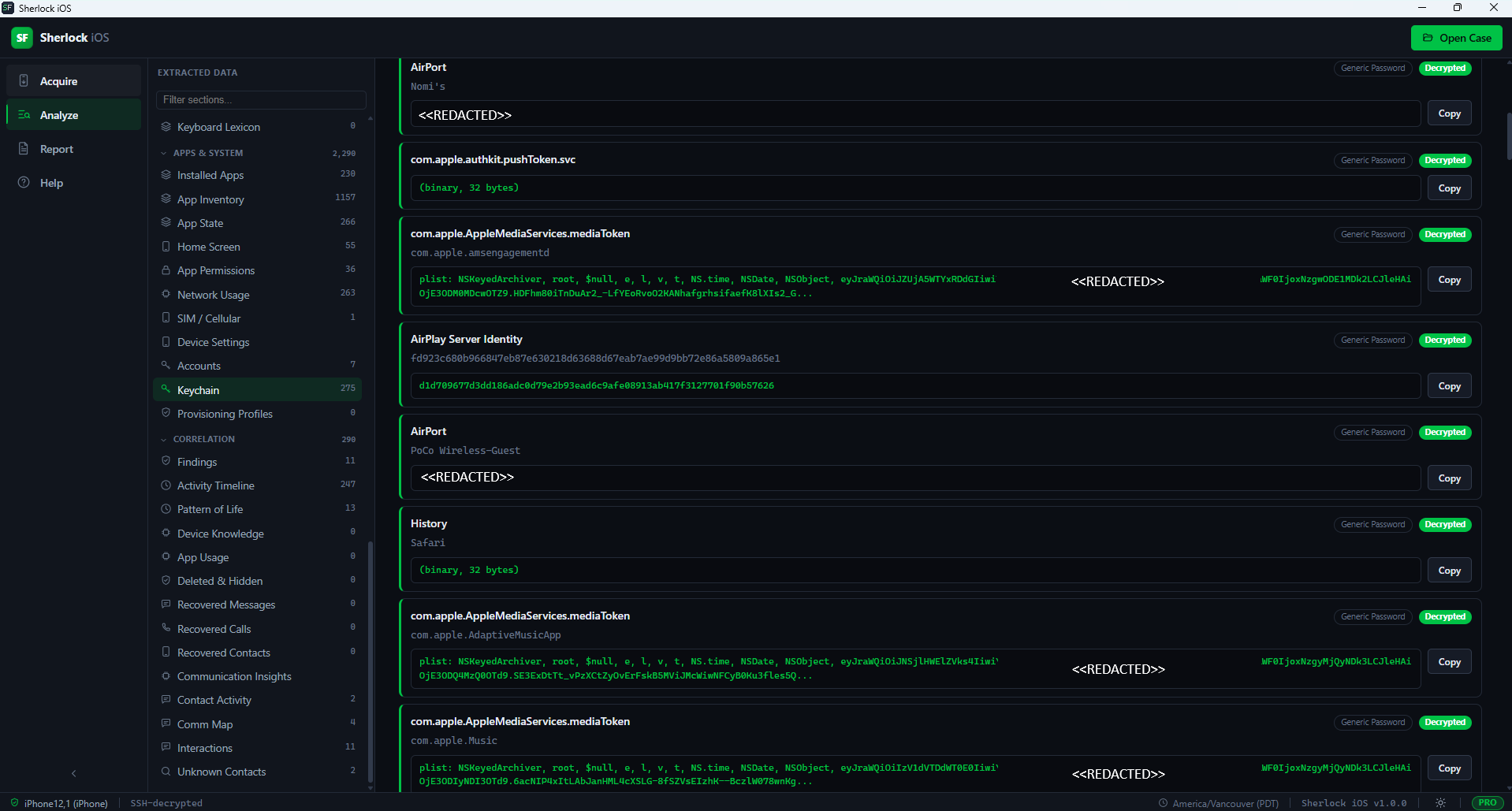
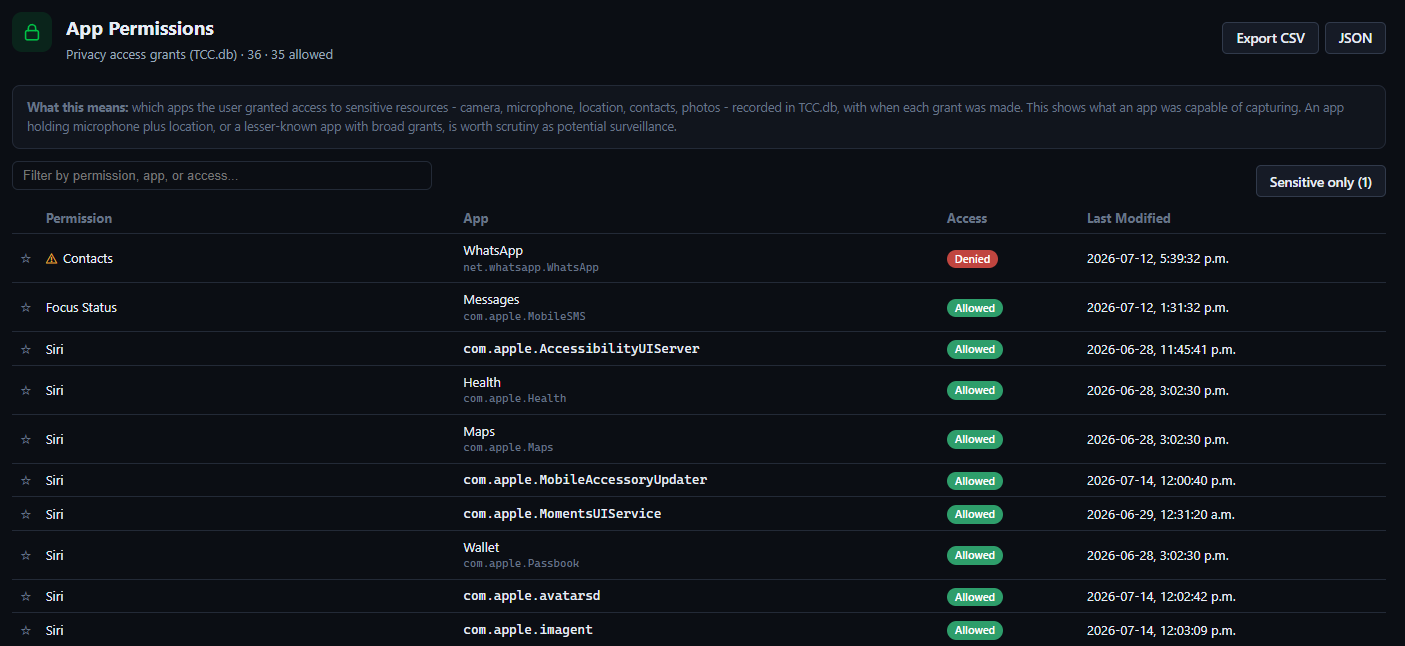
Installed Apps, App Inventory, App State (recently-used plus badged), App Permissions (TCC - camera plus microphone plus location access), Network Usage, SIM plus Cellular identity (phone number, ICCID, IMEI or MEID, carrier), Home Screen layout (dock, pages, folders, widgets - reveals apps hidden in folders), Device Settings (locale, languages, keyboards), Accounts, Keychain (passwords, tokens, Wi-Fi keys), Provisioning Profiles (enterprise, developer, MDM sideload provenance).

Acquisition and Integrity

Overview dashboard, Device Summary, Backup Info, Provenance, Acquisition Integrity, File Manifest (every backup file with size plus hashes plus metadata plus on-demand content preview plus SQLite table browser in Forensic Edition).

See It At Work

Screenshots from Sherlock iOS Analyzer showing the acquisition workflow, investigation dashboard, communications reconstruction, web plus location intelligence, plus system-artifact extraction. The visual coverage spans all six manifest artifact groups. Click any image for full-size view.

Acquisition Workflow

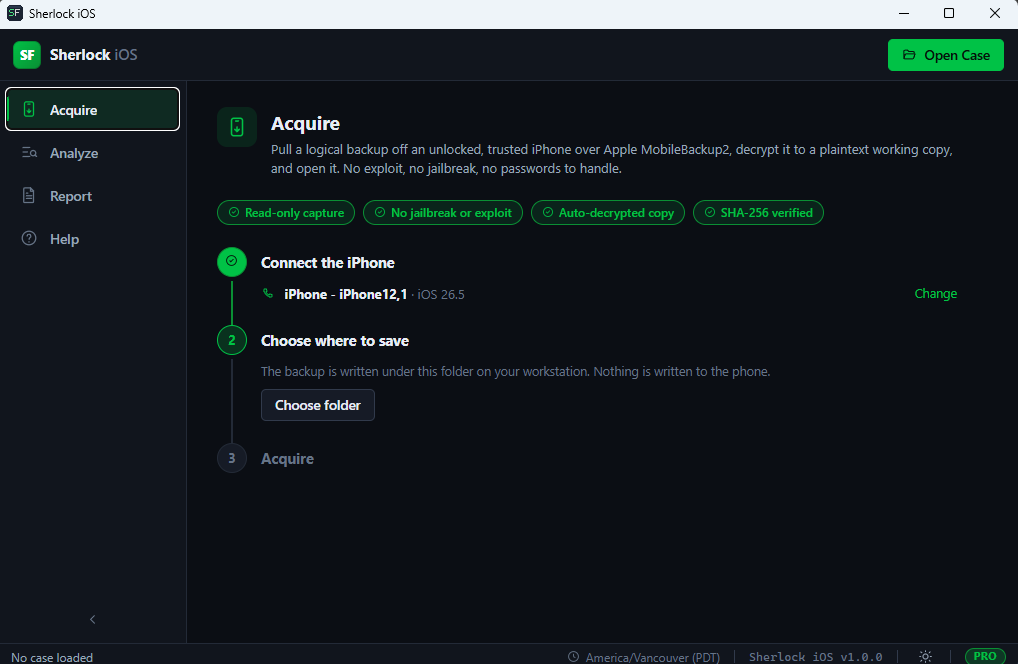
Sherlock iOS Analyzer acquisition workflow step 1 - device selection screen showing detected iPhone plus iPad devices connected for logical MobileBackup2 acquisition
Step 1: Device Selection
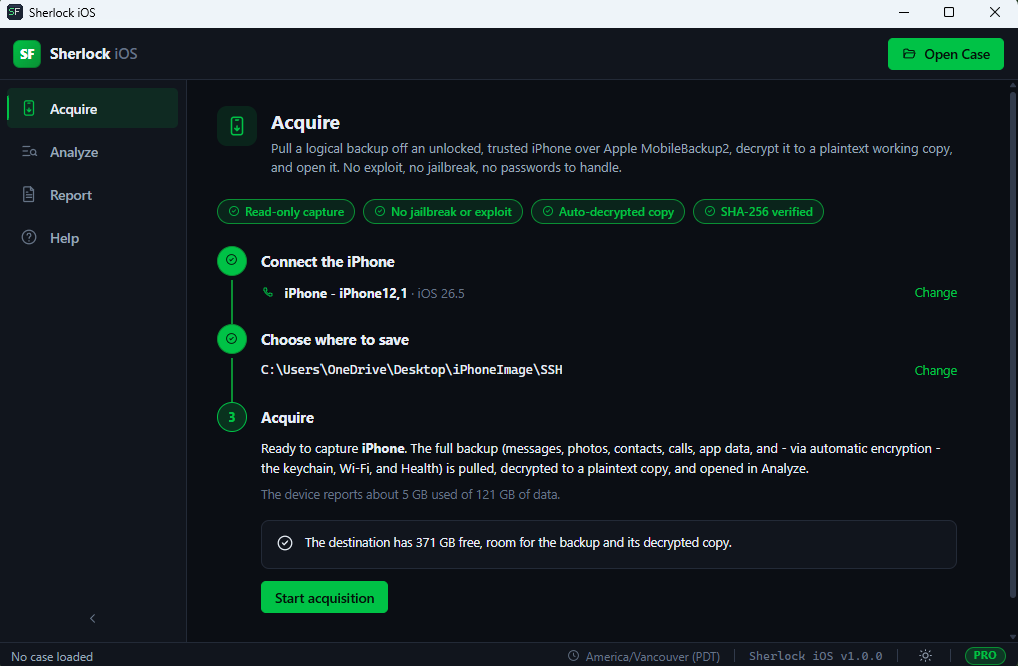
Sherlock iOS Analyzer acquisition workflow step 2 - backup configuration screen for encrypted-backup password automation plus output destination
Step 2: Backup Configuration
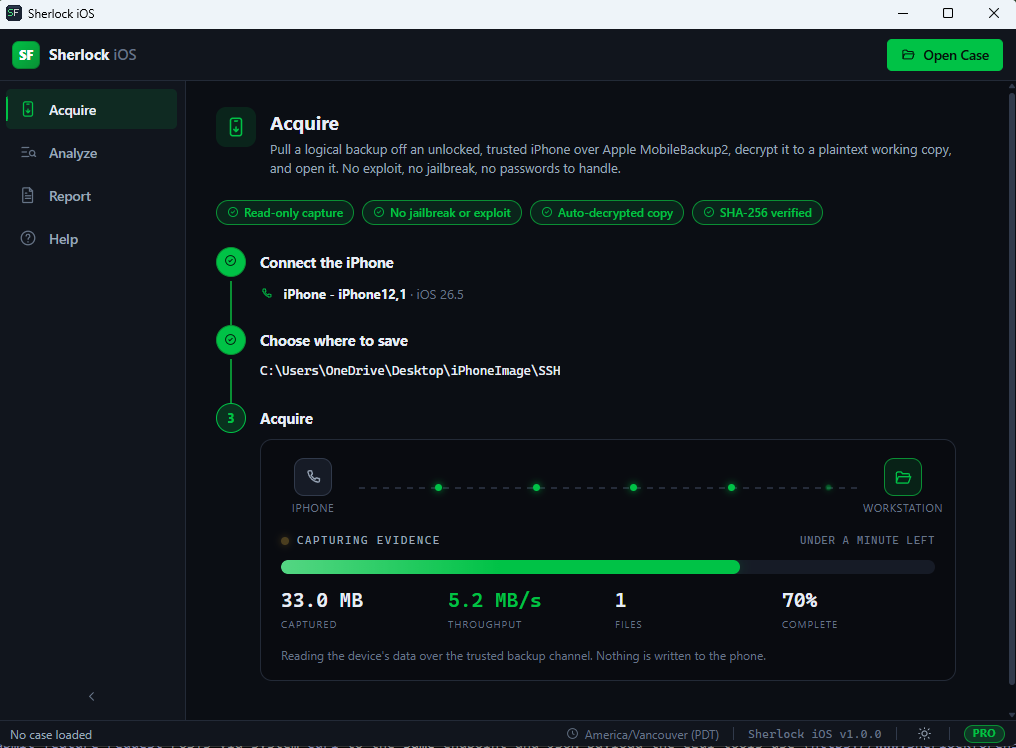
Sherlock iOS Analyzer acquisition workflow step 3 - live acquisition progress with byte counter plus estimated completion
Step 3: Acquire Data

Investigation Dashboard

Sherlock iOS Analyzer dashboard overview showing device summary plus artifact counts plus acquisition integrity indicators
Dashboard Overview
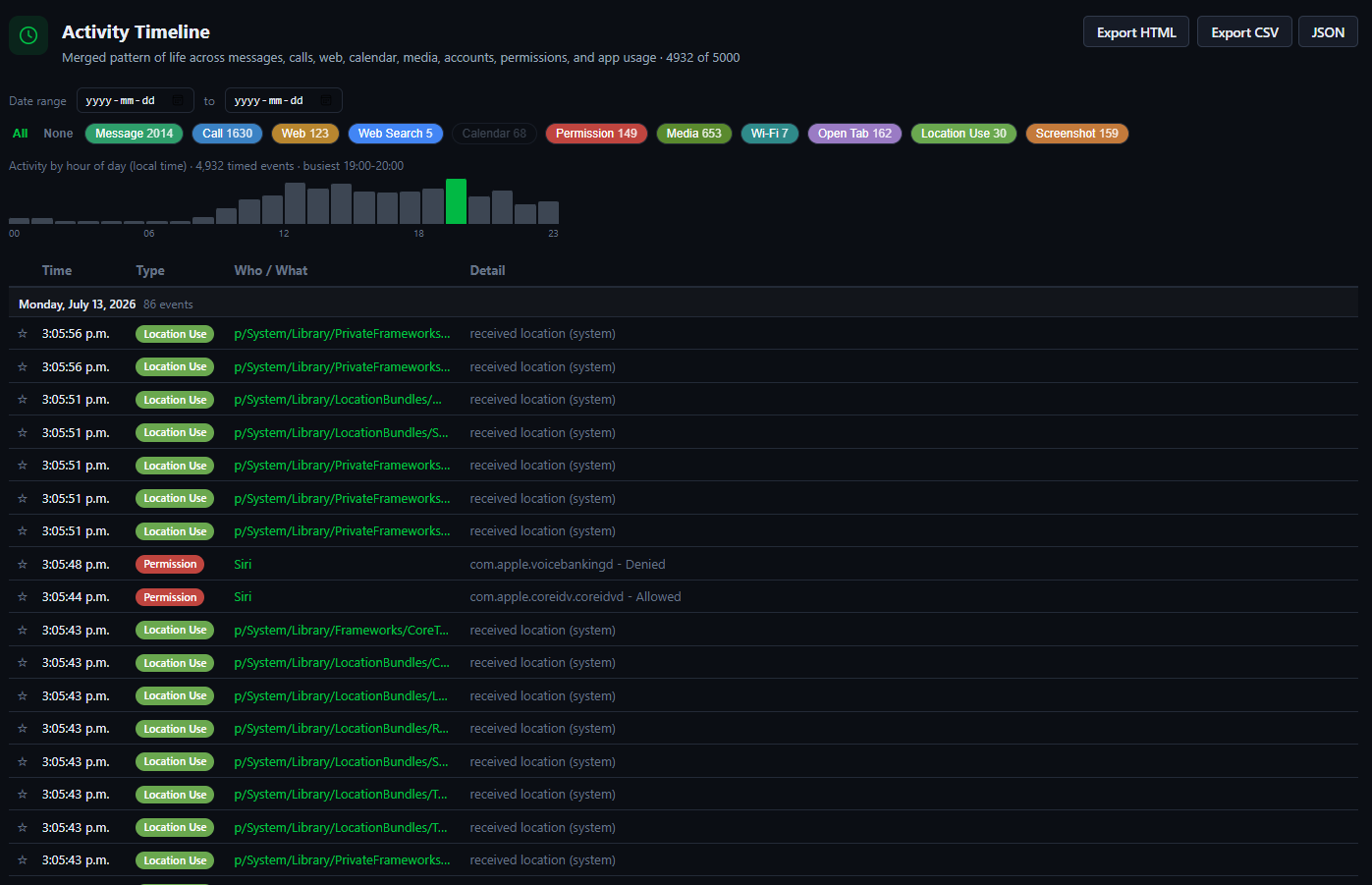
Sherlock iOS Analyzer activity timeline showing chronological event correlation across communications plus media plus web activity
Activity Timeline (chronological event correlation)
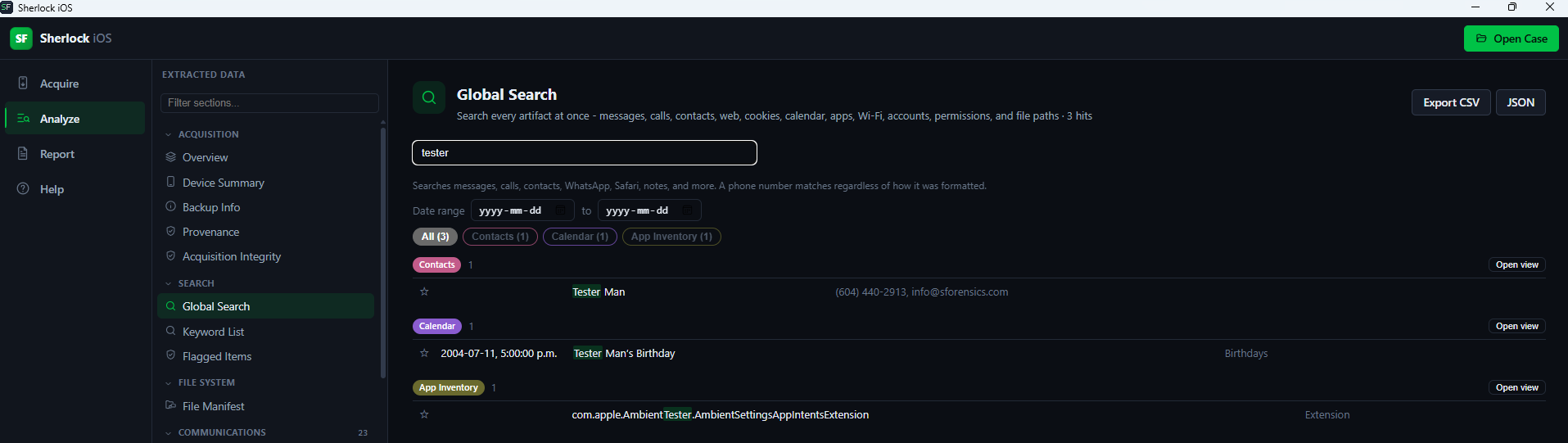
Sherlock iOS Analyzer global search interface showing keyword query across every artifact view
Global Search Across All Artifacts
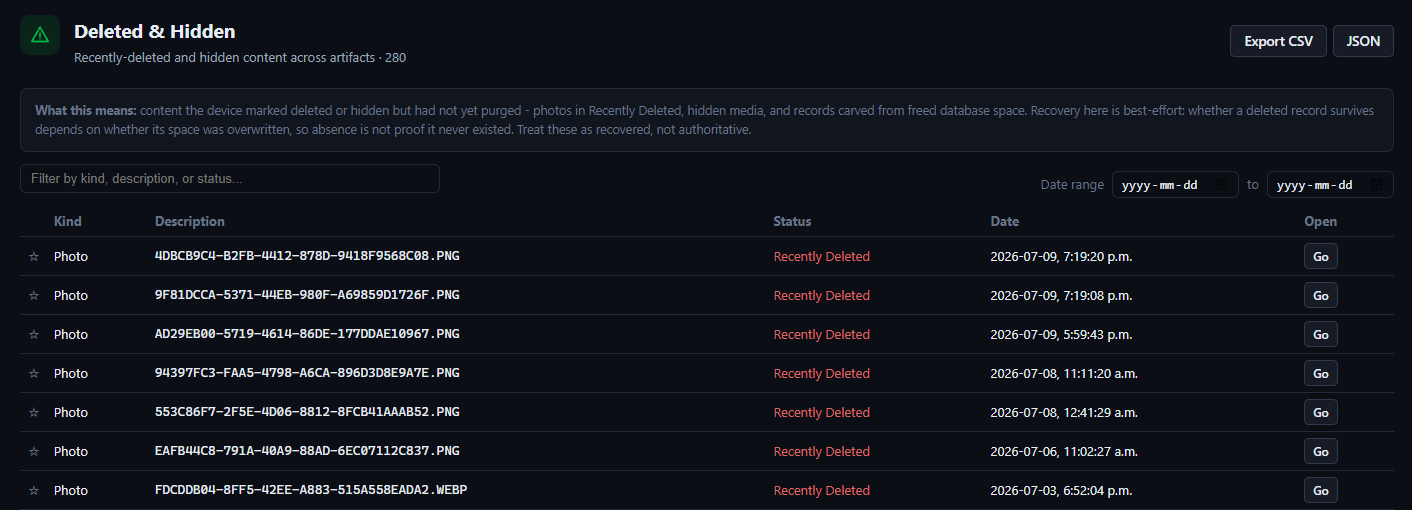
Sherlock iOS Analyzer deleted content recovery view surfacing carved SQLite messages plus hidden media plus deleted contacts
Deleted Content Recovery + Hidden Media

Communications

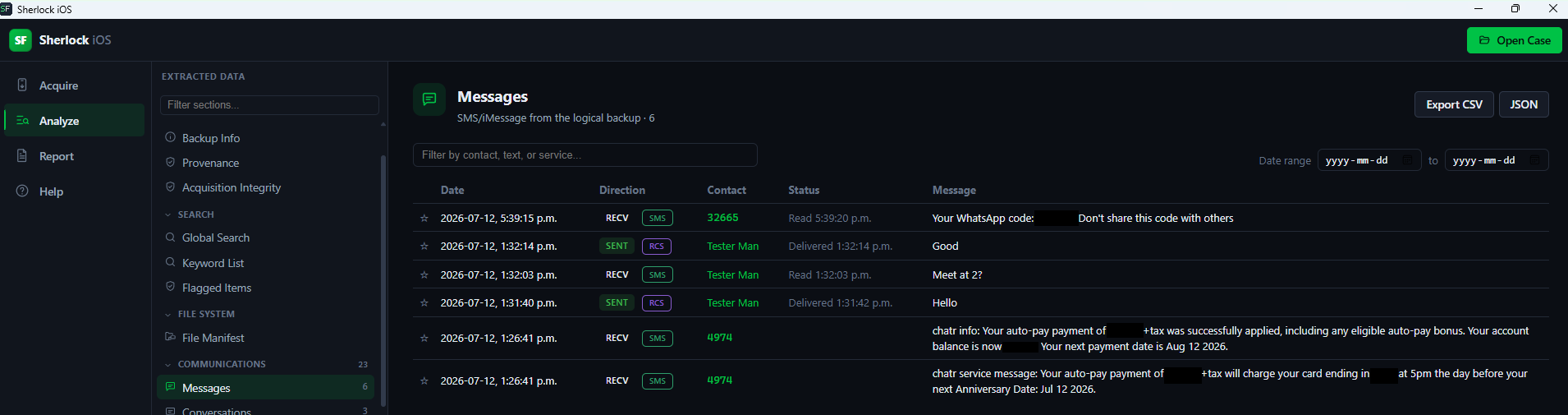
Sherlock iOS Analyzer iMessage plus SMS messages view with threaded conversation reconstruction plus attachment previews
iMessage + SMS View
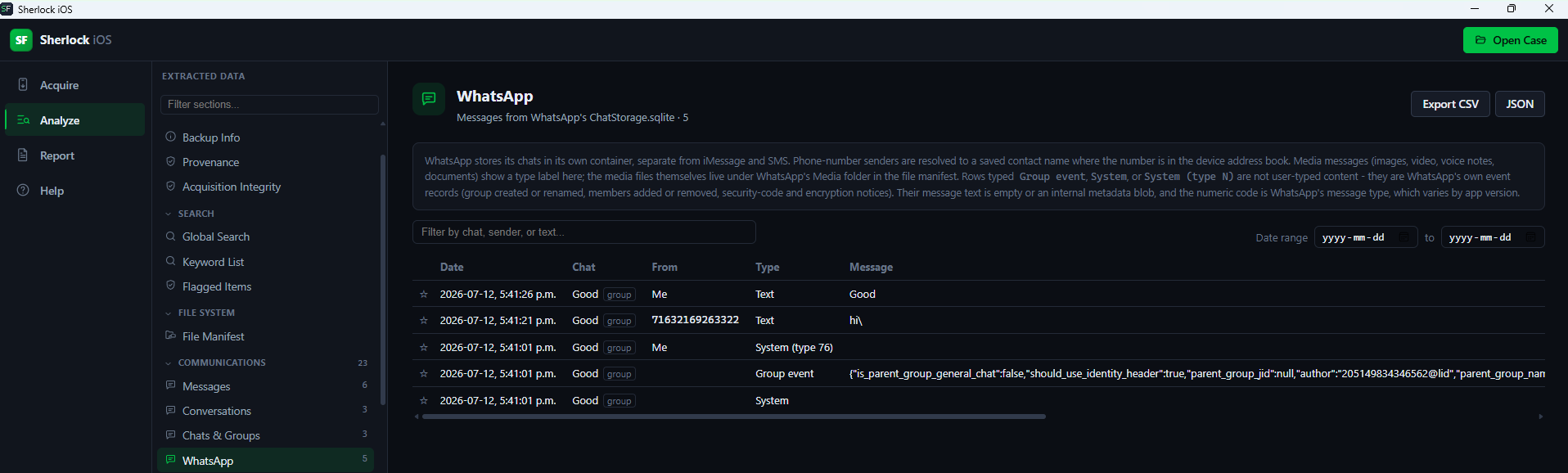
Sherlock iOS Analyzer WhatsApp messages plus groups view with member plus admin plus JID reconstruction
WhatsApp Messages + Groups
Sherlock iOS Analyzer call history view showing incoming plus outgoing plus missed calls with contact attribution plus duration
Call History with Attribution

Web + Location Intelligence

Sherlock iOS Analyzer Safari history plus bookmarks plus cookies view for iOS web activity reconstruction
Safari History + Bookmarks + Cookies
Sherlock iOS Analyzer location intelligence view showing geotagged media pins plus Weather saved HOME address on offline map
Location Intelligence (Weather HOME + Geotagged Media)
Sherlock iOS Analyzer Bluetooth devices view distinguishing paired versus merely seen devices with trackability metadata
Bluetooth Devices (Paired vs Seen + Trackability)

System Artifacts

Sherlock iOS Analyzer Home Screen layout view revealing dock plus pages plus folder structure plus apps hidden in folders
Home Screen Layout (Reveals Apps Hidden in Folders)
Sherlock iOS Analyzer keychain extraction view surfacing Wi-Fi passwords plus tokens plus credentials from decrypted encrypted backup
Keychain Extraction (Wi-Fi Passwords + Tokens + Credentials)
Sherlock iOS Analyzer app permissions view showing TCC grants for camera plus microphone plus location plus contacts access
App Permissions (TCC - Camera / Microphone / Location)

Correlation

Correlation and Findings - Automated First-Look Triage

Activity Timeline: every dated event merged chronologically, filterable across every artifact source.

Findings (Investigative Highlights): automated first-look triage surfaces emergency calls, deleted content recovered, privacy-sensitive permission grants, hidden-vault apps, blocked callers, home location, online accounts (subpoena targets) plus device attribution (phone number, Apple IDs).

Pattern of Life, Communication Map, Communication Insights (top contacts plus callers plus domains), Contact Activity, Unknown Contacts (handles messaged that are not saved).

Deleted and recovered: Deleted plus Hidden media plus Messages plus Calls plus Contacts carved from freed SQLite database pages. Content the subject deleted on-device but the SQLite freelist has not overwritten is recoverable through standard freed-page carving methodology applied across the iOS artifact set.

Global search plus keyword-watchlist search across every artifact at once. Per-view filter, sort, date-range plus item flagging (flagged items roll into the report).

Anti-forensic app detection: hidden-vault, encrypted-messaging plus anonymity or VPN apps are flagged inline everywhere apps appear (Installed Apps, App Inventory, App State, Home Screen, App Permissions) plus surfaced in Findings.

Reporting

Reporting and Export - Forensic Edition

Court-ready HTML report (print to PDF from any browser): case plus evidence numbers, agency, examiner, selectable sections grouped by topic, Investigative Highlights, optional evidence-integrity SHA-256 manifest plus communication summary, UTC or local time.

CSV or JSON export of any individual artifact view. Export all data as JSON in one action.

Court-Defensibility

Forensic Guarantees

  • 100 percent read-only. The evidence file is never modified.
  • Per-file SHA-256 plus a provenance plus acquisition manifest (chain of custody).
  • Timezone is explicitly disclosed (all times shown in the examiner workstation zone; iOS does not record the device zone in a logical backup). Tool version is stamped in the manifest.
  • Tolerant parsing that surfaces warnings plus never silently hides data. Every view has an error boundary so a data surprise does not blank-screen the tool.

Honest Scope

What Sherlock iOS Analyzer Does Not Do

Honest scope disclosure matters more than marketing polish. Sherlock iOS Analyzer does not do full-filesystem (FFS) acquisition of A12 or A13 or newer devices; the Secure Enclave blocks that path. FFS-only artifacts (knowledgeC pattern-of-life, Significant Locations, deep app-container internals) are not available plus show honest empty states rather than fabricating data.

Sherlock iOS Analyzer is not a raw disk imager. That is a separate Sherlock tool (Sherlock Disk Imager).

Version 1.0.0 is Windows x64 only. macOS plus Linux builds are not currently available.

Compare

Free vs Forensic Edition

FeatureFreeForensic Edition ($599)
Data access per artifact25 percent preview (100-row cap)Unlimited
Screen capture (export screens)-Yes
Open MobileBackup2 backupYesYes
Encrypted-backup decryptionYesYes
All 70+ artifact viewsPreview onlyFull
Deleted-content carvingPreview onlyFull
Anti-forensic app detectionYesYes
Global plus keyword-watchlist search-Yes
CSV plus JSON export-Yes
Court-ready HTML report-Yes
Raw SQLite table plus SQL browser-Yes
File extraction from backup-Yes
Chain of custody manifestYesYes

Requirements

System Requirements

  • Windows 10 version 2004 or later plus Windows 11, 64-bit.
  • Microsoft Edge WebView2 runtime (installer auto-installs if missing).
  • All dependencies bundled: HEIC decoders (libheif plus libde265 plus libx265) plus ffmpeg. Photos, HEIC, plus video all work out of the box with no extra installation.

Download

Download and Integrity Verification

File: Sherlock-iOS-1.0.0-x64-setup.exe (NSIS installer, Windows x64, ~51 MB).

SHA-256: a6f069742f0d39f1eef6d354c7708340785b5cb844a1c666cb0c4d9594e79d10 (also in the accompanying .sha256 sidecar - verify before installing).

Signed with the SSL.com EV Code Signing certificate (Sherlock Forensics Ltd, Burnaby BC), RFC3161-timestamped. Installer, application executable plus bundled ffmpeg are all signed so Windows SmartScreen shows no warning on download or first launch.

a6f069742f0d39f1eef6d354c7708340785b5cb844a1c666cb0c4d9594e79d10

How to verify:
1. Open PowerShell (right-click Start menu, click Terminal)
2. Run: Get-FileHash .\sherlock-ios-analyzer.exe
3. Compare the output with the hash above. If they match, the file has not been tampered with.

Changelog

Release History

v1.0.0 (2026-07-14) - Initial Release

  • Windows forensic workstation for iPhone plus iPad evidence.
  • MobileBackup2 logical acquisition with encrypted-backup offline decryption.
  • 70+ artifact views across Communications, Media, Web plus Location, Personal, Apps plus System, plus Acquisition plus Integrity.
  • Findings automated first-look triage plus Activity Timeline plus Pattern of Life plus Communication Map plus anti-forensic app detection.
  • Deleted-content carving from freed SQLite database pages (Messages plus Calls plus Contacts).
  • Court-ready HTML report plus CSV plus JSON export plus raw SQLite browser (Forensic Edition).
  • Read-only acquisition plus per-file SHA-256 plus provenance manifest.
  • SSL.com EV Code Signing on installer plus application executable plus bundled ffmpeg. No SmartScreen warning.

Checkout - iOS Analyzer Forensic Edition ($599)

$599.00 USD. One-time payment. License key delivered to your email.

Secure via Stripe One-time purchase No subscription