
Per-Artifact Deep Dive

Safari History Forensics: What the Browser Remembers

Web activity is often the intent evidence a case turns on. Here is what Safari records, what survives deletion and how it reaches a courtroom.

Sherlock Forensics iPhone Analyzer reconstructs Safari history, web searches, visited domains, shared links, tabs, bookmarks, cookies and downloads from an iPhone, then carves deleted history from freed SQLite pages where it survives. It works from a logical backup as well as a full-filesystem extraction, so web activity is reachable however the evidence was acquired. $599 one-time; free edition previews it first.

Windows 10/11 | One-time license | Works from a backup or an extraction | 100 percent read-only

The Artifact

What Safari Records

A browser history is one of the most revealing artifacts on a phone because it captures intent, not just contact. Messages show who a person spoke to; the web record often shows what they were thinking about: what they searched, which sites they returned to, what they saved to read later. In investigations from fraud to harassment to workplace policy, the searched term or the visited domain is frequently the evidence that reframes a case.

Sherlock Forensics iPhone Analyzer reconstructs the full Safari surface into dedicated, searchable views: history with visit times, web searches, visited domains, shared links, open and recently-closed tabs, bookmarks, cookies and Safari downloads. Each view exports to CSV or JSON. All of it feeds the merged Activity Timeline and global search so a search query reads in sequence with the messages, locations and app activity around it.

The distinct views matter because web evidence is rarely a single line. A visited domain tells you where the browser went; the search view tells you the exact terms a person typed to get there, which is often the more probative record. Shared links show what a subject sent onward to someone else, bookmarks show what they meant to return to and the tab list captures what was open at the moment of acquisition, a snapshot of active attention. Read together across the timeline, those views turn a flat list of URLs into a picture of what the person was actually doing online and when.
Any Source

Reachable From a Backup or an Extraction

Unlike the deep behavioral artifacts, Safari's core web activity is carried in an encrypted logical backup, so it does not require a full-filesystem extraction to reach. Sherlock reconstructs the Safari views from a backup you make over USB from an unlockable device, from an existing iTunes or Finder backup or from a Cellebrite UFED or VeraKey full-filesystem extraction. Whichever way the evidence arrived, the web record is available, which makes Safari one of the more accessible high-value artifacts in an iPhone case: you do not need enterprise acquisition tooling to get at it.

A full-filesystem extraction does add adjacent web context that a logical backup does not carry, the cross-app cached-web-request view that surfaces in-app web and API activity from other apps, for example. That is a separate artifact from Safari's own history. This page is about Safari itself, which a backup carries in full.

Deleted History

What Deleted Safari History Survives

Clearing browser history is one of the first things a subject does, so what survives that deletion is often the decisive question. The honest answer is the same physics that governs every SQLite artifact. When Safari history is deleted, iOS marks the record's database page as free rather than erasing it on the spot. Until the database writes new data over that page the deleted entry is still physically present. Sherlock carves those records back out through standard freed-page carving.

What survives therefore depends on time and device use after the deletion. History cleared shortly before acquisition on a lightly used phone is often recoverable; history cleared weeks ago on a heavily used device has usually been overwritten and no tool brings it back. Sherlock flags every carved entry as recovered in the interface and the report, so an examiner can state on the record which history was live and which was carved and can explain the survival logic without overclaiming. This is the same freed-page methodology every credible tool works under; the value is honest labeling, not a promised recovery number.

The Honest Limit

Private Browsing and What It Does Not Leave

A credible web-forensics page has to be straight about private browsing. Safari's private mode is designed not to persist to the history database, so private-browsing visits generally do not appear as history entries. A report that implied otherwise would not survive scrutiny. Sherlock reports what Safari actually recorded rather than inventing a private-session history that the artifact does not contain.

That said, the absence of history is not the absence of evidence. Web activity can leave traces in adjacent artifacts even when the history database does not hold it: cookies and cached content; on a full-filesystem extraction the cross-app cached-web-request view and app web caches surface web traces the history database does not hold. An examiner works those as separate lines rather than passing them off as Safari history. The discipline is the same throughout: report each artifact for what it is and let corroboration across artifacts, not overreach within one, build the picture.

See It

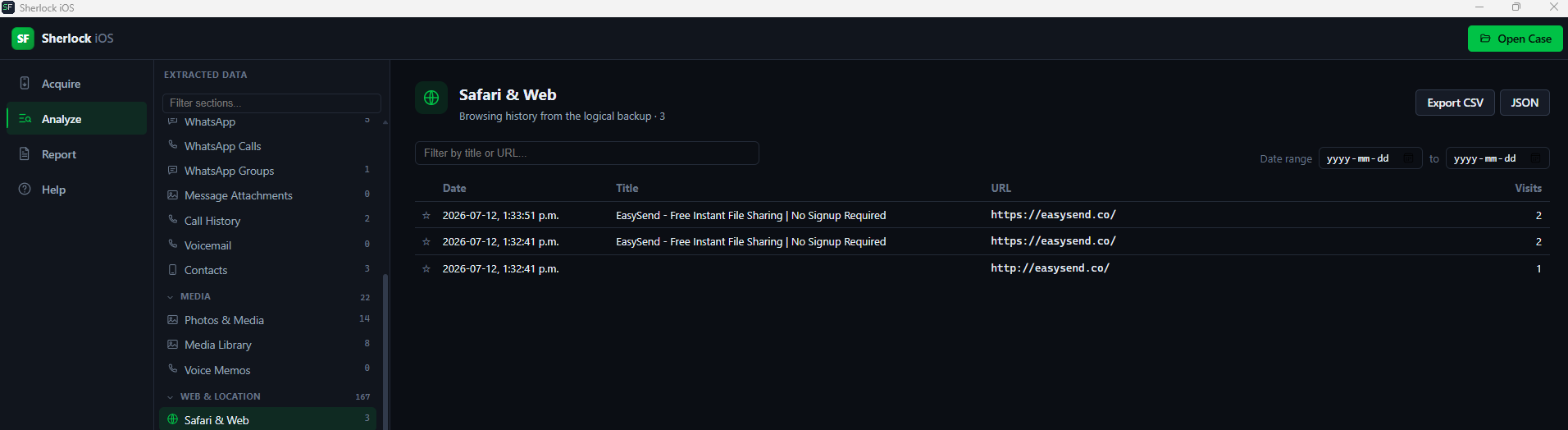
Sherlock Forensics iPhone Analyzer Safari view showing history, bookmarks and cookies reconstructed from an iPhone
Safari history, bookmarks and cookies reconstructed into searchable views

Court-Ready

From the URL to the Report

Web evidence draws scrutiny because it speaks to intent, so the documentation is built for it: the court-ready HTML report carries case and evidence numbers, examiner identification, disclosed methodology, per-artifact SHA-256 hashing and an optional evidence-integrity manifest, with recovered history flagged throughout, the documentation elements described in NIST Special Publication 800-101 Revision 1, Guidelines on Mobile Device Forensics. Analysis is 100 percent read-only; the evidence is never modified.

Built by CISSP, ISSAP and ISSMP certified examiners with 20 years of court-defensible practice. Admissibility depends on jurisdiction, authority and evidence handling; the report documents the record so testimony rests on it rather than on recollection.

Honest Scope

What This Analysis Is and Is Not

Sherlock reads the Safari record from evidence you can lawfully acquire: a device you can unlock, an existing backup or a full-filesystem extraction produced by acquisition tooling. It does not unlock a locked device, does not bypass a passcode and does not reach a subject's iCloud or server-side account history through a provider. History the subject cleared long enough ago to be overwritten is gone. Private-browsing sessions that never persisted are not in the history database. Sherlock reports what the acquired evidence carries and flags what it recovered, which is what an examiner can defend on the stand.

Questions

Safari History Forensics FAQ

Can Sherlock recover iPhone Safari history?
Yes. Sherlock Forensics iPhone Analyzer reconstructs Safari history, web searches, visited domains, shared links, open tabs, bookmarks, cookies and downloads from an iPhone. It works from a logical MobileBackup2 backup as well as a full-filesystem extraction, so web activity is reachable whichever way the evidence was acquired.
Can deleted Safari history be recovered?
Sometimes. When Safari history is deleted, iOS marks the database page as free rather than erasing it immediately, so Sherlock carves records from those freed SQLite pages where the freelist has not been overwritten. Recent deletions on lightly used devices are often recoverable; history deleted long ago on a busy device has usually been overwritten and is gone. Carved records are flagged as recovered.
Do I need a full-filesystem extraction for Safari?
No. Safari's core web activity is carried in an encrypted logical backup, so Sherlock reconstructs it from a backup you can make from an unlockable device or from an existing iTunes or Finder backup. A full-filesystem extraction adds depth elsewhere on the device, but Safari history itself does not require one.
What Safari artifacts does Sherlock parse?
History with visit times, web searches, visited domains, shared links, open and recently-closed tabs, bookmarks, cookies and Safari downloads. Each is a dedicated searchable and exportable view. All of it feeds the merged Activity Timeline and global search so web activity reads in sequence with messages, locations and app usage.
Does private browsing leave anything?
Private-browsing sessions are designed not to persist in the history database, so they generally do not appear as history entries. An honest report says so rather than implying otherwise. Related web activity can still surface in other artifacts (cached content, DNS-adjacent records or app web caches on a full-filesystem extraction), but the history view reflects what Safari actually recorded.
Is Safari evidence court-defensible?
Analysis is read-only and the court-ready report documents examiner details, methodology and per-artifact SHA-256 hashing, with recovered records flagged so live and carved history never blur. Admissibility depends on jurisdiction, authority and evidence handling; the report documents the record for testimony.

Start Now

See the Web Record in Your Evidence

Download the free edition, open a backup or extraction and read the Safari history yourself. Unlock the full record and carved history when the case calls for it: $599 one-time, no subscription.

Get Sherlock Forensics iPhone Analyzer

Related: iPhone forensics fact checks · The full parser list · iMessage forensics · Product page