
Per-Artifact Deep Dive

Recover iPhone Wi-Fi Passwords in the Clear

Every network the device saved, with its password, out of the keychain. It is one of the most consistently present artifacts in an iPhone case. It is more than a credential list.

Sherlock Forensics iPhone Analyzer surfaces saved Wi-Fi passwords from the iPhone keychain in the clear, each network with its name. They come from an encrypted MobileBackup2 backup as well as a Cellebrite full-filesystem extraction, so they appear in almost every image. Read alongside the location artifacts, the saved-network list is a whereabouts and association record, not only a set of credentials. $599 one-time.

Windows 10/11 | One-time license | From an encrypted backup or extraction | 100 percent read-only

The Artifact

More Than a Password List

Saved Wi-Fi passwords look at first like a convenience feature, a list of credentials the phone remembers so it can reconnect. In an investigation they are two things at once. They are the passwords themselves, which can corroborate that a device (and its user) had access to a specific network. And they are a record of the networks a device chose to remember, which is a map of the places its owner spent enough time to connect: homes, workplaces, a partner's apartment, a hotel, a business the person keeps returning to.

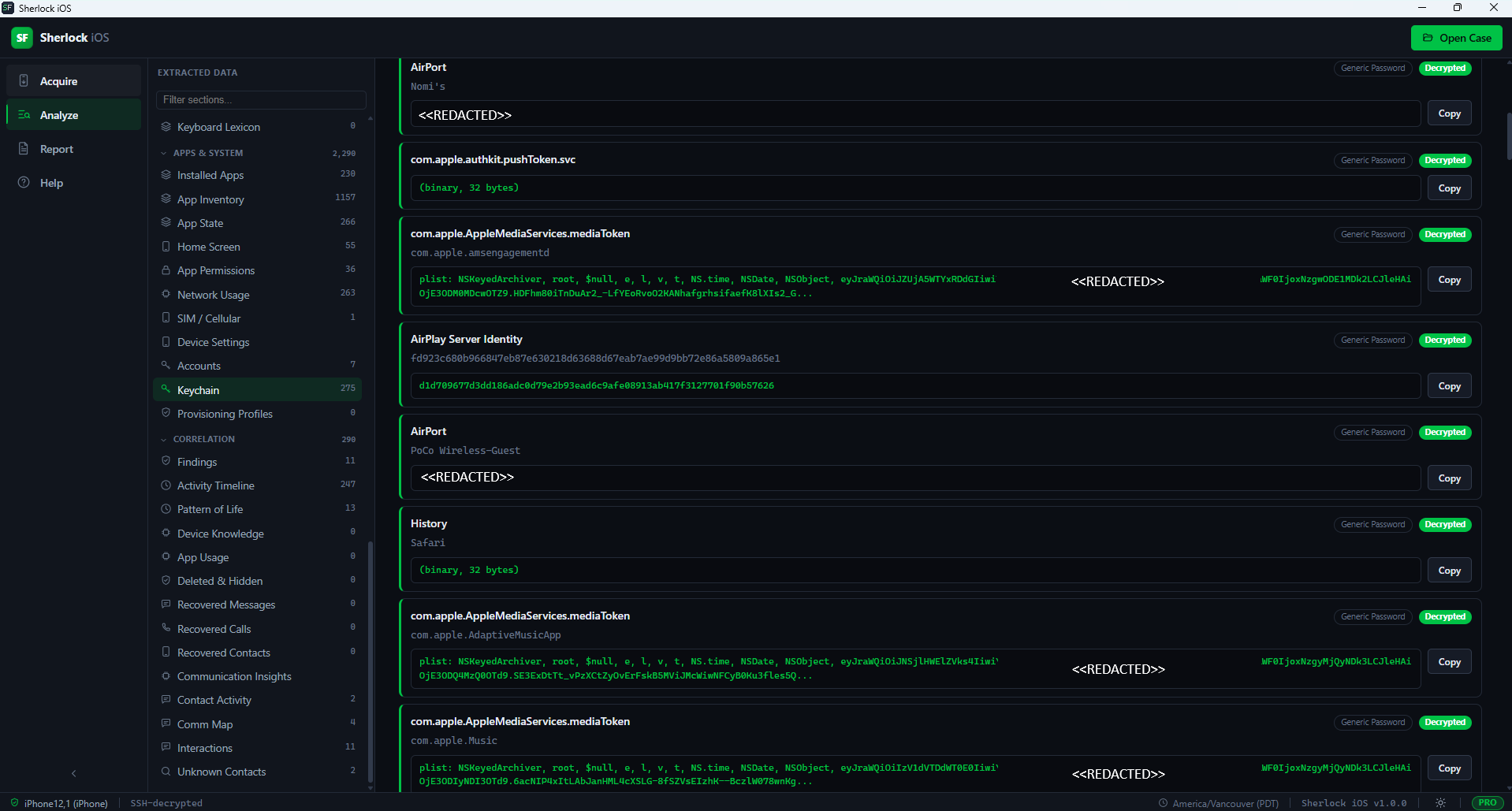
Sherlock Forensics iPhone Analyzer surfaces the saved networks from the keychain with each network's name and password in the clear, in a dedicated view alongside the broader keychain. Every entry exports and feeds the merged Activity Timeline and global search, so a network name can be searched across the whole case and lined up against the location and message evidence around it.

The distinction between the two readings is what an examiner works. As credentials, the passwords answer an access question: could this device (or its user) get onto that specific network. That matters when a network itself is part of a case, a shared home router, a company SSID, the Wi-Fi at a location under scrutiny. As a list, the set of remembered networks answers a pattern question: which places did this device return to often enough to save. The same view serves both, but a good report keeps them separate so the access claim and the pattern claim each stand on their own evidence.
The Source

Present in Almost Every Image

The reason Wi-Fi passwords turn up in nearly every iPhone case is that two different evidence sources carry them. Saved Wi-Fi passwords live in the keychain. The keychain is included in an encrypted logical backup, the category Apple omits from a plaintext backup. Because Sherlock always captures an encrypted backup, the Wi-Fi passwords come through from an ordinary logical acquisition of a device you can unlock. A Cellebrite full-filesystem extraction carries the decrypted keychain in full as well. Between those two, most images an examiner works contain the saved-network list.

The honest exception, stated plainly, is a VeraKey extraction: it ships the keychain SEP-encrypted, so on a VeraKey image the Wi-Fi passwords stay locked. That is why the capability is present in almost every image rather than every one. Sherlock does not crack the keychain; it reads what the evidence source provides and shows an honest empty state where the source does not carry the decrypted keychain.

Whereabouts

A Saved-Network List Is a Place History

A phone remembers a network because it connected to it. It connected because the device, presumably with its owner, was there. Read that way, the saved-network list is a coarse but durable whereabouts record that reaches back further than most location artifacts: a network the device joined two years ago is often still in the list long after the location databases have rolled over. A named home network, an employer's SSID, a short-let apartment's router, a venue's guest Wi-Fi, each is a place the device spent time.

Sherlock is built to work the network list against the rest of the record rather than in isolation. Cross-referenced with Significant Locations, geotagged media and the timeline, a saved network becomes a corroborated place-and-time rather than a bare SSID. The same attribution discipline applies as everywhere: the list records the device's connections; tying a specific person to a network still rests on corroboration.

There is a second, quieter value in the list that examiners learn to look for: the networks a subject would rather not explain. A home SSID that is not the subject's own home, a network named for a person or a business the subject claims no connection to, a hotel or short-let router on a date the subject accounted for differently. The device saved those because it connected to them. A saved network the subject cannot readily explain is often a more productive lead than the ones that fit the expected picture. The examiner can then run it against the location and timeline evidence to pin down when the connection happened. The passwords make the entry concrete; the presence of the network on the list is the lead.

See It

Sherlock Forensics iPhone Analyzer keychain view surfacing saved Wi-Fi passwords, tokens and credentials from an iPhone
Saved Wi-Fi passwords surfaced from the keychain, each network with its credential

Court-Ready

From the Network List to the Report

Analysis is 100 percent read-only; the evidence is never modified. The saved-network list and its passwords export like every view. The court-ready HTML report documents case and evidence numbers, examiner identification, disclosed methodology, per-artifact SHA-256 hashing and an optional evidence-integrity manifest, the documentation elements described in NIST Special Publication 800-101 Revision 1, Guidelines on Mobile Device Forensics. Because the credentials are sensitive, the view masks them on demand for screen-sharing or a shared exhibit while keeping the values intact in the underlying evidence, so nothing is lost and nothing is needlessly exposed.

Built by CISSP, ISSAP and ISSMP certified examiners with 20 years of court-defensible practice. Admissibility depends on jurisdiction, authority and evidence handling; the report documents the record so testimony rests on it.

Honest Scope

What This Analysis Is and Is Not

Sherlock reads saved Wi-Fi passwords from the keychain that the evidence carries: an encrypted backup of a device you can unlock, an existing encrypted backup or a Cellebrite full-filesystem extraction. It does not crack the keychain, does not unlock a locked device and does not recover passwords the keychain never held. From an unencrypted backup the keychain is absent by Apple's design; from a VeraKey extraction it is SEP-encrypted. In both cases Sherlock shows an honest empty state rather than fabricating credentials. Different source? Contact us before purchasing and we will confirm the layout is readable.

Questions

iPhone Wi-Fi Password FAQ

Can Sherlock recover saved Wi-Fi passwords from an iPhone?
Yes. Saved Wi-Fi passwords live in the iPhone keychain, which Sherlock surfaces in the clear with each network's name. They come through from an encrypted MobileBackup2 backup as well as from a Cellebrite full-filesystem extraction, which is why they appear in almost every image an examiner works.
Which evidence sources carry the Wi-Fi passwords?
Two sources carry them. An encrypted logical backup includes the keychain, with its Wi-Fi passwords, that Apple omits from an unencrypted backup. A Cellebrite full-filesystem extraction carries the decrypted keychain in full. The one exception is a VeraKey extraction, which ships the keychain SEP-encrypted, so Wi-Fi passwords stay locked there.
Do I need a full-filesystem extraction for Wi-Fi passwords?
No. Because Sherlock always captures an encrypted backup, the Wi-Fi passwords in the keychain come through from a logical acquisition of a device you can unlock. A full-filesystem extraction from Cellebrite also carries them. You do not need enterprise full-filesystem tooling to reach saved Wi-Fi passwords.
Why do Wi-Fi passwords matter in an investigation?
A saved-network list is a whereabouts and association record: it shows the networks a device connected to, which often maps to homes, workplaces and venues a person visited; the passwords themselves can corroborate access to a specific network. Read alongside locations and timeline data, the network list helps place a device in the places its owner frequented.
Does Sherlock show the passwords in plaintext?
Yes, from the sources that carry the decrypted keychain. This is a forensic tool and the credentials are the evidence, so saved Wi-Fi passwords are shown with their networks and can be masked on demand, for example while screen-sharing. Sherlock does not crack anything; it reads the keychain the evidence provides.
Is this court-defensible?
Analysis is read-only and the court-ready report documents examiner details, methodology and per-artifact SHA-256 hashing. The saved-network list and its passwords export like every view and feed the merged timeline. Admissibility depends on jurisdiction, authority and evidence handling; the report documents the record for testimony.

Start Now

See the Saved Networks in Your Evidence

Download the free edition, open an encrypted backup or extraction and read the saved-network list for yourself. Unlock the full record when the case calls for it: $599 one-time, no subscription.

Get Sherlock Forensics iPhone Analyzer

Related: Significant Locations forensics · The full parser list · Product page