
Open the Backup You Already Have

Read an Old iTunes Backup on Windows

That iPhone backup sitting on your PC is a full copy of a phone you can actually open. Here is how to browse everything inside it, no phone and no Mac required.

Sherlock Forensics iPhone Analyzer opens an old iTunes or Finder iPhone backup on Windows and reconstructs it into readable views: messages, photos, contacts, call history, notes and more, all searchable and exportable. It reads the backup directly, without the original phone. It recovers some deleted records where they survive. $599 one-time, with a free edition that previews the backup first.

Windows 10/11 | One-time license | Reads the backup directly | Your own backup

The Problem

A Backup You Cannot Actually Open

Most people have an old iPhone backup somewhere: a folder iTunes left on a computer, a copy saved before an upgrade or a backup of a device that is long gone. It is a complete snapshot of a phone, yet it is close to useless as it sits, because Apple stores a backup as a maze of renamed internal files rather than as your photos and messages in readable form. Restoring it to a phone is the official way to see inside, but that needs a spare device, wipes it and gives you back a live phone rather than a copy you can read and keep.

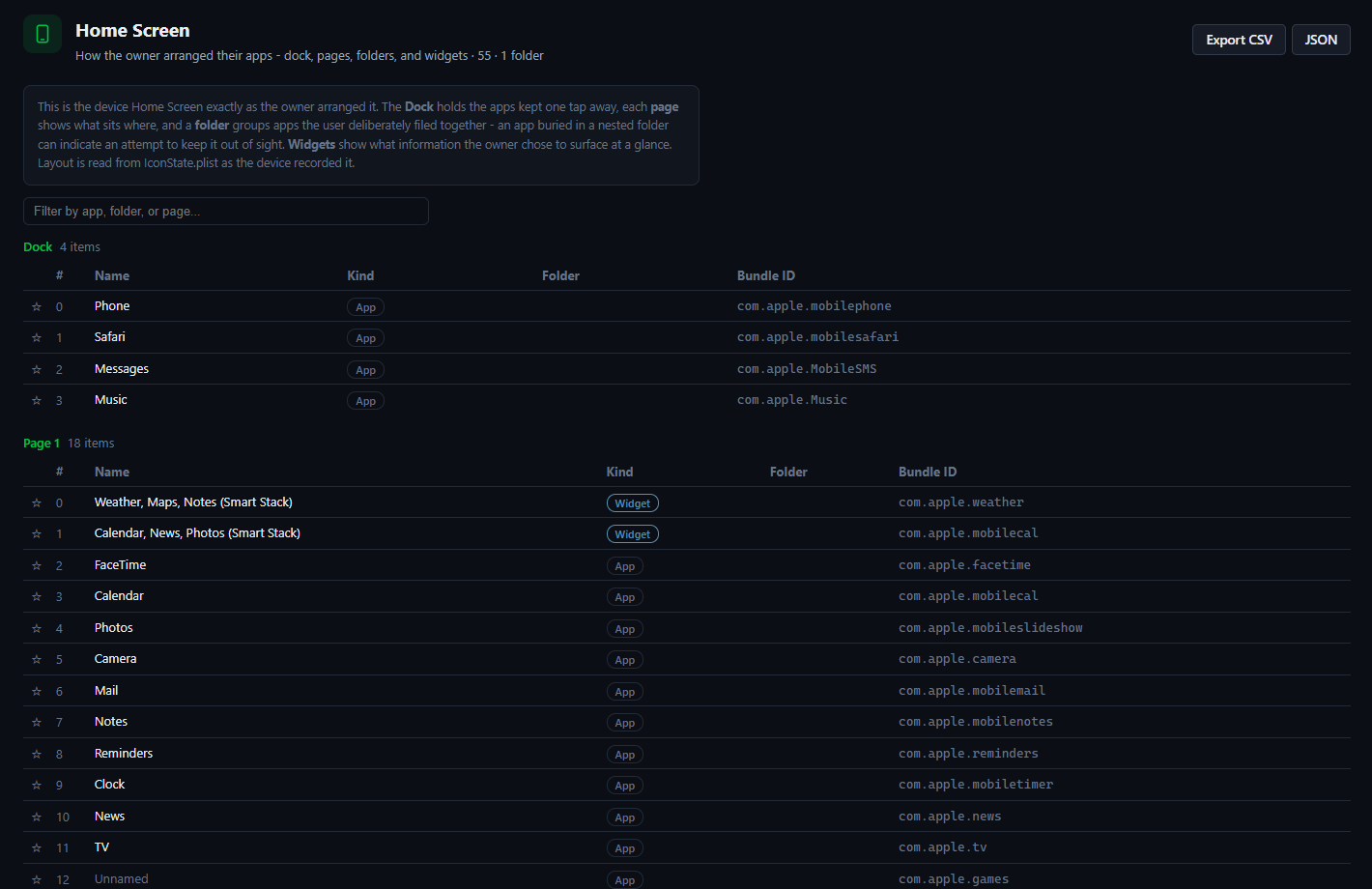
Sherlock Forensics iPhone Analyzer opens that backup where it sits. Point it at the backup folder and it reconstructs the raw files into the views you expect: conversations by contact, a photo library, the address book, the call log, notes and more. Nothing is restored to a device and nothing changes on the backup; you simply get to read what is already yours, on the Windows PC in front of you.
What Is Inside

Everything the Backup Kept

A backup holds far more than people expect. Sherlock reconstructs messages with their attachments, photos and videos, the full contact list, call history, notes, calendars, Safari bookmarks and history, voicemail and a great deal of app data, all into one searchable place. Where the backup is encrypted, it also carries the keychain items such as saved Wi-Fi passwords, which an unencrypted backup leaves out, so an encrypted backup actually shows you more rather than less.

Because everything lands in one view, the backup becomes something you can work with rather than just store. Search across it for a name, a number or a word and every match surfaces together, from a text to a note to a contact. Open a photo in place, read a thread the way it looked on the phone or scan the call log for a date. A backup that was an opaque folder becomes a browsable record of the device at the moment it was made.

The Honest Limit

The Encrypted Backup Password

There is one honest limit worth stating plainly. If a backup was made with encryption, it is protected by a password that was set at the time. That password is required to open it. Sherlock does not crack or bypass a forgotten backup password, because the encryption is doing exactly what it is meant to do. A page that promised to break into a locked backup would be selling something that does not exist. This one will not.

What you can do is straightforward when you still have the source device. If you remember the password, enter it and the backup opens in full. If you do not but still have the phone and can unlock it, make a fresh backup with a password you choose and read that instead. If the backup is not encrypted at all, no password is needed. The rule throughout is honest: Sherlock reads what you are entitled to open. It does not pretend to defeat encryption you do not hold the key to.

See It

Sherlock Forensics iPhone Analyzer reconstructing an iPhone backup into readable views on Windows
An iPhone backup reconstructed into readable views, opened on Windows

Honest Scope

What It Does and Does Not Do

This opens a backup of a device you own or are authorized to examine. It reads the backup directly without needing the phone. It does not crack the password on an encrypted backup you cannot open and is not a way to read someone else's backup without permission; on your own backup, it is simply your data. It recovers some deleted records where they survive in the backup and shows them as recovered. It never promises a specific deleted item. The free edition previews the backup so you can see what is inside before you decide.

Questions

Reading an iTunes Backup FAQ

How do I read an old iTunes backup?
Open the backup folder in Sherlock Forensics iPhone Analyzer on Windows. It reconstructs the backup into a readable view of messages, photos, contacts, call history, notes and more, so you can browse and search the contents without restoring the backup to a phone.
Can I read an iTunes backup without the iPhone?
Yes. A backup is a complete copy on your computer, so Sherlock reads it directly without the original iPhone. You point the app at the backup folder that iTunes or the Apple Devices app created and it opens the contents for you to read.
What is inside an iTunes backup?
An iPhone backup carries messages, photos and videos, contacts, call history, notes, calendars, Safari data, voicemail and app data. An encrypted backup adds the keychain items such as saved Wi-Fi passwords. Sherlock reconstructs these into readable views rather than the raw internal files a backup actually stores.
Do I need the backup password?
For an encrypted backup, yes, you need the password that was set on it. Sherlock does not crack or bypass a forgotten backup password; encryption is doing its job. If the backup is not encrypted, no password is needed. If you have the source device you can make a fresh backup with a password you set.
Can I export from the backup?
Yes. You can export messages, contacts, call history and other records to CSV or JSON and save photos and attachments out of the backup, so you keep a usable copy of what matters rather than a backup folder you cannot open.
Is it only for my own backup?
You should only open a backup of a device you own or are authorized to examine. On your own backup it is simply your data. Sherlock does not defeat the encryption on a backup you do not have the password for and is not a way to read someone else's backup without permission.

Start Now

Open Your Backup and Look Inside

Download the free edition, point it at your backup folder and preview what is inside. Unlock the full read, recovery and export when you are ready: $599 one-time, no subscription.

Get Sherlock Forensics iPhone Analyzer

Related: Recover data without a repair shop · iMessage forensics · The full parser list · Product page