
Your Data, Off the Phone

Get Your Text Messages Off an Old iPhone

The old phone in the drawer still holds years of conversations. Here is how to read them on a PC and keep a copy, no Mac and no cloud account required.

Sherlock Forensics iPhone Analyzer reads your iMessage and SMS history off an old iPhone on Windows. Make a backup of the phone while it is unlocked or open one you already have, then read, search and export every conversation with its photos and videos. It can even recover some deleted messages where they survive. $599 one-time, with a free edition that shows you the messages first.

Windows 10/11 | One-time license | Works from a backup | Your own device

Why Bother

Years of Messages Worth Keeping

An old iPhone is a time capsule. The messages on it can hold the last texts from someone who is gone, the details of a purchase or an agreement, the running thread of a family or the record you need for a claim or a dispute. When the phone finally stops holding a charge or gets traded in, all of that goes with it unless you get it off first. Pulling the messages onto a computer turns a fragile device into a copy you actually control.

The obstacle has usually been the setup. Apple keeps your messages inside a backup rather than as a folder of files you can open. Reading that backup on a Windows PC without the right tool is awkward. Sherlock Forensics iPhone Analyzer removes that friction. It opens the backup, reconstructs your conversations the way you remember them and lets you read, search and save them, so getting your own history off your own phone stops being a project and becomes a few clicks.
How It Works

From the Phone to Your PC

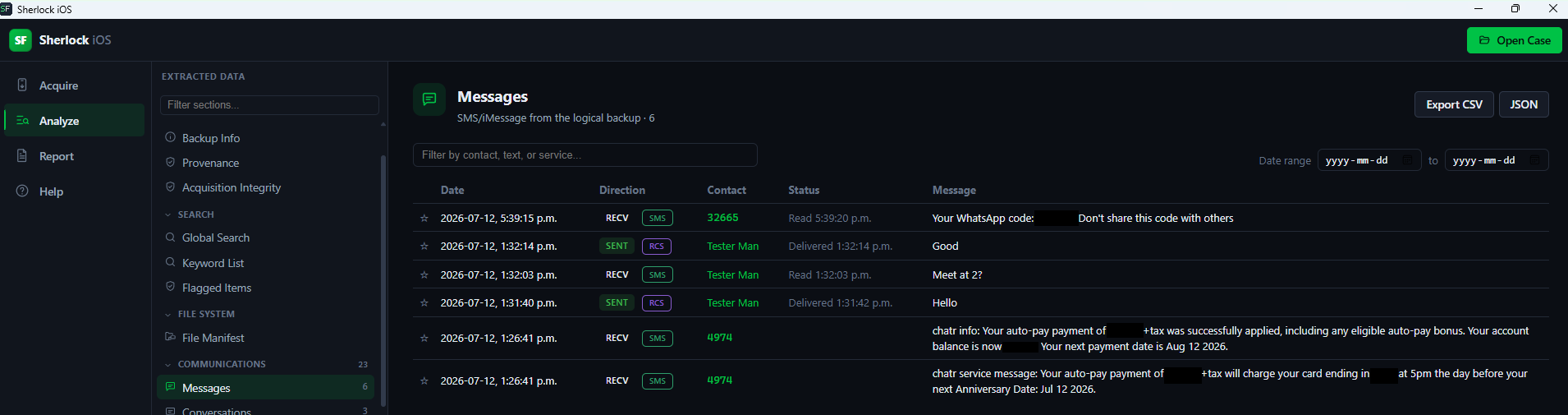
The path is simple and it stays on your own machine. If the phone still unlocks, connect it to the PC over USB and make an encrypted backup, which is what carries the messages. If you already have a backup from iTunes or the Apple Devices app, you do not even need the phone; Sherlock opens the existing backup directly. Either way the app reads your iMessage and SMS or MMS history into a clean, searchable view, each conversation grouped by contact with its photos and videos in place.

From there it is your history to work with. Browse a thread the way it looked on the phone, search across everything for a name, a number or a word and open the attachments that came with a message. When you want a permanent copy, export a conversation or the whole history to a CSV or JSON file with its attachments, so the record lives on your computer rather than on a device you are about to give up. Nothing goes to a cloud service; the messages move from the phone to your PC and stop there.

Deleted Messages

Some Deleted Texts Come Back

If the conversation you want was deleted, there is often still hope, with an honest caveat. When a message is deleted, the phone usually marks its space in the database as free rather than erasing it immediately, so until new data lands on top the old message is still there to be carved back. Sherlock recovers what it can from that freed space and shows each recovered message clearly as recovered, so you know what was live on the phone and what was carved.

How much comes back depends on how long ago it was deleted and how heavily the phone was used afterward. A text deleted recently on a phone that then sat in a drawer is often recoverable; one deleted long ago on a phone in daily use has probably been overwritten and is gone. There is no tool that can promise a specific deleted message. This page will not pretend otherwise; what Sherlock offers is an honest attempt and a clear label on whatever it finds.

See It

Sherlock Forensics iPhone Analyzer messages view showing iMessage and SMS conversations reconstructed from an iPhone backup on Windows
iMessage and SMS conversations reconstructed from a backup, grouped by contact with attachments

Honest Scope

What It Does and Does Not Do

This is for a phone you own or are authorized to examine. It works when you can unlock the device or already hold a backup of it. It does not unlock a locked phone you cannot access and is not a way to read someone else's device without permission; on your own old iPhone, it is simply your data coming home. It reads from a backup rather than reaching into a cloud account. While it recovers some deleted messages, it never promises a specific one. The free edition shows you the conversations before you decide, so you can see exactly what is there for yourself.

Questions

Getting Messages Off an Old iPhone FAQ

How do I get text messages off an old iPhone?
Make an encrypted backup of the iPhone over USB while it is unlocked and set to Trust the computer or open a backup you already have, then open it in Sherlock Forensics iPhone Analyzer on Windows. It reads your iMessage and SMS or MMS history into a searchable view you can read and export.
Do I need the phone to still work?
You need to be able to unlock it to make a fresh backup or to have an existing iTunes or Finder backup of it. A phone that powers on and unlocks can be backed up over a cable; if you only have an old backup on a computer, Sherlock reads that directly without the phone.
Can I export the messages?
Yes. You can read and search the full conversation history in the app and export it to CSV or JSON, with attachments such as photos and videos preserved. That lets you keep a readable copy of a thread, save a keepsake or hand a clean record to someone who needs it.
Can it recover deleted texts?
Sometimes. When a message is deleted the phone often marks its database space free rather than erasing it at once, so Sherlock can carve some deleted messages back where they have not been overwritten. Recent deletions are the most recoverable; messages deleted long ago may be gone. Recovered messages are shown as recovered.
Does it run on Windows?
Yes. Sherlock Forensics iPhone Analyzer runs on Windows 10 and Windows 11, so you can read an iPhone's messages on a PC without a Mac. It reads the backup that iTunes or the Apple Devices app creates or a backup it makes for you over USB.
Is this only for my own phone?
You should only use it on a device you own or are authorized to examine. You need to be able to unlock it. It does not unlock a locked phone you cannot access and is not a way to read someone else's device without permission. On your own old iPhone, it is simply your data.

Start Now

Bring Your Messages Home

Download the free edition, open a backup of your old iPhone and read the conversations for yourself. Unlock the full export and deleted-message recovery when you are ready: $599 one-time, no subscription.

Get Sherlock Forensics iPhone Analyzer

Related: iMessage forensics · Recover data without a repair shop · The full parser list · Product page